


The biggest separator in the best rgb motherboards category is header compatibility, not the number of glowing zones. A 5V ARGB device connected to a 12V RGB header can turn a lighting upgrade into an expensive lesson.
This comparison covers full motherboards, compact lighting parts, and cable-focused accessories, so the meaningful differences are easier to spot. Read on for a cleaner view of platform support, lighting control, and overall fit.
Key Takeaways
- Match the lighting device’s voltage and pin count, especially 5V 3-pin ARGB versus 12V 4-pin RGB.
- Choose the motherboard socket and chipset around your processor generation before comparing lighting features.
- Check the form factor against your case, since ATX, Micro ATX, and ITX boards need different mounting space.
- Prioritize onboard lighting software support, such as Aura Sync or RGB Fusion, for simpler color and effect control.
- Confirm the required controller, header, and cable connections before buying wireless or extension-based RGB accessories.
| AM4 Feature Leader |  |
ASUS ROG Strix B550-F WiFi 6E | WiFi 6E connectivity | 2.5Gb wired LAN | BIOS Flashback support | View on Amazon | Read Review |
| Balanced Wireless Build |  |
Gigabyte B550 Eagle WiFi 6 | WiFi 6 built in | Two M.2 slots | Front USB-C support | View on Amazon | Read Review |
| Compact Lighting Expander |  |
ASHATA 5V RGB Splitter Hub | Expands one RGB header | 5V 3-pin compatibility | Simple desktop installation | View on Amazon | Read Review |
| Next-Gen Expansion Hub |  |
Gigabyte B650 AORUS Elite AX | AM5 Ryzen support | PCIe 5.0 M.2 | 2.5GbE networking | View on Amazon | Read Review |
| Compact Mainstream Choice |  |
ASUS Prime B550M WiFi 6 | Micro ATX form factor | WiFi 6 connectivity | HDMI 2.1 output | View on Amazon | Read Review |
| Small-Form Lighting Accent |  |
Formulamod ITX RGB Backplate | ITX-oriented design | Adds motherboard lighting | Compact visual accent | View on Amazon | Read Review |
| Cable Lighting Kit | 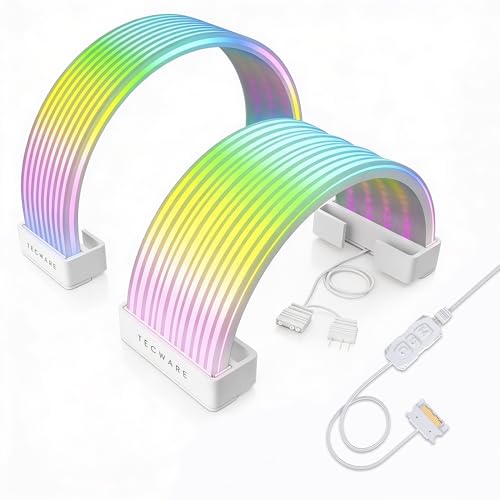 |
TECWARE Flex RGB Cable Cover | Covers 24-pin cables | Supports GPU power cables | 5V 3-pin sync | View on Amazon | Read Review |
| Wireless Cable Showpiece |  |
Lian Li Strimer 24-Pin RGB | Twelve integrated light guides | Wireless lighting control | 315mm cable length | View on Amazon | Read Review |
| High-End AM5 Platform |  |
ASUS ROG Strix B850-F WiFi 7 | WiFi 7 networking | Four M.2 slots | PCIe 5.0 support | View on Amazon | Read Review |
| Straightforward Gaming Foundation |  |
Gigabyte B550 Gaming X V2 | Two M.2 slots | Front USB-C support | Q-Flash Plus | View on Amazon | Read Review |
More Details on Our Top Picks
-
ASUS ROG Strix B550-F WiFi 6E
Built for an AM4 gaming PC, this ATX board suits Ryzen 3000-series and newer compatible processors, especially if you want integrated wireless networking and strong storage support. PCIe 4.0, WiFi 6E, 2.5Gb LAN, and BIOS Flashback give the platform useful flexibility.
Aura Sync and the addressable Gen 2 RGB header make lighting control straightforward across compatible components. The main limitation is its AM4 and DDR4 platform, which offers less upgrade runway than newer AM5 boards.
- Brand:ASUS
- Product Type:ATX motherboard
- Platform:AMD AM4
- Form Factor:ATX
- Lighting:Aura Sync RGB
- Connectivity:WiFi 6E, 2.5Gb LAN
- Additional Feature:PCIe 4.0 support
- Additional Feature:HDMI 2.1 output
- Additional Feature:Addressable Gen 2 RGB
-
Gigabyte B550 Eagle WiFi 6
The B550 Eagle WiFi 6 is a sensible foundation for a Ryzen 3000, 4000, or 5000 build that needs wireless networking without moving to AM5. Its 10+3 power phase design, two M.2 slots, PCIe 4.0 support, and USB-C connection cover the needs of a capable midrange system.
RGB Fusion provides motherboard lighting control, while PCIe EZ-Latch simplifies graphics card removal. The trade-off is Gigabit Ethernet, which is slower than the 2.5Gb networking found on some competing boards.
- Brand:GIGABYTE
- Product Type:ATX motherboard
- Platform:AMD AM4
- Form Factor:ATX
- Lighting:RGB Fusion
- Connectivity:WiFi 6, GbE LAN
- Additional Feature:10+3 power phase
- Additional Feature:PCIe 4.0 support
- Additional Feature:Q-Flash support
-
ASHATA 5V RGB Splitter Hub
Choose this 5V 3-pin RGB splitter hub if your motherboard has limited addressable lighting connections and you need to distribute one header across compatible accessories. Its small, focused design is aimed at desktop PC cable management rather than broader system control.
The practical strength is simple expansion for compatible 5V ARGB devices, including suitable fans and light strips. The limitation is crucial: it is not intended for 12V 4-pin RGB headers, so matching the connector and voltage is essential.
- Brand:ASHATA
- Product Type:RGB splitter hub
- Platform:Desktop PC
- Lighting:5V 3-pin ARGB
- Connectivity:RGB fan extension
- Additional Feature:Motherboard RGB connection
- Additional Feature:Fan extension cable
- Additional Feature:Addressable lighting support
-
Gigabyte B650 AORUS Elite AX
This ATX board targets a current AM5 build using Ryzen 7000, 8000, or 9000-series processors and DDR5 memory. Its 14+2+1 power phase design, PCIe 5.0 M.2 support, four? Wait title doesn't say number of M.2. Do not say four. 2.5GbE, WiFi 6E, and USB-C make it well suited to a performance-focused system.
RGB Fusion handles compatible lighting, while EZ-Latch and Q-Flash simplify hardware installation and firmware updates. The limitation is platform commitment: you need an AM5 processor and DDR5 memory, so existing AM4 parts cannot carry over.
- Brand:GIGABYTE
- Product Type:ATX motherboard
- Platform:AMD AM5
- Form Factor:ATX
- Lighting:RGB Fusion
- Connectivity:WiFi 6E, 2.5GbE
- Additional Feature:DDR5 memory support
- Additional Feature:USB-C 3.2 Gen 2
- Additional Feature:Q-Flash support
-
ASUS Prime B550M WiFi 6
For a smaller AM4 desktop, the ASUS Prime B550M-A WiFi II combines Micro ATX dimensions with Ryzen compatibility, DDR4 memory support, and integrated WiFi 6. PCIe 4.0 and HDMI 2.1 add useful options for gaming and everyday display setups.
An RGB header supports compatible lighting, and ECC memory support may appeal to builds where memory error correction matters. The limitation is the Micro ATX layout, which leaves less room for expansion cards and onboard connectors than a full ATX design.
- Brand:ASUS
- Product Type:Micro ATX motherboard
- Platform:AMD AM4
- Form Factor:Micro ATX
- Lighting:RGB header
- Connectivity:WiFi 6
- Additional Feature:PCIe 4.0 support
- Additional Feature:ECC memory support
- Additional Feature:DDR4 memory support
-
Formulamod ITX RGB Backplate
This ITX RGB backplate is aimed at compact PC builders who want to add lighting around the motherboard’s rear area without changing the core components. It can serve as a visual accent in a small case, where every illuminated surface has a little more presence.
The main appeal is its space-conscious lighting design and ITX-oriented format. Compatibility details, connection requirements, and control software are not specified in the supplied listing, so confirm those points before planning the installation.
- Brand:Formulamod
- Product Type:RGB backplate
- Platform:ITX motherboards
- Form Factor:ITX
- Lighting:RGB LED
- Additional Feature:Backplate lighting surface
- Additional Feature:Small-form-factor accessory
- Additional Feature:Motherboard-focused design
-
TECWARE Flex RGB Cable Cover
The TECWARE Flex kit is for builders who want lit power cables to look as deliberate as the rest of the system. It supports a 24-pin motherboard connection plus 8-pin or 16-pin GPU cabling, giving the main power runs a cleaner, coordinated appearance.
A 5V 3-pin sync connection allows compatible motherboard lighting control, and the white finish fits bright or high-contrast builds. The limitation is compatibility: you must match the cable format, connector arrangement, and available ARGB header before installation.
- Brand:TECWARE
- Product Type:RGB cable cover
- Platform:Desktop PC
- Lighting:5V 3-pin ARGB
- Connectivity:24-pin, 8-pin, 16-pin
- Additional Feature:White finish
- Additional Feature:Motherboard lighting synchronization
- Additional Feature:PSU cable extension design
-
Lian Li Strimer 24-Pin RGB
Lian Li’s Strimer Wireless 24-Pin focuses on the most visible power lead in many builds, adding 12 light guides across a 315mm extension. Its 2.4GHz wireless lighting control helps reduce the need for a direct lighting signal cable around the motherboard.
The 24-pin motherboard format suits showcase PCs where cable presentation matters as much as component selection. A compatible controller is required and not included, so this accessory needs additional control hardware before its lighting can be managed.
- Brand:Lian Li
- Product Type:RGB power extension
- Platform:Desktop PC
- Lighting:12 light guides
- Connectivity:24-pin motherboard power
- Additional Feature:2.4GHz wireless control
- Additional Feature:Controller required
- Additional Feature:315mm extension length
-
ASUS ROG Strix B850-F WiFi 7
This board is built for a newer AM5 system using DDR5 memory, with WiFi 7, four M.2 slots, and PCIe 5.0 support for fast storage and expansion. Its 16+2+2 power stages and broad USB selection suit demanding gaming, workstation, and AI-focused builds.
Aura Sync adds coordinated RGB control, while 20Gbps USB-C and AI Networking II expand its connectivity toolkit. The limitation is the required AM5 and DDR5 ecosystem, which makes it a poor match for older AM4 processors or DDR4 memory.
- Brand:ASUS
- Product Type:ATX motherboard
- Platform:AMD AM5
- Form Factor:ATX
- Lighting:Aura Sync RGB
- Connectivity:WiFi 7, 20Gbps USB-C
- Additional Feature:16+2+2 power stages
- Additional Feature:DDR5 AEMP support
- Additional Feature:AI Networking II
-
Gigabyte B550 Gaming X V2
The B550 Gaming X V2 keeps the focus on essential AM4 gaming hardware, supporting Ryzen 3000, 4000, and 5000-series processors with DDR4 memory. PCIe 4.0, two M.2 slots, front USB-C, and a 10+3 power phase design give it a practical feature mix for a mainstream build.
RGB Fusion provides lighting management, while Q-Flash Plus helps with firmware updates. The limitation is the lack of listed built-in WiFi, and its Gigabit LAN is less suited to networks above 1Gbps.
- Brand:GIGABYTE
- Product Type:ATX motherboard
- Platform:AMD AM4
- Form Factor:ATX
- Lighting:RGB Fusion
- Connectivity:GbE LAN, USB-C
- Additional Feature:PCIe 4.0 support
- Additional Feature:10+3 power phase
- Additional Feature:DDR4 memory support
Frequently Asked Questions
What Makes A Motherboard Good For RGB Builds?
Look for several 5V 3-pin ARGB headers, clear lighting software support, and enough power for your connected fans and light strips. Header placement matters as well, since reachable connectors make cable management far less irritating. A good RGB board also supports the CPU, memory, case size, and graphics card you plan to use. Lighting should complement the build, not force compromises in core hardware.
Can I Connect 5V ARGB To A 12V RGB Header?
No. A 5V 3-pin ARGB connector and a 12V 4-pin RGB connector use different voltages and wiring, so connecting the wrong type can damage the lighting device. Check the connector labels and motherboard manual before plugging anything in. If you have more devices than headers, use a compatible powered RGB hub that matches the correct voltage.
Do RGB Motherboards Need Special RAM Or Fans?
No, RGB motherboards use standard desktop memory and cooling connections, provided the parts match the board’s socket, memory type, and fan headers. RGB memory and fans simply add lighting hardware that connects through compatible headers or controllers. For memory, check the board’s QVL, or qualified vendor list, when possible. This list identifies kits that the manufacturer has approved for the board’s rated speeds, although compatible kits may extend beyond it.
Is Wi-Fi Included On Every RGB Motherboard?
No. Wireless networking is usually limited to models labeled Wi-Fi, Wireless, or AX, while similar boards without that designation may require a separate adapter. Confirm the exact model number because manufacturers often sell wired and wireless versions with nearly identical names. Built-in Wi-Fi may also include Bluetooth, which helps connect controllers, headphones, and other accessories. A wired Ethernet connection remains preferable for fixed gaming or workstation systems that need the lowest latency.
How Much Should I Spend On An RGB Motherboard?
Plan on roughly $150 to $250 for a capable mainstream RGB motherboard, with premium models costing more because of stronger power delivery, extra storage, faster networking, and expanded connectivity. Spend according to your processor and build plans, not the number of lighting zones. A well-matched midrange board with useful headers and BIOS support is often a better purchase than an expensive model whose extra features will sit unused.


