Virtualization workloads often care less about gaming speed than about memory capacity, I/O lanes, and support for multiple networked guests. A modest-looking board can outperform a faster desktop design once several VMs share storage and RAM.
This roundup compares ten candidates, from compact NAS boards to server platforms and security modules for a broader setup. Use the guide to weigh CPU support, expansion, and connectivity before choosing the best motherboards for virtualization.
Key Takeaways
- Prioritize ECC memory support if uptime and data integrity matter, especially for storage-heavy or always-on virtual machines.
- Match the CPU platform to your VM count, since core and thread capacity usually matters more than peak single-core speed.
- Count PCIe lanes before buying, because NVMe drives, network cards, and host bus adapters can compete for limited bandwidth.
- Choose enough RAM capacity and confirm the board’s DIMM type, maximum density, and compatibility with registered or unbuffered modules.
- Check network speed and SATA or NVMe connectivity against your workload, not just the port count printed in the title.
| Compact NAS Workhorse | 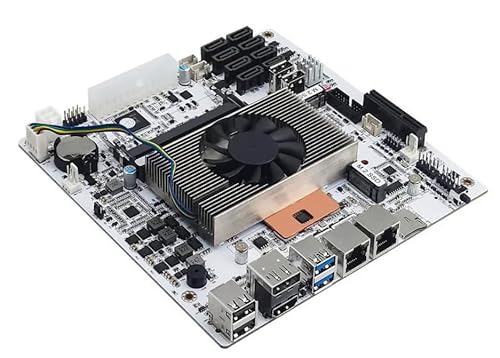 |
M11 NAS Motherboard, 2.5GbE | Eight-bay storage support | Dual 2.5GbE networking | Two NVMe connections | View on Amazon | Read Review |
| High-Speed Storage Hub |  |
C612 NAS Motherboard, Dual 10GbE | Dual 10GbE networking | Ten SATA ports | ECC memory support | View on Amazon | Read Review |
| Balanced NAS Platform |  |
i5 NAS Motherboard, Eight-Bay | Eight SATA 3.0 ports | Dual 2.5GbE LAN | Dual NVMe support | View on Amazon | Read Review |
| Legacy Expansion Specialist | 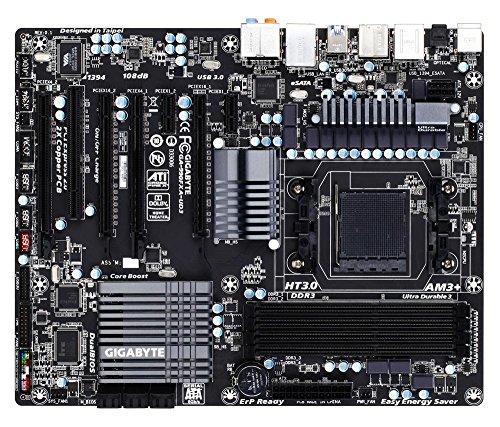 |
Gigabyte 990FX Motherboard, AM3+ | Full-size ATX layout | SATA 6Gb/s support | USB 3.0 connectivity | View on Amazon | Read Review |
| Efficient Six-Bay Base |  |
N150 NAS Motherboard, DDR5 | Six SATA ports | DDR5 memory support | Dual 2.5GbE LAN | View on Amazon | Read Review |
| Security Upgrade Module | 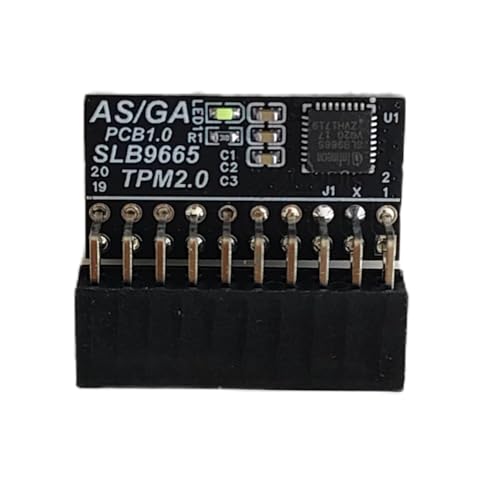 |
Yeiwenl TPM 2.0 Module | TPM 2.0 security support | Supports compatible motherboards | Useful for Windows 11 | View on Amazon | Read Review |
| Memory-Dense Virtualization Board |  |
Vvikizy Dual Motherboard, Eight DIMMs | Eight DDR4 DIMM slots | Xeon E5 v3/v4 support | Multiple PCIe x16 slots | View on Amazon | Read Review |
| Enterprise Core Platform |  |
Supermicro H11SSL-i, EPYC Server | AMD EPYC processor support | Eight DDR4 DIMM slots | Single-socket server design | View on Amazon | Read Review |
| Dual-Socket Lab Foundation |  |
Supermicro X9DRL-IF, Dual Socket | Dual-socket server platform | Xeon E5 compatibility | Suited to virtualization labs | View on Amazon | Read Review |
| SPI Security Add-On |  |
Gigabyte TPM 2.0 Module, SPI | TPM 2.0 functionality | SPI interface design | Gigabyte motherboard compatibility | View on Amazon | Read Review |
More Details on Our Top Picks
-
M11 NAS Motherboard, 2.5GbE
The M11 suits a compact virtualization server where small dimensions and practical network throughput matter. Its Core i5-8265U provides four cores and eight threads, while dual 2.5GbE ports help separate storage, management, or virtual-machine traffic.
Storage flexibility is a major strength, with eight SATA bays and two PCIe 3.0 x2 NVMe connections. The limitation is its older mobile processor platform, which leaves less headroom for numerous demanding virtual machines than newer desktop or server CPUs.
- Product Type:NAS motherboard
- Form Factor:Mini-ITX
- CPU Platform:Core i5-8265U
- Storage Count:Eight SATA bays
- Network Speed:Dual 2.5GbE
- Additional Feature:PCIe x4 expansion slot
- Additional Feature:TF card support
- Additional Feature:HDMI and DisplayPort
-
C612 NAS Motherboard, Dual 10GbE
Choose this C612 board for a storage-heavy virtualization build based on Xeon E5 v3 or v4 processors. Dual 10GbE ports give it a strong networking foundation, particularly for shared storage, backup traffic, and multiple hosts.
Support for ECC memory improves error detection in long-running server workloads, while ten SATA ports and dual M.2 support offer plenty of storage options. Its older Xeon platform and Mini-ITX layout may limit expansion compared with newer server boards.
- Product Type:NAS motherboard
- Form Factor:Mini-ITX
- CPU Platform:Xeon E5 v3/v4
- Memory Type:ECC memory
- Storage Count:Ten SATA ports
- Network Speed:Dual 10GbE
- Additional Feature:Dual M.2 NVMe support
- Additional Feature:M.2 adapter included
- Additional Feature:Two SFF-8643 cables
-
i5 NAS Motherboard, Eight-Bay
This board is a sensible fit for a compact NAS hypervisor, especially if you want several storage drives without building around a full-size platform. The Core i5-8265U offers four cores and eight threads, and dual i226-V 2.5GbE ports support faster network transfers than standard gigabit Ethernet.
Two NVMe connections, eight SATA 3.0 ports, and a PCIe x4 slot create useful storage and expansion flexibility. Keep in mind that it arrives as a barebone board, with no RAM or SSD included, and its older mobile CPU is better suited to moderate virtual-machine loads.
- Product Type:NAS motherboard
- Form Factor:Mini-ITX
- CPU Platform:Core i5-8265U
- Storage Count:Eight SATA ports
- Network Speed:Dual 2.5GbE
- Additional Feature:PCIe x4 expansion slot
- Additional Feature:4K HDMI output
- Additional Feature:DisplayPort output
-
Gigabyte 990FX Motherboard, AM3+
The Gigabyte GA-990FXA-UD3 belongs in a virtualization roundup for users maintaining an older AMD system or repurposing existing AM3+ hardware. Its 990FX chipset and ATX format provide a broad foundation for legacy processors, add-in cards, and conventional storage.
SATA 6Gb/s and USB 3.0 keep the platform useful for basic server duties, but the AM3+ socket is dated and lacks modern features such as DDR4 or DDR5 support. It makes the most sense for light virtualization, lab work, or a low-cost legacy build rather than a new, high-density host.
- Product Type:Desktop motherboard
- Form Factor:ATX
- CPU Platform:AMD AM3+
- Network Speed:Not specified
- Additional Feature:AMD 990FX chipset
- Additional Feature:SB950 southbridge
- Additional Feature:Multiple expansion slots
-
N150 NAS Motherboard, DDR5
The N150 board targets a low-power virtualization host that also needs meaningful local storage. Its six SATA ports, DDR5 memory support, and dual 2.5GbE connections make a practical combination for file services, containers, and a small group of lightweight virtual machines.
The compact Mini-ITX design helps with small NAS enclosures, while the Intel N150 platform should favor efficiency over heavy multi-VM throughput. Its main limitation is processing headroom, so demanding databases, desktop virtual machines, or large concurrent workloads may require a stronger CPU platform.
- Product Type:NAS motherboard
- Form Factor:Mini-ITX
- CPU Platform:Intel N150
- Memory Type:DDR5
- Storage Count:Six SATA ports
- Network Speed:Dual 2.5GbE
- Additional Feature:Six-bay storage design
- Additional Feature:Compact NAS layout
- Additional Feature:Low-power processor platform
-
Yeiwenl TPM 2.0 Module
This Yeiwenl module is for a virtualization host that needs hardware-backed security features, provided the motherboard has the correct 20-1 pin TPM header. TPM 2.0 can support platform measurements, encryption features, and Windows 11 requirements, although the exact capabilities depend on the motherboard and firmware.
It is a component rather than a motherboard, so it does not add CPU power, memory capacity, storage ports, or network bandwidth. Confirm the header layout and firmware support before ordering, because TPM connectors are not universally interchangeable despite similar-looking pins.
- Product Type:TPM security module
- Form Factor:20-1 pin
- CPU Platform:Motherboard-dependent
- Additional Feature:Hardware encryption support
- Additional Feature:Platform security functions
- Additional Feature:Windows 11 compatibility
-
Vvikizy Dual Motherboard, Eight DIMMs
The Vvikizy board is aimed at memory-heavy virtualization systems using Xeon E5 v3 or v4 processors. Eight DDR4 DIMM slots can help you assign more memory across several virtual machines, while the listed PCIe 3.0 x16 slots offer considerable room for networking, storage, or accelerator cards.
Its dual-motherboard design appears intended for NAS and virtualization builds, but the unusual layout makes chassis compatibility a critical concern. Confirm CPU socket details, power connections, BIOS support, and the exact PCIe slot arrangement before planning a complete server.
- Product Type:Dual motherboard
- CPU Platform:Xeon E5 v3/v4
- Memory Type:DDR4
- Storage Count:Ten SATA ports
- Additional Feature:Two-board server layout
- Additional Feature:PCIe 3.0 expansion
- Additional Feature:Designed for NAS systems
-
Supermicro H11SSL-i, EPYC Server
The Supermicro H11SSL-i is a strong choice for serious virtualization based on AMD EPYC 7001 or 7002 processors. Its single-socket server design can provide substantial compute capacity, and eight DDR4 DIMM slots support the large memory allocations that virtualization workloads often demand.
This platform is better suited to a dedicated server chassis than a casual desktop build, and component compatibility deserves careful attention. Its EPYC generation is older than current server platforms, but the combination of high core counts and server-class memory support remains useful for dense virtual-machine hosts.
- Product Type:Server motherboard
- Form Factor:ATX
- CPU Platform:AMD EPYC 7001/7002
- Memory Type:DDR4
- Storage Count:Not specified
- Additional Feature:Single-socket architecture
- Additional Feature:Server-oriented platform
- Additional Feature:Eight memory slots
-
Supermicro X9DRL-IF, Dual Socket
The X9DRL-IF family is suited to a legacy dual-processor lab where multiple virtual machines matter more than modern platform efficiency. Its server-oriented design can support a substantial virtualization base when paired with compatible Xeon E5 hardware, making it relevant for homelabs and older enterprise deployments.
The main drawback is age: this platform uses an older Xeon generation and should be assessed carefully for memory, CPU, firmware, and chassis compatibility. The supplied title references several related model variants, so verify the exact board revision and included features before building around it.
- Product Type:Server motherboard
- CPU Platform:Xeon E5 platform
- Memory Type:Not specified
- Additional Feature:X9DRL-IF model family
- Additional Feature:Multi-player simulator support
- Additional Feature:Designed for multi-VM workloads
-
Gigabyte TPM 2.0 Module, SPI
This Gigabyte-compatible module adds TPM 2.0 support to motherboards that provide the matching 12-pin SPI header. It can help a virtualization host meet platform-security requirements and support encryption features that rely on a trusted hardware module.
Like the other TPM option, it is an accessory rather than a compute platform, so it cannot improve core count, memory capacity, storage, or network performance. The decisive limitation is connector compatibility, and the motherboard manual should confirm both the 12-pin layout and supported TPM module type.
- Product Type:TPM security module
- Form Factor:12-pin SPI
- CPU Platform:Motherboard-dependent
- Additional Feature:Platform security support
- Additional Feature:Encryption-related functions
- Additional Feature:GC-TPM20 SPI compatibility
Frequently Asked Questions
Do I need a server motherboard for virtualization?
No. A quality consumer motherboard can run VMware ESXi, Proxmox, Hyper-V, or similar software, provided its processor and firmware support the required virtualization features. A server board becomes more useful when you need ECC memory, remote management, many PCIe lanes, or long-term platform support. For a home lab or development system, a mainstream desktop platform often delivers better value and simpler component selection.
How much RAM should a virtualization motherboard support?
Treat 64GB as a practical starting point for several modest virtual machines, and consider 128GB or more for active databases, desktop VMs, build servers, or large development environments. Leave some memory for the host operating system and file cache. Capacity matters first, but use matched modules and follow the board’s qualified memory list where possible. Four large DIMMs may run at a lower supported speed than two smaller modules, so check the manual before planning the final configuration.
Is ECC memory necessary for a virtual machine host?
ECC is not mandatory, but it can provide error detection and correction, which is useful for systems running continuously or holding important data. It is especially attractive for file servers, storage appliances, and business workloads. Support depends on the complete platform, including the CPU, motherboard, BIOS, and operating system. Confirm that the board reports ECC operation rather than merely accepting ECC modules, since compatibility and correction are not the same thing.
Can I pass a GPU or network card through to a virtual machine?
Usually, yes, if the platform supports IOMMU, the hypervisor supports device assignment, and the motherboard provides suitable PCIe connectivity. Enable VT-d or AMD-Vi, then review the board’s slot and lane-sharing rules. A GPU may also require its own reset behavior, a compatible driver, and enough power and cooling. For dependable PCIe passthrough, avoid boards that hide important devices behind limited chipset lanes or disable key slots when certain M.2 connectors are occupied.
What BIOS features matter most for virtualization?
Look for VT-d or AMD-Vi, SVM or Intel Virtualization Technology, SR-IOV, Above 4G Decoding, and PCIe bifurcation if your hardware requires it. Secure Boot and TPM support can also help with modern operating systems and host security policies. Features are only useful when the firmware exposes them clearly and keeps them enabled after updates. Check the current manual and BIOS revision, especially if you plan to use device passthrough or install a newer processor.