


A common mistake with older motherboards is treating the socket as the whole story. Processor support, memory limits, expansion layout, and storage connections can change the answer quickly.
The best ddr3 motherboards still serve capable builds, but the right choice depends on the platform each board supports. The comparison ahead sorts through the key differences, so keep reading before settling on a match.
Key Takeaways
- Confirm the CPU socket and chipset support before choosing a DDR3 motherboard, since similar-looking boards may serve entirely different processor generations.
- Check the board’s maximum memory capacity and supported DDR3 speed if you plan to run demanding software or multiple applications.
- Match the form factor to your case, especially when choosing between Micro-ATX and full-size ATX layouts.
- Count the available storage connections, including SATA ports and M.2 support, before planning SSDs and hard drives.
- Review the expansion slots and rear I/O for graphics cards, networking, display outputs, and USB devices you intend to use.
| Balanced Haswell Platform |  |
SHANGZHAOYUAN B85M Pro DDR3 | Supports Intel 4th Gen CPUs | NVMe M.2 storage | Compact Micro-ATX design | View on Amazon | Read Review |
| Low Power Workhorse | 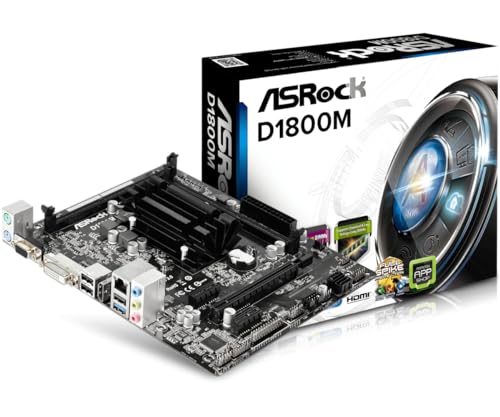 |
ASRock D1800M DDR3 | Integrated Celeron platform | Low-power system design | Compact Micro-ATX format | View on Amazon | Read Review |
| Flexible Haswell Refresh | 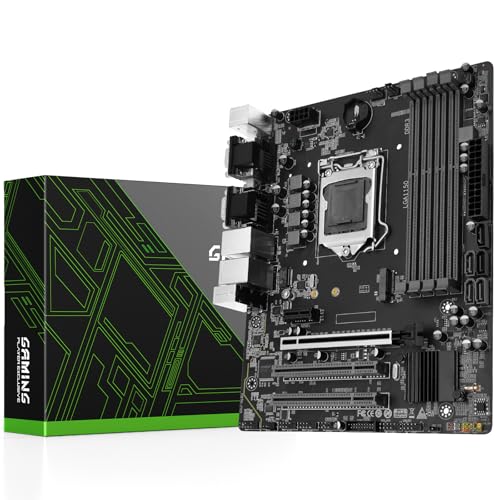 |
SHANGZHAOYUAN H97M Pro DDR3 | Four DDR3 memory slots | Supports 4th and 5th Gen CPUs | NVMe M.2 interface | View on Amazon | Read Review |
| Budget Sandy Bridge |  |
SHANGZHAOYUAN H61 DDR3 | Supports 2nd Gen Intel CPUs | Supports 3rd Gen Intel CPUs | Straightforward DDR3 platform | View on Amazon | Read Review |
| Enthusiast Haswell Choice |  |
Gigabyte Z97X-UD3H DDR3 | Feature-rich Z97 chipset | ATX expansion layout | M.2 and SATA Express | View on Amazon | Read Review |
| Compact Office Foundation |  |
ASUS H81M-K DDR3 | Compact Micro-ATX layout | Supports Intel 4th Gen CPUs | SATA 6Gbps storage | View on Amazon | Read Review |
| AMD Compact Performer |  |
ASRock 970M PRO3 DDR3 | Four DDR3 memory slots | Supports AMD AM3+ CPUs | Compact gaming-friendly layout | View on Amazon | Read Review |
| Dependable Haswell Mainstay |  |
Gigabyte GA-B85M-D3H DDR3 | Four DDR3 memory slots | HDMI and USB 3.0 | PCIe 3.0 support | View on Amazon | Read Review |
| Full Size AMD Base | 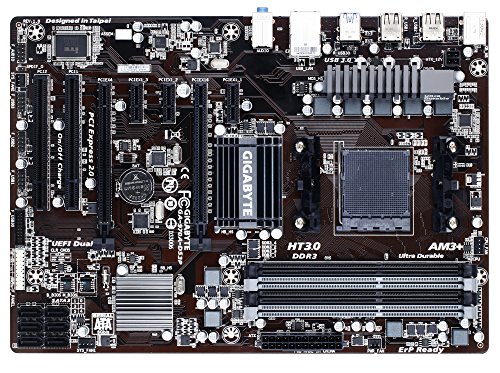 |
Gigabyte GA-970A-DS3P DDR3 | Full ATX expansion space | AMD 970 chipset | SATA 6Gbps connectivity | View on Amazon | Read Review |
| Tiny LGA 1155 Build |  |
ASUS P8H61-I DDR3 | Mini-ITX footprint | Supports 2nd and 3rd Gen CPUs | Compact legacy platform | View on Amazon | Read Review |
More Details on Our Top Picks
-
SHANGZHAOYUAN B85M Pro DDR3
The SHANGZHAOYUAN B85M Pro suits a practical LGA 1150 build based on Intel 4th Gen Core, Pentium, or Celeron processors. Its Micro-ATX layout fits compact cases, while PCIe 3.0, SATA 3.0, and built-in VGA, DVI, and HDMI-compatible display outputs cover common office and home-PC needs.
A listed NVMe M.2 slot gives this older platform a useful storage upgrade path, and Gigabit LAN handles standard wired networking. The main limitation is its age and narrower upgrade range, since it cannot support newer Intel CPU generations or current DDR4 and DDR5 memory.
- Brand:SHANGZHAOYUAN
- Form Factor:Micro-ATX
- CPU Socket:LGA 1150
- Memory Type:DDR3
- Expansion Slots:PCIe 3.0
- Storage Interface:SATA 3.0, NVMe M.2
- Additional Feature:VGA, DVI, HDMI-compatible outputs
- Additional Feature:Gigabit LAN
- Additional Feature:Intel Pentium and Celeron support
-
ASRock D1800M DDR3
The ASRock D1800M is aimed at basic computing, including web access, document work, media playback, and small always-on systems. Its Intel Celeron J1800 platform is integrated, so you receive a ready-made low-power foundation rather than a conventional motherboard that accepts a separate desktop CPU.
The Micro-ATX format is easy to place in modest cases, and DDR3 memory support keeps the platform aligned with inexpensive legacy components. Performance is limited for demanding software, modern games, and heavy multitasking, so this board is best treated as a quiet utility platform rather than a performance machine.
- Brand:ASRock
- Form Factor:Micro-ATX
- CPU Socket:Integrated Celeron J1800
- Memory Type:DDR3
- Storage Interface:SATA
- Additional Feature:Intel Celeron J1800 processor
- Additional Feature:Compact desktop platform
- Additional Feature:Suitable for basic office use
-
SHANGZHAOYUAN H97M Pro DDR3
Choose the SHANGZHAOYUAN H97M Pro for a broader LGA 1150 build, since it supports Intel 4th and 5th Gen Core processors along with Pentium and Xeon chips. Four DDR3 slots provide more memory capacity flexibility than many compact legacy boards, which helps with multitasking and workstation-style use.
The board also lists NVMe M.2, SATA 3.0, USB 3.0, and PCIe 3.0 connectivity, giving an older system several useful modern touches. Its limitation is platform age, and CPU support may still depend on the installed BIOS version and the exact processor model.
- Brand:SHANGZHAOYUAN
- Form Factor:Micro-ATX
- CPU Socket:LGA 1150
- Memory Type:DDR3
- Expansion Slots:PCIe 3.0
- Storage Interface:SATA 3.0, NVMe M.2
- Additional Feature:USB 3.0 connectivity
- Additional Feature:Intel Xeon processor support
- Additional Feature:Compact Micro-ATX layout
-
SHANGZHAOYUAN H61 DDR3
The SHANGZHAOYUAN H61 targets an older Intel upgrade path, supporting 2nd and 3rd Gen Core i3, i5, and i7 processors. It makes sense for a low-cost repair or replacement build where existing LGA 1155 hardware remains serviceable and new-platform features are not essential.
DDR3 support keeps component matching straightforward, while the H61 chipset focuses on core desktop functionality. You give up newer storage standards and broader expansion compared with B85, H97, or Z97 boards, so this model is better suited to simple home and office systems than ambitious upgrades.
- Brand:SHANGZHAOYUAN
- CPU Socket:LGA 1155
- Memory Type:DDR3
- Additional Feature:Intel Core i3 support
- Additional Feature:Intel Core i5 support
- Additional Feature:Intel Core i7 support
-
Gigabyte Z97X-UD3H DDR3
The Gigabyte GA-Z97X-UD3H is the strongest fit here for a feature-rich legacy desktop, pairing the Z97 chipset with Intel LGA 1150 processors and DDR3 memory. Its ATX layout offers more room for expansion, while support for DDR3-1600 suits a balanced Haswell-era performance build.
You also get PCIe 3.0, SATA 6Gbps, SATA Express, and an M.2 slot, giving this older board a surprisingly useful storage and expansion mix. The honest tradeoff is that Z97 still belongs to a discontinued platform, and its larger ATX footprint requires a compatible mid-tower or full-size case.
- Brand:Gigabyte
- Form Factor:ATX
- CPU Socket:LGA 1150
- Memory Type:DDR3
- Expansion Slots:PCIe 3.0
- Storage Interface:SATA 6Gbps, M.2
- Additional Feature:SATA Express support
- Additional Feature:DDR3-1600 support
- Additional Feature:Intel Haswell processor support
-
ASUS H81M-K DDR3
The ASUS H81M-K is a sensible option for a compact LGA 1150 computer, especially an office machine, media box, or general-purpose home system. Its H81 chipset supports Intel 4th Gen Core processors, and the Micro-ATX format works well in smaller cases.
SATA 6Gbps, USB 3.0, and DDR3 memory support cover the basics without adding unnecessary platform complexity. Its two memory slots and entry-level chipset leave less room for expansion than larger Z97 or four-slot boards, so plan the memory configuration carefully.
- Brand:ASUS
- Form Factor:Micro-ATX
- CPU Socket:LGA 1150
- Memory Type:DDR3
- Expansion Slots:PCIe 2.0
- Storage Interface:SATA 6Gbps
- Additional Feature:USB 3.0 connectivity
- Additional Feature:Intel Core processor support
- Additional Feature:HDMI-compatible display output
-
ASRock 970M PRO3 DDR3
The ASRock 970M PRO3 gives AMD builders a Micro-ATX AM3+ platform for compatible FX, Phenom II, Athlon II, and Sempron processors. Four DDR3 slots make it a practical choice for a compact legacy workstation or gaming system that already has suitable AMD components.
Its 970 chipset, SATA 6Gbps ports, and PCIe expansion support provide a useful foundation for dedicated graphics and conventional SSD storage. The limitation is CPU efficiency and platform age, particularly compared with newer AMD sockets, and AM3+ compatibility should be checked against the exact processor and BIOS version.
- Brand:ASRock
- Form Factor:Micro-ATX
- CPU Socket:AM3+
- Memory Type:DDR3
- Expansion Slots:PCIe 2.0
- Storage Interface:SATA 6Gbps
- Additional Feature:AMD 970 chipset
- Additional Feature:Multi-GPU graphics support
- Additional Feature:USB 3.0 connectivity
-
Gigabyte GA-B85M-D3H DDR3
The Gigabyte GA-B85M-D3H is well suited to a balanced Intel 4th Gen build, with a Micro-ATX design that fits compact cases without stripping away useful connectivity. Its four DDR3 slots offer better memory flexibility than many entry-level H81 boards, while DDR3-1600 support matches the platform well.
You also receive SATA 6Gbps, USB 3.0, HDMI, and PCIe 3.0 support, making it capable for office systems, home PCs, and modest gaming builds. B85 is not designed for the overclocking focus of Z97, and the LGA 1150 socket limits upgrades to its generation.
- Brand:Gigabyte
- Form Factor:Micro-ATX
- CPU Socket:LGA 1150
- Memory Type:DDR3
- Expansion Slots:PCIe 3.0
- Storage Interface:SATA 6Gbps
- Additional Feature:Intel B85 chipset
- Additional Feature:Gigabit Ethernet
- Additional Feature:DDR3-1600 support
-
Gigabyte GA-970A-DS3P DDR3
The Gigabyte GA-970A-DS3P is built for a full-size AMD desktop, using the AM3+ socket and AMD 970 chipset rather than the LGA 1150 reference included in the listing title. Its ATX form factor leaves more room for graphics cards, add-in cards, and storage connections than a Micro-ATX board.
DDR3-1600 support, SATA 6Gbps, and USB 3.0 provide a solid set of period-appropriate features for an FX or other compatible AMD processor. The main drawback is its older AM3+ platform, which has limited modern upgrade potential and may require careful CPU and BIOS compatibility checks.
- Brand:Gigabyte
- Form Factor:ATX
- CPU Socket:AM3+
- Memory Type:DDR3
- Expansion Slots:PCIe 2.0
- Storage Interface:SATA 6Gbps
- Additional Feature:USB 3.0 connectivity
- Additional Feature:DDR3-1600 support
- Additional Feature:Multi-GPU graphics support
-
ASUS P8H61-I DDR3
The ASUS P8H61-I R2.0 is designed for a small-form-factor Intel system, using a Mini-ITX layout and LGA 1155 support for 2nd and 3rd Gen Core processors. Its compact footprint makes it useful for a small office PC, media system, or space-conscious repair build.
DDR3 support keeps memory sourcing simple, while the H61 chipset handles essential desktop duties with a modest feature set. The tradeoff is limited expansion and older storage connectivity, so this board fits focused builds better than systems needing several add-in cards or high-speed modern drives.
- Brand:ASUS
- Form Factor:Mini-ITX
- CPU Socket:LGA 1155
- Memory Type:DDR3
- Expansion Slots:PCIe 2.0
- Storage Interface:SATA
- Additional Feature:Intel H61 chipset
- Additional Feature:Intel Core processor support
- Additional Feature:Small-form-factor design
Frequently Asked Questions
Is DDR3 still worth buying?
DDR3 can make sense for a low-cost upgrade, a retro gaming build, or a system that already includes a compatible processor and memory. It is less appealing for a new general-purpose PC, because DDR4 platforms are often faster, easier to source, and only moderately more expensive as a complete package. Compare the full platform cost rather than the motherboard price alone. RAM, CPU availability, storage support, and future upgrade options can change the calculation quickly.
Can any DDR3 motherboard use any DDR3 RAM?
No. Check the board’s memory capacity, supported voltage, speed range, and whether it requires standard non-ECC DIMMs. DDR3L memory often operates at 1.35 volts and may work in some boards, but compatibility depends on the motherboard and processor. Avoid mixing ECC and non-ECC memory unless the manufacturer specifically supports that combination. Also install matched pairs in the recommended slots to enable dual-channel operation.
How do I know which processor fits a DDR3 motherboard?
Identify the board’s CPU socket, chipset, and supported processor list. For example, an LGA1155 board generally targets second- or third-generation Intel Core chips, while an LGA1150 board is intended for fourth- or fifth-generation models. Check the BIOS support page before purchasing a used board and CPU together. The socket tells you the physical fit, but the BIOS determines whether the system can recognize the processor.
Are DDR3 motherboards compatible with modern graphics cards?
Usually, yes. A PCIe x16 slot can often run a newer graphics card through backward compatibility, although the older platform may limit performance in demanding games and applications. Confirm that the power supply has the required PCIe power connectors, enough wattage, and suitable electrical protection. Also check the card’s length and thickness, since older cases and boards may offer less clearance.
What should I check before buying a used DDR3 motherboard?
Confirm the exact model, socket, chipset, RAM limit, storage connections, and BIOS version. Request clear photos of the CPU socket, board surface, capacitors, ports, and included accessories, especially the I/O shield. Prefer listings with a return window and clear condition details. Avoid boards with bent socket pins, corrosion, unexplained boot problems, or vague claims such as “untested,” which usually means the mystery has been assigned to you.


