


A surprising number of boards can run Intel’s Core i7-14700K, but they do not all feed it the same power or offer the same upgrade room. The chipset, memory standard, and firmware support can matter more than flashy extras.
This roundup compares the best motherboards for 14700k across premium Z790 options, practical B-series choices, and even one platform mismatch worth spotting. Keep reading to separate useful specifications from decorative clutter.
Key Takeaways
- Choose a Z790 board for stronger overclocking support, more high-speed connectivity, and greater flexibility with a power-hungry 14700K.
- Confirm the motherboard uses LGA 1700 and supports 14th-generation processors, including BIOS update requirements.
- Match the board’s memory type, since DDR4 and DDR5 are not interchangeable and determine your RAM upgrade path.
- Prioritize strong VRM cooling and adequate CPU power connectors for sustained workloads, gaming, and high boost clocks.
- Check the M.2 slots, PCIe layout, Wi-Fi standard, and rear USB selection before choosing based on chipset alone.
| Balanced Z790 Pick |  |
ASUS TUF Z790 WiFi DDR5 | Z790 overclocking support | DDR5 memory platform | Built-in Wi-Fi | View on Amazon | Read Review |
| Practical Z790 Pairing |  |
MSI PRO Z790-P WiFi DDR5 | Z790 chipset flexibility | DDR5 support | Integrated Wi-Fi | View on Amazon | Read Review |
| Feature Dense Platform | Gigabyte Z790 AORUS Elite AX | Four M.2 slots | PCIe 5.0 support | Wi-Fi 6E included | View on Amazon | Read Review | |
| Budget DDR4 Route | 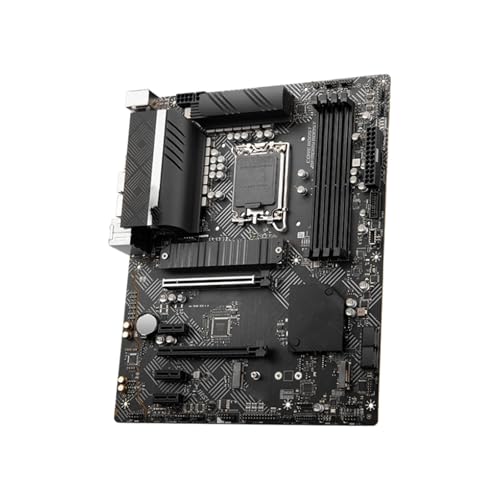 |
ZXKLXYY B660-A DDR4 | DDR4 memory compatibility | Four memory slots | NVMe M.2 support | View on Amazon | Read Review |
| WiFi 7 Frontier |  |
Z790 MAX Gaming WiFi 7 | Z790 chipset platform | Wi-Fi 7 connectivity | ATX expansion room | View on Amazon | Read Review |
| Ready Made Performance |  |
ASUS Z790 WiFi 7 32GB | Processor included | 32GB DDR5 included | Wi-Fi 7 motherboard | View on Amazon | Read Review |
| High Speed Workhorse |  |
MSI PRO Z790-A WiFi II | 80A SPS VRM | Four M.2 slots | PCIe 5.0 x16 | View on Amazon | Read Review |
| Value DDR4 Foundation |  |
MSI PRO B760-P WiFi DDR4 | DDR4 memory support | Wi-Fi 6E included | 2.5Gbps networking | View on Amazon | Read Review |
| Compact DDR4 Base |  |
MSI PRO B760M-P DDR4 | Compact microATX format | DDR4 memory support | PCIe 4.0 support | View on Amazon | Read Review |
| AMD Platform Mismatch |  |
ASUS ROG Strix B550-F WiFi II | Wi-Fi 6E connectivity | PCIe 4.0 support | BIOS Flashback | View on Amazon | Read Review |
More Details on Our Top Picks
-
ASUS TUF Z790 WiFi DDR5
For a 14700K build, this combo gives you a strong starting point with the ASUS TUF Z790-Plus WiFi board and DDR5 support. The Z790 chipset supports processor overclocking, while the ATX layout leaves room for multiple expansion cards and storage drives.
You also get built-in Wi-Fi, modern connectivity, and a board designed for demanding gaming or productivity systems. The main limitation is that the bundle listing provides few component details, so verify the exact memory kit and BIOS version before ordering.
- Brand:ASUS
- Socket:LGA 1700
- Form Factor:ATX
- Chipset:Z790
- Memory Type:DDR5
- Wireless:Wi-Fi
- Additional Feature:PCIe 5.0 support
- Additional Feature:Multiple M.2 storage slots
- Additional Feature:TUF Gaming design
-
MSI PRO Z790-P WiFi DDR5
Choose this bundle if you want the 14700K paired with a work-focused Z790 board rather than a heavily styled gaming model. The MSI PRO Z790-P WiFi provides processor overclocking support, DDR5 compatibility, and a straightforward ATX layout for a full-size build.
Its integrated wireless networking and broad storage connectivity suit gaming, content creation, and office workloads alike. The limitation is the sparse bundle description, which leaves the included memory configuration and other accessory details unspecified.
- Brand:MSI
- Socket:LGA 1700
- Form Factor:ATX
- Chipset:Z790
- Memory Type:DDR5
- Wireless:Wi-Fi
- Additional Feature:CPU overclocking support
- Additional Feature:Multiple M.2 slots
- Additional Feature:Full-size ATX layout
-
Gigabyte Z790 AORUS Elite AX
The Z790 AORUS Elite AX is a strong fit for a feature-rich 14700K build, especially if fast storage and connectivity matter as much as raw processor speed. Its 16+1+2 power phase design, four M.2 slots, and PCIe 5.0 support give you plenty of room for a demanding system.
You also receive Wi-Fi 6E, 2.5Gb Ethernet, USB-C, and convenient Q-Flash and EZ-Latch features. The main drawback is that this is a motherboard only, so you must source the processor, memory, and cooling separately.
- Brand:Gigabyte
- Socket:LGA 1700
- Form Factor:ATX
- Chipset:Z790
- Memory Type:DDR5
- Wireless:Wi-Fi 6E
- Additional Feature:16+1+2 power phase
- Additional Feature:2.5GbE networking
- Additional Feature:Q-Flash BIOS update
-
ZXKLXYY B660-A DDR4
This board targets buyers who want to run a 14700K with lower-cost DDR4 memory instead of moving to DDR5. The listing specifies four DDR4 slots, support for speeds up to 5333MHz, HDMI output, NVMe M.2 storage, and the LGA 1700 socket.
That platform can make sense for a value-focused build, but the B660 chipset is not designed for CPU overclocking, which limits the 14700K’s unlocked multiplier. Confirm the BIOS supports 14th-generation processors, and verify the board’s exact manufacturer details before purchase.
- Brand:ZXKLXYY
- Socket:LGA 1700
- Form Factor:ATX
- Chipset:B660
- Memory Type:DDR4
- Additional Feature:HDMI display output
- Additional Feature:Four DDR4 slots
- Additional Feature:PCIe 4.0 platform
-
Z790 MAX Gaming WiFi 7
This bundle is aimed at builders who want a 14700K system with next-generation wireless networking. The Z790 platform is a suitable match for Intel’s unlocked processor, and the ATX format should provide useful room for expansion and cooling hardware.
The standout feature is Wi-Fi 7, assuming the listed motherboard specification is accurate. Because the product title does not clearly identify the board manufacturer or memory type, check the exact model, socket, BIOS support, and included accessories before committing.
- Socket:LGA 1700
- Form Factor:ATX
- Chipset:Z790
- Wireless:Wi-Fi 7
- Additional Feature:Intel 14th-generation support
- Additional Feature:Processor overclocking support
- Additional Feature:Full-size ATX layout
-
ASUS Z790 WiFi 7 32GB
For a simpler build plan, this three-part package combines the Core i7-14700K, an ASUS Z790 MAX Gaming WiFi 7 motherboard, and 32GB of KLEVV Bolt V DDR5 memory. The included 6000MHz CL30 kit gives the system a clearly defined memory configuration instead of leaving you to match parts yourself.
The bundle suits gaming and demanding desktop work, with Wi-Fi 7 and a modern Z790 platform included. Its limitation is reduced component flexibility, since you may prefer different memory capacity, timings, or motherboard features for a specialized build.
- Brand:ASUS
- Socket:LGA 1700
- Form Factor:ATX
- Chipset:Z790
- Memory Type:DDR5
- Wireless:Wi-Fi 7
- Additional Feature:6000MHz memory kit
- Additional Feature:CL30 memory timings
- Additional Feature:Two 16GB modules
-
MSI PRO Z790-A WiFi II
The MSI PRO Z790-A WiFi II makes sense for a performance-focused 14700K workstation or gaming PC that needs fast memory and plentiful storage. Its 80A SPS VRM, PCIe 5.0 x16 slot, and support for memory speeds above 7800MT/s provide a strong foundation for high-end components.
You also get four PCIe 4.0 M.2 slots, Wi-Fi 6E, and 2.5Gb Ethernet, all in a practical ATX design. The limitation is that the high memory-speed ceiling depends on the selected kit, processor memory controller, and BIOS settings.
- Brand:MSI
- Socket:LGA 1700
- Form Factor:ATX
- Chipset:Z790
- Memory Type:DDR5
- Wireless:Wi-Fi 6E
- Additional Feature:2.5Gbps LAN
- Additional Feature:Memory support over 7800MT/s
- Additional Feature:Four PCIe 4.0 M.2
-
MSI PRO B760-P WiFi DDR4
This board suits a 14700K build where DDR4 affordability matters more than CPU overclocking. You get an ATX layout, Wi-Fi 6E, Bluetooth 5.3, 2.5Gbps LAN, and support for Intel’s 12th, 13th, and 14th-generation processors.
Its PCIe 4.0 storage support and HDMI and DisplayPort outputs cover the needs of a capable everyday or gaming system. The B760 chipset does not support traditional CPU multiplier overclocking, so the unlocked 14700K will run primarily at stock settings.
- Brand:MSI
- Socket:LGA 1700
- Form Factor:ATX
- Chipset:B760
- Memory Type:DDR4
- Wireless:Wi-Fi 6E
- Additional Feature:Bluetooth 5.3
- Additional Feature:PCIe 4.0 interface
- Additional Feature:HDMI and DisplayPort
-
MSI PRO B760M-P DDR4
Pick this model for a compact 14700K system that needs essential features without a full-size ATX board. The microATX format fits smaller cases, while DDR4 support, PCIe 4.0, an M.2 slot, and USB 3.2 Gen 2 cover the basics for a modern desktop.
The board also includes HDMI and DisplayPort outputs for compatible integrated graphics configurations. Its smaller size and B760 chipset mean fewer expansion options and no standard CPU overclocking, making it better suited to practical builds than highly tuned performance systems.
- Brand:MSI
- Socket:LGA 1700
- Form Factor:microATX
- Chipset:B760
- Memory Type:DDR4
- Additional Feature:M.2 storage support
- Additional Feature:USB 3.2 Gen 2
- Additional Feature:HDMI and DisplayPort
-
ASUS ROG Strix B550-F WiFi II
This motherboard is not compatible with the Intel Core i7-14700K. The ASUS ROG Strix B550-F Gaming WiFi II uses AMD’s AM4 socket and B550 chipset, while the 14700K requires Intel’s LGA 1700 platform.
For an AMD Ryzen build, the board offers DDR4 support, PCIe 4.0, Wi-Fi 6E, 2.5Gb Ethernet, and BIOS Flashback. It belongs in an AM4 motherboard roundup, not among recommendations for the 14700K, unless the listing is corrected or the processor choice changes.
- Brand:ASUS
- Socket:AM4
- Form Factor:ATX
- Chipset:B550
- Memory Type:DDR4
- Wireless:Wi-Fi 6E
- Additional Feature:2.5Gb LAN
- Additional Feature:HDMI 2.1 output
- Additional Feature:Aura Sync lighting
Frequently Asked Questions
Do I need a Z790 motherboard for the Core i7-14700K?
No, but Z790 is the best match if you want CPU overclocking, extensive firmware controls, and more high-speed connectivity. A B760 board can run the processor at stock settings and support memory overclocking, which may be enough for a straightforward gaming or productivity build. A Z690 board can also be compatible after a BIOS update, provided the manufacturer lists 14th-generation processor support. Check for BIOS Flashback if the board may arrive with older firmware.
Is DDR4 or DDR5 better for a 14700K build?
DDR5 is the preferred choice for a new system because it offers higher bandwidth and gives you a longer upgrade path. A sensible starting point is a 32GB kit rated around DDR5-6000, with timings and compatibility listed by the motherboard maker. DDR4 still makes financial sense if you already own a good kit or need to control the build cost. Buy a DDR4 motherboard specifically, since DDR4 and DDR5 slots are not interchangeable.
How strong should the motherboard VRM be?
Choose a board with a well-cooled 12-phase or stronger VRM design, although phase counts alone do not determine quality. Large heatsinks, sensible power limits, and a reputable board design matter just as much. For sustained heavy workloads or overclocking, move toward a midrange or premium Z790 board. Avoid pairing this processor with the least expensive board in the product range, especially if airflow inside the case is limited.
Will the 14700K need a BIOS update?
It might, particularly with older Z690 or early Z790 boards. Many newer models ship ready for 14th-generation processors, but the exact firmware version depends on manufacturing date and remaining stock. Look for BIOS Flashback, which lets you update firmware with a USB drive and power connected, often without installing a compatible processor first. Confirm the required BIOS version on the manufacturer’s support page before purchase.
What cooler and power supply should I pair with the 14700K?
Use a substantial 240mm or 280mm liquid cooler, or a high-end dual-tower air cooler with strong case airflow. The processor can run hot during all-core workloads, particularly when motherboard defaults allow higher power draw. Pair the system with a quality 750W to 850W power supply, increasing capacity if you install a high-end graphics card. Choose a unit with the appropriate PCIe power connectors and an 80 Plus Gold efficiency rating from a reputable manufacturer.


