


Your game is rendering, the fans are humming, and a new CPU upgrade is waiting on the desk. Choosing among the best motherboards for i7-13700k means sorting genuine LGA1700 matches from older boards and integrated mini PCs that serve a different purpose.
This roundup brings those distinctions into focus, with attention to socket support, memory format, board size, and expansion room. Read on before a tempting title sends your build down the wrong path.
Key Takeaways
- Confirm the motherboard uses the LGA1700 socket and supports 13th-generation Intel processors before buying.
- Match the board’s DDR4 or DDR5 memory type to the RAM already installed or planned for the build.
- Choose a Z690 or Z790 chipset for stronger overclocking controls, while B760 boards suit standard CPU operation.
- Check the form factor, especially Mini-ITX, Micro-ATX, or ATX, against your case and available expansion slots.
- Verify BIOS support, VRM cooling, M.2 storage slots, Wi-Fi, and rear I/O before prioritizing decorative features.
| Budget Bundle Pick |  |
MSI B760M DDR4 Bundle | CPU and motherboard bundle | LGA1700 platform | Compact Micro-ATX design | View on Amazon | Read Review |
| High Core Count |  |
MSI Z790 WiFi Bundle | Twenty-core processor | Integrated Wi-Fi | Z790 chipset | View on Amazon | Read Review |
| Durable DDR5 Platform |  |
ASUS TUF Z790 DDR5 | DDR5 memory support | Built-in Wi-Fi | Full ATX layout | View on Amazon | Read Review |
| Legacy Office Upgrade |  |
SHANGZHAOYUAN B85M DDR3 | Multiple display outputs | NVMe M.2 support | Compact Micro-ATX design | View on Amazon | Read Review |
| Compact Integrated System |  |
ERYING 13700H Mini ITX | Mini-ITX footprint | Integrated Core i7 | DDR5 memory | View on Amazon | Read Review |
| PCIe 5 Expansion | 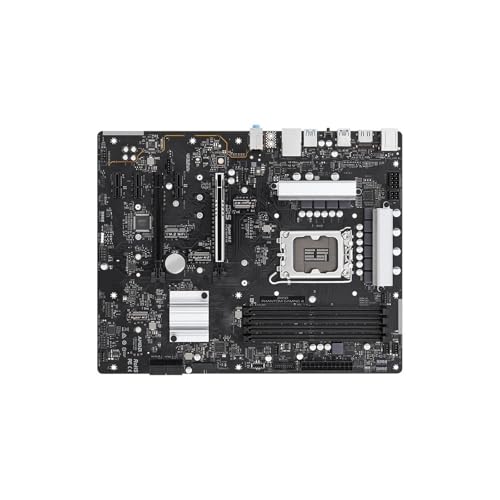 |
ASRock Z690 DDR4 Board | i7-13700K compatibility | PCIe 5.0 support | DDR4 platform | View on Amazon | Read Review |
| Four-Slot Refurbishment | 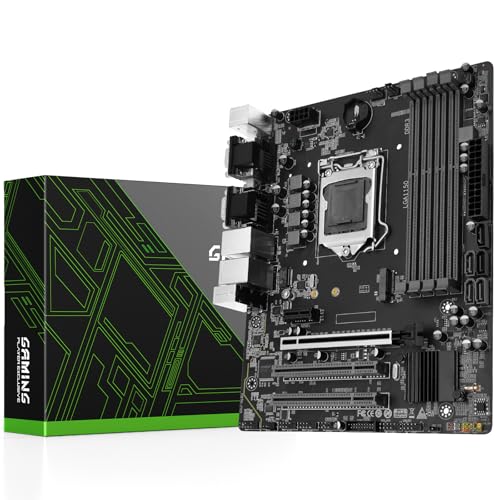 |
SHANGZHAOYUAN H97M DDR3 | Four DDR3 slots | NVMe M.2 support | USB 3.0 connectivity | View on Amazon | Read Review |
| Broad CPU Compatibility | MSI Z790 DDR5 Board | i7-13700K support | DDR5-7000 listed | M.2 storage support | View on Amazon | Read Review | |
| WiFi 6E Workhorse | ASRock Steel Legend DDR4 | WiFi 6E connectivity | PCIe 5.0 support | Direct i7-13700K support | View on Amazon | Read Review | |
| Basic LGA1150 Replacement |  |
SHANGZHAOYUAN H97 Legacy | 4th-generation Core support | LGA1150 socket | Simple replacement option | View on Amazon | Read Review |
More Details on Our Top Picks
-
MSI B760M DDR4 Bundle
This bundle suits buyers who want a CPU and motherboard together for a mainstream Intel build. The MSI PRO B760M-P provides LGA1700 support, a compact Micro-ATX layout, and DDR4 compatibility, while the included Core i7-12700KF offers strong multitasking performance.
The key limitation is compatibility with this roundup’s target: the included i7-12700KF is not an i7-13700K. You also get no integrated graphics from the KF processor, so a discrete graphics card is required.
- Brand:MSI, Intel
- Socket:LGA1700
- Form Factor:Micro-ATX
- Memory Type:DDR4
- Additional Feature:Unlocked Core i7 processor
- Additional Feature:B760 chipset
- Additional Feature:Discrete graphics required
-
MSI Z790 WiFi Bundle
Choose this pairing for a performance-focused build centered on the 20-core Core i7-14700K. The MSI PRO Z790-P WiFi motherboard provides LGA1700 compatibility, a full-size ATX layout, and built-in wireless networking, making it a practical foundation for demanding gaming and productivity workloads.
It is a strong alternative for users considering a 13th-generation i7, but the included processor is 14th generation, not the i7-13700K. Memory support should be checked carefully before purchase because the listing does not clearly identify the motherboard’s DDR generation.
- Brand:MSI, Intel
- Socket:LGA1700
- Form Factor:ATX
- Additional Feature:Up to 5.6 GHz
- Additional Feature:Unlocked desktop processor
- Additional Feature:ProSeries motherboard
-
ASUS TUF Z790 DDR5
This ASUS-based bundle fits buyers who want DDR5 memory and a sturdier feature set around an unlocked Intel processor. The TUF Gaming Z790-Plus WiFi offers LGA1700 support, an ATX layout, wireless networking, and a suitable platform for high-end desktop components.
As with Product 2, the bundle includes an i7-14700K rather than an i7-13700K. That newer processor may appeal to buyers seeking extra cores, but it makes this a less direct match for a strict i7-13700K roundup.
- Brand:ASUS, Intel
- Socket:LGA1700
- Form Factor:ATX
- Memory Type:DDR5
- Additional Feature:TUF Gaming design
- Additional Feature:Z790 chipset
- Additional Feature:Twenty-core processor
-
SHANGZHAOYUAN B85M DDR3
A low-cost legacy platform makes this board more suitable for repairing or extending an older desktop than building an i7-13700K system. It supports 4th-generation Intel processors, DDR3 memory, Micro-ATX cases, and familiar display outputs including VGA, DVI, and HDMI.
Storage connectivity is useful for an older machine, with NVMe M.2 and SATA 3.0 listed alongside PCIe 3.0 expansion. The decisive drawback is its LGA1150 socket, which cannot support any 12th-, 13th-, or 14th-generation Intel desktop processor.
- Brand:SHANGZHAOYUAN
- Socket:LGA1150
- Form Factor:Micro-ATX
- Memory Type:DDR3
- Expansion:PCIe 3.0
- Storage:NVMe M.2, SATA 3.0
- Additional Feature:VGA, DVI, HDMI outputs
- Additional Feature:Gigabit LAN
- Additional Feature:4th-generation Intel support
-
ERYING 13700H Mini ITX
This ERYING package targets compact builds that prioritize small dimensions and an integrated processor. Its Core i7-13700H, DDR5 memory, and Mini-ITX format are suited to space-conscious gaming, streaming, and general desktop setups.
Do not confuse the mobile i7-13700H with the desktop i7-13700K. The processor is integrated into the platform, so this is not a conventional socketed motherboard for upgrading to a desktop K-series chip.
- Brand:ERYING, Intel
- Socket:Integrated CPU
- Form Factor:Mini-ITX
- Memory Type:DDR5
- Additional Feature:Core i7-13700H processor
- Additional Feature:Gaming and streaming focus
- Additional Feature:Integrated motherboard design
-
ASRock Z690 DDR4 Board
For a builder seeking a direct LGA1700 motherboard, this ASRock Z690 Phantom Gaming 4 option supports the i7-13700K alongside several other Intel processors. Its DDR4 support, ATX layout, and PCIe 5.0 capability create a useful base for a performance desktop without requiring DDR5 memory.
The listing presents this as a board compatible with multiple CPUs, but it does not identify BIOS revision support. Confirm that the installed firmware supports the i7-13700K before assembling the system, because older Z690 stock may need an update.
- Brand:ASRock
- Socket:LGA1700
- Form Factor:ATX
- Memory Type:DDR4
- Expansion:PCIe 5.0
- Storage:M.2
- Additional Feature:Z690 chipset
- Additional Feature:ATX motherboard
- Additional Feature:Supports unlocked processors
-
SHANGZHAOYUAN H97M DDR3
This H97M board belongs in a refurbishment or repair build, especially when older DDR3 memory is already available. Four memory slots, USB 3.0, SATA 3.0, and NVMe M.2 support give the Micro-ATX board more flexibility than many basic legacy replacements.
Compatibility remains limited to LGA1150-era processors, including select 4th- and 5th-generation Core chips and Xeon models. It has no meaningful connection to the i7-13700K platform, so its value depends on maintaining an older system rather than starting a current build.
- Brand:SHANGZHAOYUAN
- Socket:LGA1150
- Form Factor:Micro-ATX
- Memory Type:DDR3
- Expansion:PCIe 3.0
- Storage:NVMe M.2, SATA 3.0
- Additional Feature:4th and 5th generation support
- Additional Feature:Xeon processor support
- Additional Feature:Four memory slots
-
MSI Z790 DDR5 Board
This MSI Z790-S01 motherboard is aimed at buyers building an LGA1700 desktop with DDR5 memory. The listing names support for the i7-13700K, alongside 12th- and 14th-generation processors, while HDMI output and M.2 storage add practical connectivity.
Its advertised DDR5-7000 memory support is useful for performance builds, but memory speed can depend on the installed kit, BIOS, and processor. The listing also provides limited detail about the board’s power delivery and rear-panel connectivity, so confirm those points before pairing it with aggressive overclocking plans.
- Brand:MSI
- Socket:LGA1700
- Form Factor:ATX
- Memory Type:DDR5
- Storage:M.2
- Additional Feature:HDMI output
- Additional Feature:Z790 chipset
- Additional Feature:Supports 12th to 14th generation
-
ASRock Steel Legend DDR4
The ASRock Z690 Steel Legend WiFi 6E is a sensible choice for an i7-13700K DDR4 build, particularly if wireless networking matters. It supports LGA1700 processors, includes WiFi 6E, uses a full ATX layout, and lists PCIe 5.0 plus M.2 storage support.
Because this is a Z690 board, check its BIOS support before installation with a 13th-generation processor. DDR4 keeps memory costs and platform requirements familiar, but it does not provide the forward memory transition offered by a DDR5 motherboard.
- Brand:ASRock
- Socket:LGA1700
- Form Factor:ATX
- Memory Type:DDR4
- Expansion:PCIe 5.0
- Storage:M.2
- Additional Feature:Steel Legend design
- Additional Feature:LGA1700 processor support
- Additional Feature:Multiple Intel generations supported
-
SHANGZHAOYUAN H97 Legacy
This H97 motherboard is intended for a basic older Intel system, such as a repair project or office desktop refresh. Its LGA1150 socket supports 4th-generation Core i7, i5, and i3 processors, providing a straightforward replacement path for compatible hardware.
The platform is far too old for an i7-13700K, and the listing does not specify memory type, form factor, expansion slots, or storage interfaces. That missing detail makes it harder to plan a complete build, even before accounting for the legacy socket.
- Brand:SHANGZHAOYUAN
- Socket:LGA1150
- Additional Feature:Core i7 processor support
- Additional Feature:Core i5 processor support
- Additional Feature:Core i3 processor support
Frequently Asked Questions
Is Z790 the best chipset for the i7-13700K?
Z790 is the easiest match because it supports CPU overclocking, offers broad PCIe and USB connectivity, and usually arrives with firmware designed for 13th-generation processors. It is a strong choice for a new performance-focused build. A Z690 board can deliver similar performance and may cost less, but confirm BIOS support before buying. B760 works well for a stock-speed system, although CPU multiplier overclocking is not available.
Can an i7-13700K motherboard use DDR4 RAM?
Yes, but only if you choose a DDR4 motherboard. DDR4 and DDR5 boards use different memory designs, so the two standards cannot be swapped between them. DDR4 lowers the cost when you already own compatible memory, while DDR5 offers higher bandwidth and a clearer upgrade path. Choose the memory type first, then filter motherboard listings accordingly.
Do I need to update the BIOS for the i7-13700K?
A Z790 motherboard usually supports the i7-13700K out of the box, although older stock can still vary. Some Z690 models need a BIOS update before they will start with a 13th-generation processor. A board with BIOS Flashback lets you update firmware from a USB drive without installing a supported CPU first. Check the manufacturer’s CPU support list and the BIOS version required for the processor before purchase.
What cooling does the i7-13700K need?
Plan on a high-performance CPU cooler, such as a large dual-tower air cooler or a 240mm, 280mm, or 360mm liquid cooler. The right choice depends on your case, noise preference, and whether you will run sustained rendering or other heavy workloads. Use a case with strong front-to-back airflow and at least several quality intake and exhaust fans. Intel does not include a stock cooler with this processor, so the cooling solution belongs in the initial build budget.
Is motherboard overclocking worth it for the i7-13700K?
It can be worthwhile if you want to tune performance, power limits, temperatures, or memory, but CPU overclocking requires a Z-series chipset, suitable cooling, and a power delivery system with adequate thermal headroom. The gains depend on your workload and cooling capacity. For many systems, careful power and voltage tuning offers a better balance than chasing the highest possible clock speed. A quality Z790 board gives you the most flexibility, while a B760 board suits users who prefer stock settings and a simpler build.


