

A common mistake is treating a home-server board like a desktop motherboard with extra storage. That shortcut can leave you with awkward drive support, limited networking, or a case that simply refuses to cooperate.
The best motherboards for home server projects vary sharply in purpose and scale. This comparison brings the major options into focus, so keep reading before choosing a foundation for your always-on machine.
Key Takeaways
- Prioritize native SATA capacity if your server will manage several hard drives, because add-in controllers can consume valuable expansion slots.
- Match the networking speed to your workload, with 2.5GbE suitable for many homes and 10GbE better for large file transfers or shared editing.
- Check ECC memory support and maximum RAM capacity for virtual machines, storage services, and other workloads that benefit from error correction.
- Confirm the form factor and power requirements before buying, since Mini-ITX, Micro-ATX, and E-ATX boards need different cases and cooling plans.
- Treat PCIe lane availability as a key specification when you need NVMe drives, HBA cards, GPUs, or high-speed network adapters at the same time.
| Dual-Ten-Gig Workhorse | ASRock Rack B650D4U-2L2T 10GbE | Dual 10GbE networking | Ryzen 7000 support | PCIe 5.0 expansion | View on Amazon | Read Review | |
| Compact Storage Hub |  |
Quad-Core Mini-ITX NAS Board | Eight SATA connections | Dual 2.5GbE ports | Two M.2 slots | View on Amazon | Read Review |
| Budget Compute Platform | 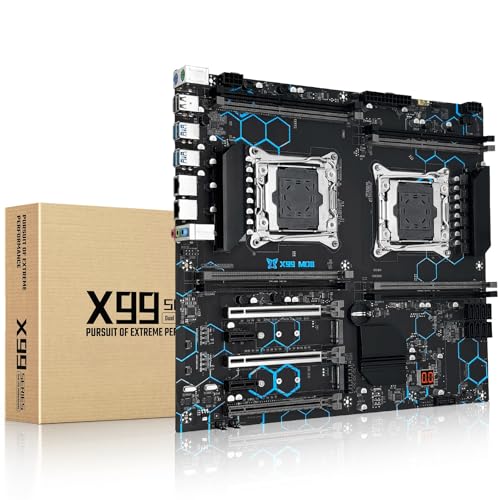 |
MACHINIST X99 Dual Xeon | Dual Xeon support | Up to 256GB memory | PCIe 3.0 expansion | View on Amazon | Read Review |
| Trusted Micro-ATX Base |  |
Supermicro H13SAE-MF Ryzen | Ryzen 7000 compatibility | Compact micro-ATX layout | Supermicro server pedigree | View on Amazon | Read Review |
| Quiet Low-Power Starter |  |
ASRock J4125M Quad-Core | Integrated quad-core CPU | Low-power platform | Simple server foundation | View on Amazon | Read Review |
| High-Density NAS Node |  |
StoneStorm N150 Eight-Bay NAS | Eight-bay NAS layout | 10GbE networking | DDR5 support | View on Amazon | Read Review |
| Fast Compact File Server |  |
N150 Six-Bay Dual-10GbE NAS | Dual 10GbE ports | Six SATA connections | Three M.2 slots | View on Amazon | Read Review |
| Flexible NAS Enclosure | 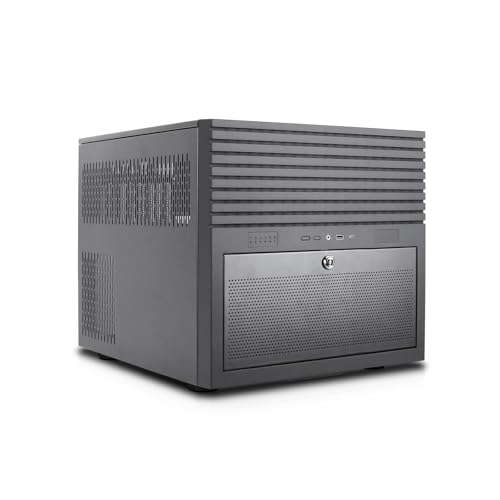 |
Rosewill Hearth Six-Bay Chassis | Six hot-swap HDD bays | Six 2.5-inch SSD bays | E-ATX motherboard support | View on Amazon | Read Review |
| Maximum Drive Capacity |  |
JONSBO N5 Twelve-Drive Case | Twelve hard-drive bays | Four SSD positions | Supports up to four GPUs | View on Amazon | Read Review |
| Ready-Made Mini Server |  |
ZimaBoard 2 N150 16GB | Compact home-server platform | 16GB LPDDR5 memory | PCIe x4 expansion | View on Amazon | Read Review |
More Details on Our Top Picks
-
ASRock Rack B650D4U-2L2T 10GbE
For a serious home lab, this micro-ATX server board offers a strong foundation around AMD Ryzen 7000 processors. Its B650E platform, PCIe 5.0 support, and dual 10GbE networking suit virtualization, high-speed storage, and demanding network services.
You will need to source the processor, memory, and storage separately, and the platform may be more capability than a basic file server requires. The main limitation is that power consumption and total platform cost can rise quickly with a high-end Ryzen build.
- Brand:ASRock Rack
- Form Factor:Micro-ATX
- Processor:AMD Ryzen 7000
- Storage:PCIe 5.0
- Networking:Dual 10GbE
- Additional Feature:B650E chipset
- Additional Feature:Single CPU socket
- Additional Feature:Server-oriented design
-
Quad-Core Mini-ITX NAS Board
Choose this Mini-ITX platform for a compact NAS, firewall, or lightweight virtualization host. Its low-power quad-core, eight-thread processor, eight SATA ports, dual 2.5GbE connections, and two M.2 slots create plenty of room for storage-focused builds.
The integrated HDMI and DisplayPort outputs support 4K displays, which helps during setup and maintenance. The limitation is the unspecified processor model and DDR4 memory platform, so performance and upgrade options may be narrower than newer DDR5 systems.
- Form Factor:Mini-ITX
- Processor:Quad-core, 8-thread
- Memory:DDR4
- Storage:8 SATA, 2 M.2
- Networking:Dual 2.5GbE
- Additional Feature:HDMI and DisplayPort
- Additional Feature:4K display support
- Additional Feature:PCIe x4 slot
-
MACHINIST X99 Dual Xeon
This dual-socket X99 board targets a home lab that needs many CPU cores and substantial memory capacity without moving to a current-generation platform. Support for Intel Xeon E5 v3 and v4 processors, up to 256GB of DDR4, and PCIe 3.0 expansion makes it suitable for virtualization, older workstation workloads, and multi-service servers.
The older LGA 2011-v3 ecosystem can offer attractive used-market flexibility, but it generally brings higher power use and less efficient performance than modern platforms. Gigabit Ethernet also limits network throughput for large transfers and multi-user storage.
- Brand:MACHINIST
- Form Factor:E-ATX
- Processor:Xeon E5 v3/v4
- Memory:Up to 256GB DDR4
- Storage:SATA 3.0, M.2
- Networking:Gigabit Ethernet
- Additional Feature:Dual CPU sockets
- Additional Feature:USB 3.0 connectivity
- Additional Feature:NGFF and NVMe support
-
Supermicro H13SAE-MF Ryzen
The H13SAE-MF is a sensible starting point for a modern Ryzen home server in a compact enclosure. Its micro-ATX format and AMD Ryzen 7000 compatibility allow you to build a capable virtualization host, media server, or general-purpose lab system.
The listing provides limited detail about storage connections, networking, and memory support, so you should confirm the full board specification before choosing components. That missing information is the key drawback, particularly for a storage-heavy build where port count matters.
- Brand:Supermicro
- Form Factor:Micro-ATX
- Processor:AMD Ryzen 7000
- Additional Feature:H13 platform
- Additional Feature:Single-socket design
- Additional Feature:Suitable for home labs
-
ASRock J4125M Quad-Core
For a simple home server, the ASRock J4125M keeps the hardware recipe straightforward with an integrated Intel J4125 processor. Its four cores and low-power design fit file sharing, backups, lightweight containers, and basic media-serving duties.
The processor reaches up to 2.7GHz, but this is an older entry-level platform, not a strong choice for heavy virtualization or demanding transcoding. You also give up the upgrade flexibility of a socketed desktop CPU because the processor is built into the motherboard.
- Brand:ASRock
- Form Factor:Micro-ATX
- Processor:Intel J4125
- Additional Feature:Up to 2.7GHz
- Additional Feature:Four processor cores
- Additional Feature:Integrated motherboard CPU
-
StoneStorm N150 Eight-Bay NAS
This StoneStorm board is built around eight-bay NAS storage, making it a natural fit for a compact file server, backup system, or media library. The N150 processor, DDR5 support up to 48GB, dual M.2 slots, and 10GbE connectivity provide a useful balance of efficiency and storage capacity.
Dual 2.5GbE ports add flexibility for network segmentation or link aggregation, while the 10GbE AQC113C connection handles faster transfers. The main limitation is that the integrated low-power CPU is better suited to storage and light services than sustained, compute-heavy virtualization.
- Brand:StoneStorm
- Form Factor:Mini-ITX
- Processor:Intel N150
- Memory:Up to 48GB DDR5
- Storage:Dual M.2 NVMe
- Networking:10GbE, dual 2.5GbE
- Additional Feature:Dual 4K display output
- Additional Feature:PCIe x4 slot
- Additional Feature:10Gbps USB Type-C
-
N150 Six-Bay Dual-10GbE NAS
This six-bay Mini-ITX NAS board focuses on fast network storage in a small footprint. Its Intel N150 processor, six SATA connections, three M.2 NVMe slots, and dual 10GbE through an X550-AT2 NIC give you a strong layout for shared files, backups, and SSD caching.
DDR5 support and 4K HDMI make the platform current enough for a tidy home lab or media-focused build. The N150 remains an efficiency-first processor, so sustained virtualization and CPU-intensive media conversion should stay on the modest side.
- Form Factor:Mini-ITX
- Processor:Intel N150
- Memory:DDR5
- Storage:6 SATA, 3 M.2
- Networking:Dual 10GbE
- Additional Feature:Intel X550-AT2 NIC
- Additional Feature:4K HDMI output
- Additional Feature:Included cooling fan
-
Rosewill Hearth Six-Bay Chassis
The Rosewill Hearth is a server chassis, not a motherboard, so it belongs on your shortlist only if you need an enclosure for a separate system build. It supports up to six hot-swap 3.5-inch hard drives, six 2.5-inch SSDs, and E-ATX motherboards, giving you room for a sizable storage array.
Five 120mm PWM fan positions help move air through a densely populated build, while the front 5.25-inch bays add unusual flexibility. The limitation is that you must still choose and install the motherboard, power supply, processors, memory, and storage hardware.
- Brand:Rosewill
- Form Factor:E-ATX chassis
- Storage:6 HDD, 6 SSD bays
- Additional Feature:Five 120mm PWM fans
- Additional Feature:Two 5.25-inch bays
- Additional Feature:Front USB Type-C
-
JONSBO N5 Twelve-Drive Case
The JONSBO N5 is another NAS chassis rather than a motherboard, designed for builders who need a large local storage pool. Its support for up to 12 hard drives and four SSDs, E-ATX boards, multiple GPUs, and eight expansion slots leaves generous room for storage, graphics, and add-in networking.
A 330mm motherboard limit and ATX power supply support help accommodate substantial components, while the built-in fans provide basic airflow. The tradeoff is size: this case makes the most sense for a dedicated storage server, not a discreet shelf-top appliance.
- Brand:JONSBO
- Form Factor:E-ATX case
- Storage:12 HDD, 4 SSD bays
- Additional Feature:Supports 330mm motherboards
- Additional Feature:Three built-in fans
- Additional Feature:ATX PSU support
-
ZimaBoard 2 N150 16GB
The ZimaBoard 2 offers a compact path into home-server projects, with an Intel N150 processor, 16GB of LPDDR5 memory, and a PCIe 3.0 x4 expansion interface. It suits lightweight containers, network tools, personal cloud services, and small automation projects where low power and a tiny footprint matter.
Its integrated memory keeps the system simple, but it also limits future upgrades compared with a conventional motherboard. Storage and expansion capacity will depend heavily on the available external drives and the add-in hardware connected through PCIe.
- Brand:ZimaBoard
- Processor:Intel N150
- Memory:16GB LPDDR5
- Additional Feature:x86 server architecture
- Additional Feature:Integrated low-power design
- Additional Feature:Suitable for containers
Frequently Asked Questions
Do I need a server motherboard for a home server?
No. A well-chosen desktop or workstation motherboard can handle file sharing, backups, media serving, containers, and several other home-server tasks. A server board becomes more appealing if you need ECC support, IPMI remote management, many drive connections, or continuous virtualization workloads. Prioritize documented support for your processor, operating system, memory, and storage layout. Extra server features are useful, but paying for them does not automatically improve a simple NAS.
Is ECC memory necessary for a home server?
ECC is not mandatory, but it provides an extra layer of memory error correction that suits long-running systems and important data. It is especially worthwhile for ZFS storage, virtual machines, databases, and servers that you cannot easily monitor every day. Confirm support across the CPU, motherboard, and memory modules. Some consumer platforms support ECC only partially, such as error correction without detailed reporting, so read the board manual rather than relying on a product title.
How many SATA ports should my motherboard have?
Count every drive you plan to install, then reserve at least two additional ports for expansion or replacement drives. A four-drive NAS may need four ports today, but six to eight ports give you more breathing room for backups, larger arrays, or a separate boot drive. You can add a PCIe storage controller later, but that uses an expansion slot and may require careful lane planning. Check for shared ports, because some boards disable one or more SATA connectors when a particular M.2 socket is occupied.
Can I use a gaming motherboard for a home server?
Yes, provided it offers the storage connections, network support, memory capacity, and operating-system compatibility you need. Gaming boards can provide strong processors and useful PCIe slots, but they often omit ECC support, IPMI, and server-oriented diagnostics. Review idle power behavior, fan-control options, and onboard network hardware before choosing one. Decorative features rarely help a server, while stable firmware and low standby consumption matter every day.
What motherboard features matter most for a Proxmox or TrueNAS server?
For Proxmox, focus on CPU virtualization support, sufficient RAM slots, ECC compatibility if required, and enough PCIe lanes for network and storage controllers. For TrueNAS, prioritize drive connectivity, reliable network drivers, memory capacity, and a layout that avoids unwanted port sharing. Also check IOMMU support if you plan to pass a network card, storage controller, or graphics device through to a virtual machine. Confirm that the exact CPU and motherboard combination supports the features you need, because a promising specification sheet can still hide a frustrating limitation.


