


Many shoppers assume an older CPU socket means every compatible board is basically the same. That shortcut can lead to mismatched memory support, missing ports, or a board built for an entirely different platform.
This roundup compares the best lga 1150 motherboards across several chipsets, sizes, and feature sets. Keep reading to separate sensible upgrades from listings that merely sound impressive.
Key Takeaways
- Confirm the LGA 1150 socket and chipset support before checking other features, since socket mismatch makes the board unusable for your processor.
- Choose the form factor based on your case, especially if you are replacing a full-size ATX board with a compact Micro-ATX model.
- Check the number and maximum capacity of DDR3 slots, because memory limits can matter more than extra expansion features on an older platform.
- Prioritize SATA 6Gbps and M.2 support if you want faster storage, but verify whether the M.2 slot supports NVMe, SATA, or both.
- Confirm the available video outputs, USB ports, and PCIe slots before buying, since these determine practical upgrade and display options.
| Versatile Legacy Pick |  |
SHANGZHAOYUAN B85M PRO DDR3 | Broad 4th-gen CPU support | NVMe M.2 storage | Compact Micro-ATX design | View on Amazon | Read Review |
| Compact Storage Upgrade |  |
H81 M.2 Micro-ATX Board | M.2 storage support | Compact Micro-ATX format | Simple H81 platform | View on Amazon | Read Review |
| Straightforward H97 Foundation |  |
SHANGZHAOYUAN H97 Motherboard | Supports 4th-gen Core CPUs | H97 chipset platform | Suitable for rebuilds | View on Amazon | Read Review |
| Expandable Micro-ATX Choice | 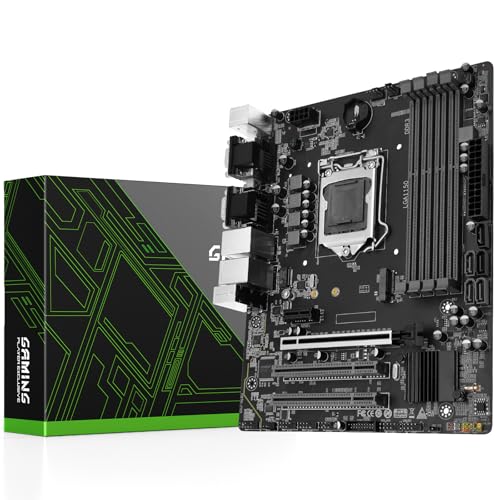 |
SHANGZHAOYUAN H97M PRO DDR3 | Four DDR3 memory slots | NVMe M.2 support | 4th and 5th gen support | View on Amazon | Read Review |
| Budget Gaming Refresh |  |
MACHINIST H81M-PRO DDR3 | 16GB DDR3 maximum | PCIe x16 graphics slot | NVMe M.2 support | View on Amazon | Read Review |
| Modern Platform Mismatch |  |
ASUS B760M-AYW WiFi DDR4 | Modern LGA 1700 platform | Two M.2 slots | Wi-Fi 6 connectivity | View on Amazon | Read Review |
| Basic Office Rebuild |  |
ASUS H81M-K DDR3 | Compact Micro-ATX footprint | DDR3-1066 support | Familiar ASUS platform | View on Amazon | Read Review |
| Full-Size Enthusiast Base | 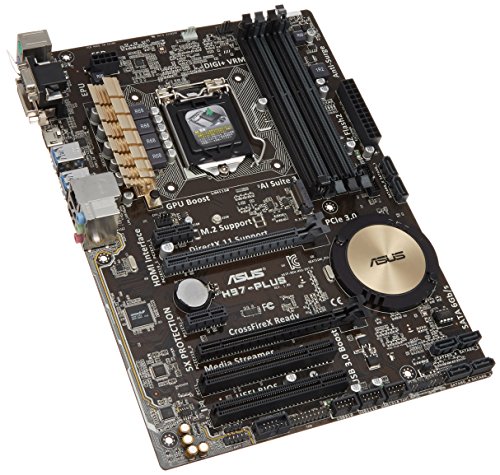 |
ASUS H97-PLUS DDR3 | Full-size ATX layout | DDR3-2600 support | H97 chipset platform | View on Amazon | Read Review |
| Balanced B85 Workhorse |  |
Gigabyte GA-B85M-D3H DDR3 | Balanced B85 feature set | HDMI video output | SATA 6Gb/s support | View on Amazon | Read Review |
| Practical Connectivity Pick |  |
Gigabyte GA-B85M-DS3H-A DDR3 | Practical B85 platform | HDMI video output | USB 3.0 support | View on Amazon | Read Review |
More Details on Our Top Picks
-
SHANGZHAOYUAN B85M PRO DDR3
For a practical LGA 1150 rebuild, this B85M PRO offers broad compatibility with 4th-generation Core, Pentium, and Celeron processors. Its Micro-ATX layout suits compact office PCs, budget desktops, and modest home servers.
Key strengths include DDR3 memory, PCIe 3.0, and an NVMe M.2 slot, giving an older platform useful modern storage support. The main limitation is platform age, so it cannot support newer Intel sockets or current-generation memory.
- Brand:SHANGZHAOYUAN
- Socket:LGA 1150
- Form Factor:Micro-ATX
- Memory Type:DDR3
- Expansion Slot:PCIe 3.0
- Storage Interface:NVMe M.2, SATA 3.0
- Additional Feature:HDMI, VGA, and DVI-compatible
- Additional Feature:Gigabit LAN
- Additional Feature:Pentium and Celeron support
-
H81 M.2 Micro-ATX Board
Choose this H81 board for a basic LGA 1150 desktop where compact dimensions and M.2 storage matter most. The listing identifies NVMe and NGFF support, a useful feature for refreshing an older computer without relying only on conventional hard drives.
Its Micro-ATX format works well in smaller cases, while the H81 chipset keeps the design focused and straightforward. The listing provides limited detail, and the older H81 platform offers fewer expansion and memory options than B85 or H97 boards.
- Socket:LGA 1150
- Form Factor:Micro-ATX
- Storage Interface:M.2 NVMe, NGFF
- Additional Feature:6 Gb/s storage support
- Additional Feature:Desktop PC design
- Additional Feature:High-speed storage focus
-
SHANGZHAOYUAN H97 Motherboard
This H97 model fits a traditional 4th-generation Intel build, especially if you already have a compatible Core i3, i5, or i7 processor. Its appeal is simplicity, with the H97 chipset providing a sensible base for an office PC or general-purpose desktop.
The board may suit a focused rebuild better than an ambitious upgrade, since the listing does not provide details about memory capacity, storage connectors, or form factor. That sparse information is the main drawback, so verify the rear I/O and case compatibility before ordering.
- Brand:SHANGZHAOYUAN
- Socket:LGA 1150
- Additional Feature:Core i3, i5, i7 support
- Additional Feature:H97 chipset
- Additional Feature:Desktop motherboard design
-
SHANGZHAOYUAN H97M PRO DDR3
For a more expandable compact build, the H97M PRO brings four DDR3 slots to a Micro-ATX board, giving you more room for memory expansion than many entry-level LGA 1150 options. It supports listed 4th- and 5th-generation Core processors, along with Pentium and Xeon models.
You also get NVMe M.2, SATA 3.0, USB 3.0, and PCIe 3.0 support, which helps an older system feel less restricted. Its limitation is the aging LGA 1150 platform, and processor compatibility should be checked carefully, particularly with Xeon chips.
- Brand:SHANGZHAOYUAN
- Socket:LGA 1150
- Form Factor:Micro-ATX
- Memory Type:DDR3
- Expansion Slot:PCIe 3.0
- Storage Interface:NVMe M.2, SATA 3.0
- Additional Feature:USB 3.0 connectivity
- Additional Feature:Pentium and Xeon support
- Additional Feature:H97 chipset
-
MACHINIST H81M-PRO DDR3
The MACHINIST H81M-PRO is aimed at a low-cost gaming or general desktop refresh built around a 4th-generation Intel processor. Its dual-channel DDR3 design supports up to 16GB of memory, enough for everyday workloads and lighter gaming setups.
An NVMe M.2 slot, SATA 3.0, and a PCIe x16 slot add useful flexibility for storage and graphics hardware. The 16GB memory ceiling and H81 chipset are clear constraints, so demanding modern games and heavy multitasking will quickly expose the platform’s age.
- Brand:MACHINIST
- Socket:LGA 1150
- Form Factor:Micro-ATX
- Memory Type:Dual-channel DDR3
- Expansion Slot:PCIe x16
- Storage Interface:NVMe M.2, SATA 3.0
- Additional Feature:Supports Xeon E3 v3
- Additional Feature:USB 3.0 support
- Additional Feature:H81M-PRO S1 design
-
ASUS B760M-AYW WiFi DDR4
This ASUS board does not belong in an LGA 1150 roundup. It uses the LGA 1700 socket and Intel B760 chipset, so it cannot support the 4th-generation processors intended for the other boards here.
As a standalone motherboard, it offers DDR4 memory, PCIe 5.0 graphics support, two M.2 slots, Wi-Fi 6, and 2.5Gb Ethernet. Those are useful modern features, but the socket mismatch makes it unsuitable for an LGA 1150 replacement.
- Brand:ASUS
- Socket:LGA 1700
- Form Factor:Micro-ATX
- Memory Type:DDR4
- Expansion Slot:PCIe 5.0 x16
- Storage Interface:Two M.2 slots
- Additional Feature:Intel B760 chipset
- Additional Feature:Realtek 2.5Gb Ethernet
- Additional Feature:Aura Sync lighting
-
ASUS H81M-K DDR3
The ASUS H81M-K makes sense for a simple LGA 1150 office or home computer, especially when you need a known ASUS board in a compact case. Its Micro-ATX format and DDR3 support keep the build straightforward and compatible with older components.
The listed DDR3-1066 support suits basic computing, but it signals a more modest memory profile than boards designed around higher DDR3 speeds. Storage and expansion details are limited in the supplied listing, so check the board layout before planning a larger upgrade.
- Brand:ASUS
- Socket:LGA 1150
- Form Factor:Micro-ATX
- Memory Type:DDR3-1066
- Additional Feature:H81 chipset
- Additional Feature:Desktop motherboard design
- Additional Feature:Older Intel processor support
-
ASUS H97-PLUS DDR3
The ASUS H97-PLUS is the better fit for a full-size desktop build that needs an ATX motherboard rather than a compact replacement. Its H97 platform and listed DDR3-2600 support give it a stronger enthusiast profile than basic H81 alternatives.
The ATX layout generally provides more room for expansion cards and connectors, while the LGA 1150 socket targets 4th-generation Intel processors. Its limitation is straightforward: DDR3 and LGA 1150 restrict future upgrade choices compared with newer platforms.
- Brand:ASUS
- Socket:LGA 1150
- Form Factor:ATX
- Memory Type:DDR3-2600
- Additional Feature:H97 chipset
- Additional Feature:Desktop enthusiast layout
- Additional Feature:Older Intel CPU support
-
Gigabyte GA-B85M-D3H DDR3
This Gigabyte board offers a sensible middle ground for a mainstream LGA 1150 desktop, combining a Micro-ATX footprint with support for DDR3-1600 memory. It is well suited to office systems, family PCs, and general-purpose builds that do not need elaborate platform features.
Useful connections include HDMI, SATA 6Gb/s, USB 3.0, and a PCIe graphics slot, giving you practical flexibility for everyday hardware. As with any B85 board, the older socket limits processor and memory upgrades, but the feature mix remains well balanced for a legacy rebuild.
- Brand:Gigabyte
- Socket:LGA 1150
- Form Factor:Micro-ATX
- Memory Type:DDR3-1600
- Expansion Slot:PCIe
- Storage Interface:SATA 6Gb/s
- Additional Feature:USB 3.0 connectivity
- Additional Feature:Intel B85 chipset
- Additional Feature:Desktop PC support
-
Gigabyte GA-B85M-DS3H-A DDR3
For a dependable Micro-ATX replacement board, the GA-B85M-DS3H-A focuses on the essentials of an LGA 1150 system. Its DDR3-1600 support, HDMI output, and SATA 6Gb/s connectivity cover the needs of a typical office, media, or home desktop.
USB 3.0 adds useful peripheral speed, while the B85 chipset keeps the board suited to mainstream 4th-generation Intel builds. The supplied specifications do not identify detailed slot counts or memory limits, so confirm those points if you plan a substantial hardware expansion.
- Brand:Gigabyte
- Socket:LGA 1150
- Form Factor:Micro-ATX
- Memory Type:DDR3-1600
- Storage Interface:SATA 6Gb/s
- Additional Feature:Intel B85 chipset
- Additional Feature:SATA 6Gb/s connectivity
- Additional Feature:Desktop PC design
Frequently Asked Questions
Which chipset is best for an LGA 1150 motherboard?
Z97 is usually the best pick if you want CPU overclocking, stronger connectivity, and broad support for Haswell Refresh processors. It pairs particularly well with unlocked CPUs such as the Core i5-4690K and Core i7-4790K. Choose H97 or B85 for a locked processor and a lower purchase price. Z87 can also work well, but you may need a BIOS update for newer Haswell Refresh chips.
Can LGA 1150 motherboards use DDR4 memory?
No. LGA 1150 systems use DDR3 memory, generally in desktop DIMMs. DDR4 modules have a different electrical design and physical notch position, so they are not interchangeable. Check the motherboard’s maximum supported capacity and memory speed before buying. A reliable DDR3-1600 kit is a sensible match for many systems on this platform.
Do all LGA 1150 motherboards support overclocking?
No. CPU overclocking generally requires a Z87 or Z97 chipset and an unlocked K-series processor. H-series and B-series boards normally support only standard CPU settings, although some may offer limited memory tuning. A board’s VRM quality also matters, particularly with sustained loads. Look for suitable heatsinks and a power design intended for the processor you plan to install.
Will an LGA 1150 motherboard support my Haswell Refresh CPU?
It may, but support depends on the BIOS version and the specific motherboard model. Processors such as the Core i5-4590 and Core i7-4790 often require a later firmware release on early 8-series boards. Check the manufacturer’s CPU support list before purchase. If the board ships with an old BIOS and cannot update without an older compatible CPU, the upgrade can become a small hardware riddle nobody asked for.
Are LGA 1150 motherboards still worth buying?
They can be worthwhile for upgrading an existing Haswell system, especially if you already own compatible DDR3 memory and an LGA 1150 processor. A replacement board can restore a working PC at a reasonable cost. For a complete new build, compare the total price with a newer platform. If the motherboard, CPU, and memory together approach the cost of a modern system, newer parts usually provide better performance, newer interfaces, and a longer upgrade path.


