

A micro-ATX board can now anchor a serious AM5 build without occupying the footprint of a traditional ATX platform. That compact size makes the best matx am5 motherboards surprisingly varied, with meaningful differences hiding behind similar product names.
This comparison sorts those differences into clear, practical categories, so you can see which specifications matter before a small motherboard creates a large headache. Keep reading for the details worth your attention.
Key Takeaways
- Prioritize the AM5 chipset and listed CPU support so the board matches your Ryzen generation and upgrade plans.
- Check DDR5 speed support and memory compatibility, since advertised overclocked rates depend on the kit, BIOS, and processor.
- Choose enough M.2 slots for your storage roadmap, especially if adding multiple NVMe drives later.
- Compare Wi-Fi generation and LAN speed based on your network hardware, not just the headline specification.
- Review rear I/O, USB-C speeds, display outputs, and BIOS update features before choosing a compact board.
| Balanced AM5 Pick |  |
Gigabyte B850M Eagle WiFi6E | Ryzen 9000 support | PCIe 5.0 support | WiFi 6E connectivity | View on Amazon | Read Review |
| High-Speed Connectivity |  |
MSI PRO B850M WiFi 7 | WiFi 7 support | 5G LAN | DDR5-8200+ OC | View on Amazon | Read Review |
| Power-Focused Foundation |  |
Gigabyte B850M AORUS Elite | 12+2+2 power phase | PCIe 5.0 support | Two M.2 slots | View on Amazon | Read Review |
| Mainstream Gaming Core |  |
Gigabyte B850M Gaming X | PCIe 5.0 support | WiFi 6E built in | 2.5GbE LAN | View on Amazon | Read Review |
| Clean White Build |  |
Gigabyte B850M Eagle WiFi6E ICE | White ICE styling | PCIe 5.0 support | WiFi 6E connectivity | View on Amazon | Read Review |
| Expansion-Friendly TUF | ASUS TUF B850M WiFi 7 | Three M.2 slots | WiFi 7 support | 80A DrMOS stages | View on Amazon | Read Review | |
| Proven Platform Value |  |
Gigabyte B650M AORUS Elite AX | B650 AM5 platform | 12+2+2 power phase | PCIe 5.0 M.2 | View on Amazon | Read Review |
| Premium Storage Specialist |  |
ASUS ROG Strix B850-G WiFi | Four M.2 slots | WiFi 7 support | 20Gbps USB-C | View on Amazon | Read Review |
| Practical Budget Platform | 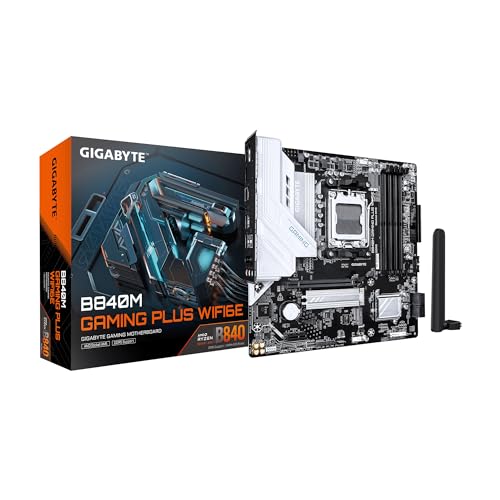 |
Gigabyte B840M Gaming Plus | Ryzen 9000 support | WiFi 6E connectivity | Two M.2 slots | View on Amazon | Read Review |
| Straightforward Upgrade |  |
ASRock B850M-X WiFi | Ryzen 9000 support | PCIe 5.0 support | DDR5-8200+ OC | View on Amazon | Read Review |
More Details on Our Top Picks
-
Gigabyte B850M Eagle WiFi6E
For a compact Ryzen build, this board offers a well-rounded feature set without pushing into specialty hardware. Support for Ryzen 9000, 8000, and 7000 processors, DDR5 memory, and PCIe 5.0 gives you a strong foundation for a new AM5 system.
You also get WiFi 6E, 2.5GbE LAN, USB-C, and two M.2 slots, while the 8+2+2 power phase design suits mainstream gaming and productivity CPUs. The main limitation is the two-slot M.2 layout, which gives you less storage expansion than several higher-end options.
- Brand:Gigabyte
- Form Factor:Micro-ATX
- Chipset:B850
- Memory:DDR5
- Wireless:WiFi 6E
- M.2 Slots:2
- Additional Feature:USB-C connectivity
- Additional Feature:EZ-Latch design
- Additional Feature:8+2+2 power phase
-
MSI PRO B850M WiFi 7
Choose this MSI board if fast networking and high-speed DDR5 support matter as much as core gaming performance. Its WiFi 7 and 5G LAN connections are especially useful for fast local transfers, modern broadband, and systems that need strong wireless flexibility.
The board supports Ryzen 9000, 8000, and 7000 processors, along with PCIe 5.0 x16, PCIe 4.0 x4, and a Gen5 M.2 interface. Its limitation is that the supplied specifications do not state the total M.2 slot count, so storage planning requires a closer look at the full manual or retailer listing.
- Brand:MSI
- Form Factor:Micro-ATX
- Chipset:B850
- Memory:DDR5
- Wireless:WiFi 7
- Additional Feature:Gen5 M.2 interface
- Additional Feature:PCIe 4.0 x4
- Additional Feature:Memory Boost support
-
Gigabyte B850M AORUS Elite
Heavy CPU workloads are the natural fit here, thanks to a 12+2+2 power phase design that gives this AORUS model a stronger power-delivery profile than the entry-level options in this group. It supports the full Ryzen 9000, 8000, and 7000 range, plus DDR5 and PCIe 5.0.
You get two M.2 slots, WiFi 6E, 2.5GbE, USB-C, and a five-year warranty, which makes the board attractive for a long-lived build. The trade-off is straightforward: it still offers only two M.2 slots, and WiFi 6E is one step behind the newer WiFi 7 standard.
- Brand:Gigabyte
- Form Factor:Micro-ATX
- Chipset:B850
- Memory:DDR5
- Wireless:WiFi 6E
- M.2 Slots:2
- Additional Feature:USB-C connectivity
- Additional Feature:EZ-Latch design
- Additional Feature:Ryzen 9000 support
-
Gigabyte B850M Gaming X
For a gaming-focused AM5 build, this board keeps the essentials in the right places: PCIe 5.0, DDR5, USB-C, and support for Ryzen 9000, 8000, and 7000 processors. Its 10+2+2 power phase configuration gives you a sensible middle ground between basic boards and more aggressively equipped models.
The combination of WiFi 6E, 2.5GbE LAN, and two M.2 slots covers most modern gaming systems neatly. Storage expansion is the clear constraint, since two M.2 slots may feel tight if you plan to maintain several large game libraries locally.
- Brand:Gigabyte
- Form Factor:Micro-ATX
- Chipset:B850
- Memory:DDR5
- Wireless:WiFi 6E
- M.2 Slots:2
- Additional Feature:10+2+2 power phase
- Additional Feature:USB-C connectivity
- Additional Feature:EZ-Latch design
-
Gigabyte B850M Eagle WiFi6E ICE
A white or light-colored compact PC benefits from this ICE-themed design, while the underlying platform remains practical for current Ryzen processors. You get DDR5, PCIe 5.0, WiFi 6E, 2.5GbE LAN, and USB-C in a compact Micro-ATX layout.
The 8+2+2 power phase is suited to mainstream AM5 builds, and the two M.2 slots cover a typical boot drive plus a secondary storage drive. The limitation is the same tidy-but-finite storage arrangement, with only two M.2 slots and a three-year warranty.
- Brand:Gigabyte
- Form Factor:Micro-ATX
- Chipset:B850
- Memory:DDR5
- Wireless:WiFi 6E
- M.2 Slots:2
- Additional Feature:USB-C connectivity
- Additional Feature:EZ-Latch design
- Additional Feature:Ryzen 9000 support
-
ASUS TUF B850M WiFi 7
This ASUS TUF board makes the strongest case for builders who want extra storage and strong power delivery in a compact chassis. Its 14+2+1 configuration uses 80A DrMOS power stages, while three M.2 slots provide more room for multiple high-speed drives.
You also receive WiFi 7, 2.5Gb Ethernet, PCIe 5.0, rear USB-C at 20Gbps, and front USB-C at 10Gbps. The limitation is that its feature-rich design may be more than you need for a simple single-drive gaming PC, where two M.2 slots and slower networking could already cover the job.
- Brand:ASUS
- Form Factor:Micro-ATX
- Chipset:B850
- Memory:DDR5
- Wireless:WiFi 7
- M.2 Slots:3
- Additional Feature:2.5Gb Ethernet
- Additional Feature:Front USB-C 10Gbps
- Additional Feature:HDMI and DisplayPort
-
Gigabyte B650M AORUS Elite AX
You can save some platform expense by choosing this B650-based AORUS board, while retaining support for Ryzen 9000, 8000, and 7000 processors. It pairs DDR5 with PCIe 5.0 M.2 support, WiFi 6E, 2.5GbE, and USB-C 3.2 Gen 2.
The 12+2+2 power phase design is a strong point for a compact board, and Q-Flash makes BIOS updates more convenient. The main limitation is the older B650 chipset, which does not present the same B850 platform positioning as the newer boards in this roundup.
- Brand:Gigabyte
- Form Factor:Micro-ATX
- Chipset:B650
- Memory:DDR5
- Wireless:WiFi 6E
- Additional Feature:USB-C 3.2 Gen 2
- Additional Feature:2.5GbE networking
- Additional Feature:RGB Fusion support
-
ASUS ROG Strix B850-G WiFi
If your compact build needs several fast drives, this ROG Strix model brings four M.2 slots to the Micro-ATX format, an unusually useful amount of storage capacity for a smaller board. It also supports PCIe 5.0, DDR5, Ryzen AM5 processors, WiFi 7, and 2.5G LAN.
The 14+2+1 power stages and 20Gbps USB-C connection suit demanding gaming and workstation-style systems. Its main drawback is focus: if you only need one or two drives, much of the board’s storage hardware may sit unused.
- Brand:ASUS
- Form Factor:Micro-ATX
- Chipset:B850
- Memory:DDR5
- Wireless:WiFi 7
- M.2 Slots:4
- Additional Feature:14+2+1 power stages
- Additional Feature:AI Advisor
- Additional Feature:AI PC ready
-
Gigabyte B840M Gaming Plus
This board is aimed at a more restrained AM5 build, pairing B840 platform hardware with support for Ryzen 9000, 8000, and 7000 processors. DDR5, WiFi 6E, USB-C, and two M.2 slots provide the core features needed for a modern compact gaming system.
Its PCIe 4.0 interface and standard Gigabit Ethernet help explain the simpler positioning compared with the B850 models above. That is the key limitation for long-term expansion, particularly if you want PCIe 5.0 graphics or faster-than-Gigabit wired networking.
- Brand:Gigabyte
- Form Factor:Micro-ATX
- Chipset:B840
- Memory:DDR5
- Wireless:WiFi 6E
- M.2 Slots:2
- Additional Feature:PCIe 4.0 support
- Additional Feature:EZ-Latch design
- Additional Feature:Gigabit Ethernet
-
ASRock B850M-X WiFi
ASRock keeps this board focused on the essentials, offering AM5 processor support across Ryzen 9000, 8000, and 7000 families, along with DDR5 and PCIe 5.0. WiFi 6E, 2.5G LAN, USB-C, and BIOS Flashback make it a capable starting point for a compact new build.
The stated DDR5-8200+ overclocked support gives memory-focused builders useful headroom, while BIOS Flashback can simplify firmware updates. The limitation is that the supplied specifications do not list the M.2 slot count, so storage expansion needs confirmation before you buy.
- Brand:ASRock
- Form Factor:Micro-ATX
- Chipset:B850
- Memory:DDR5
- Wireless:WiFi 6E
- Additional Feature:2.5G LAN
- Additional Feature:USB-C connectivity
- Additional Feature:BIOS Flashback
Frequently Asked Questions
Is mATX a good size for an AM5 gaming PC?
Yes. An mATX AM5 board can support a powerful Ryzen processor, a large graphics card, DDR5 memory, and multiple M.2 drives while using less space than a full ATX build. You will usually get fewer expansion slots and less room around large components, so check the GPU and cooler clearance before purchasing. For a single graphics card and one or two add-in cards, mATX is often a sensible middle ground.
Which AM5 chipset should you choose for an mATX motherboard?
B650 and B850 are strong choices for most buyers because they support current Ryzen processors, DDR5 memory, and overclocking features, although exact connectivity varies by board. Choose X670, X870, or related premium chipsets when you specifically need more USB, PCIe, or storage connectivity. Do not choose only by chipset name. Compare the individual board's VRM quality, M.2 layout, rear I/O, and BIOS support, since manufacturers can build very different boards around the same chipset.
How much DDR5 memory should an AM5 build have?
32GB, using two 16GB modules, is the practical starting point for most gaming and general-purpose systems. It leaves enough capacity for modern games, browsers, voice chat, and everyday multitasking without putting unnecessary pressure on the budget. Choose 64GB for demanding creation work, software development, large mod libraries, or virtual machines. A DDR5-6000 EXPO kit is a common target, but confirm compatibility with the board's memory QVL and your selected Ryzen processor.
Do AM5 motherboards need a BIOS update?
They may. Boards manufactured before a new Ryzen processor launched can require a BIOS update for CPU recognition, even when the socket is physically compatible. Check the manufacturer's CPU support page and look for BIOS Flashback before purchase. If the board lacks Flashback, you may need an older supported processor to perform the update, which turns a small firmware task into an avoidable logistical puzzle.
What should you check before installing an mATX AM5 motherboard?
Confirm the case supports microATX, then verify the standoff locations, rear I/O shield, CPU cooler height, graphics card length, and power-supply cable reach. Also check whether the graphics card will cover an M.2 slot or prevent access to a smaller PCIe slot. Install the CPU, cooler backplate if required, memory, and primary M.2 drive before placing the board in a cramped case. Keep the front-panel and USB headers accessible, because those connectors become surprisingly elusive once the graphics card and cooler are installed.


