


The Core i9-12900K does not automatically require the most expensive motherboard on the shelf. That popular assumption can steer you toward unused features, while a mismatched chipset or memory standard creates the real headache.
This roundup of the best motherboards for 12900k compares the platform choices that shape performance, expansion, and upgrade flexibility. The details matter more than flashy labels, so keep reading before you choose a board.
Key Takeaways
- Confirm the board’s LGA 1700 socket and BIOS support before pairing it with the 12900K.
- Choose Z690 or Z790 for CPU overclocking, while B760 suits locked settings and simpler builds.
- Match DDR4 or DDR5 support to the memory you already own, since the standards are not interchangeable.
- Prioritize VRM quality and cooling if sustained rendering or heavy workloads matter, not just the advertised chipset.
- Count M.2 slots, PCIe lanes, USB ports, and network features against your actual expansion plans.
| Complete Platform |  |
Micro Center Z790 Gaming WiFi7 | Includes 12900K processor | Z790 enthusiast chipset | Wi-Fi 7 listed | View on Amazon | Read Review |
| Enthusiast Pairing | 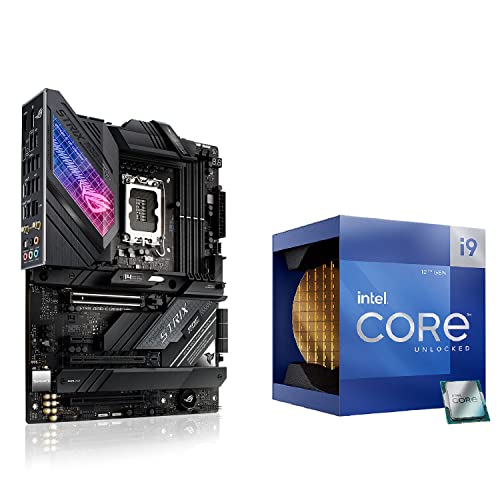 |
ASUS Z690-E Gaming WiFi | Includes unlocked 12900K | DDR5 memory support | PCIe 5.0 support | View on Amazon | Read Review |
| Value Workhorse |  |
MSI B760-P WiFi DDR4 | Affordable DDR4 platform | Wi-Fi 6E included | 2.5Gbps wired LAN | View on Amazon | Read Review |
| Premium Expansion |  |
ASUS Z790-E Gaming WiFi | Strong power delivery | Five M.2 slots | PCIe 5.0 support | View on Amazon | Read Review |
| Platform Mismatch |  |
ASUS B850-A Gaming WiFi | Wi-Fi 7 connectivity | Four M.2 slots | PCIe 5.0 support | View on Amazon | Read Review |
| Future Platform | ASUS Z890 Maximus Hero | Three PCIe 5.0 M.2 | Wi-Fi 7 connectivity | Heavy-duty power design | View on Amazon | Read Review | |
| Balanced DDR5 Pick | GIGABYTE Z790 AORUS Elite | Four M.2 slots | Wi-Fi 6E included | 2.5GbE wired networking | View on Amazon | Read Review | |
| Compact Budget Base | GIGABYTE H610M S2H DDR5 | Compact micro-ATX layout | DDR5 memory support | Multiple display outputs | View on Amazon | Read Review | |
| Barebones Compatibility | 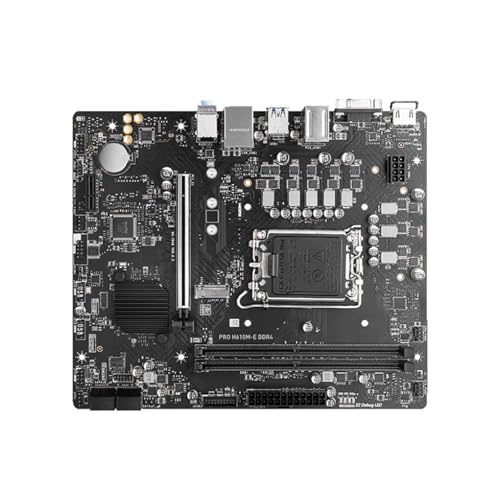 |
MSI H610M-E DDR4 | Compact micro-ATX design | DDR4 memory support | M.2 storage support | View on Amazon | Read Review |
| Storage Specialist |  |
ASUS Z690-E Gaming WiFi | Five M.2 slots | DDR5 memory support | PCIe 5.0 support | View on Amazon | Read Review |
More Details on Our Top Picks
-
Micro Center Z790 Gaming WiFi7
For a new Core i9-12900K build, this bundle puts the processor and a Z790 motherboard together, simplifying the parts list and reducing the chance of a mismatched socket. The LGA 1700 platform supports the 12900K, while the Z790 chipset is suited to enthusiast desktops and unlocked processors.
You still need to confirm the included motherboard’s memory standard, cooler requirements, and exact expansion layout before ordering. Because the listing provides few board-level details, the main limitation is reduced visibility into BIOS features, power delivery, and storage connectivity.
- Brand:Micro Center
- Socket:LGA 1700
- Chipset:Z790
- Form Factor:ATX
- Additional Feature:Wi-Fi 7
- Additional Feature:Desktop processor bundle
- Additional Feature:Unlocked Core i9 processor
-
ASUS Z690-E Gaming WiFi
Choose this combo if you want the 12900K and motherboard sourced together, with ASUS’s ROG Strix Z690-E serving as the central platform. Its DDR5 support, PCIe 5.0 capability, and high-end connectivity make it a strong fit for gaming, content creation, and fast storage.
The Z690 chipset may require a BIOS update depending on board inventory and firmware version, so confirm compatibility before assembly. It also uses DDR5 memory, which can raise the total build cost and limits reuse of older DDR4 modules.
- Brand:ASUS
- Socket:LGA 1700
- Chipset:Z690
- Form Factor:ATX
- Memory Type:DDR5
- Expansion:PCIe 5.0
- Additional Feature:Wi-Fi 6E
- Additional Feature:Five M.2 slots
- Additional Feature:Thunderbolt 4 support
-
MSI B760-P WiFi DDR4
The MSI PRO B760-P makes sense for a practical 12900K system that prioritizes useful connectivity over CPU overclocking. Its DDR4 support can help control memory costs, while Wi-Fi 6E, 2.5Gbps LAN, and multiple display outputs suit a capable everyday workstation or gaming PC.
The B760 chipset does not provide traditional CPU multiplier overclocking, so this board is better for running the 12900K at stock settings or with sensible power tuning. A strong CPU cooler remains necessary because the 12900K can draw substantial power under sustained workloads.
- Brand:MSI
- Socket:LGA 1700
- Chipset:B760
- Form Factor:ATX
- Memory Type:DDR4
- Expansion:PCIe 4.0
- Additional Feature:Two M.2 storage slots
- Additional Feature:USB 3.2 Gen2
- Additional Feature:HDMI and DisplayPort
-
ASUS Z790-E Gaming WiFi
Built for buyers who want plenty of headroom, the ROG Strix Z790-E combines the 12900K-compatible Z790 chipset with DDR5 memory and a generous storage layout. Its 18+1 power-stage design, PCIe 5.0 support, and five M.2 slots give demanding gaming and creation systems room to grow.
This is a feature-heavy ATX board, so it needs a case with adequate clearance and airflow. The DDR5-only design also means older DDR4 kits cannot be carried into the build, and many premium features may be unnecessary for a basic gaming setup.
- Brand:ASUS
- Socket:LGA 1700
- Chipset:Z790
- Form Factor:ATX
- Memory Type:DDR5
- Expansion:PCIe 5.0
- Additional Feature:Wi-Fi 6E
- Additional Feature:2.5Gbps LAN
- Additional Feature:Thunderbolt 4 support
-
ASUS B850-A Gaming WiFi
This ASUS ROG Strix board is a capable AM5 motherboard, with DDR5 support, Wi-Fi 7, four M.2 slots, and PCIe 5.0 connectivity. Those features suit a modern AMD build, especially one that needs fast storage and strong network performance.
It is not compatible with the Core i9-12900K because the board uses AMD’s AM5 socket rather than Intel’s LGA 1700 socket. For this roundup, that socket mismatch is decisive, despite the otherwise appealing feature set.
- Brand:ASUS
- Socket:AM5
- Chipset:B850
- Form Factor:ATX
- Memory Type:DDR5
- Expansion:PCIe 5.0
- Additional Feature:2.5Gbps LAN
- Additional Feature:USB 20Gbps Type-C
- Additional Feature:AI networking tools
-
ASUS Z890 Maximus Hero
The ROG Maximus Z890 Hero targets a newer Intel desktop platform, offering DDR5, Wi-Fi 7, three PCIe 5.0 M.2 slots, and extensive USB connectivity. Its 22+2+1+2 power design is aimed at high-end processors and demanding workstation workloads.
However, the board uses the LGA 1851 socket, so it cannot support the 12th-generation Core i9-12900K and should not be selected for this build. Consider it only for a separate, newer Intel system where its platform features can be used.
- Brand:ASUS
- Socket:LGA 1851
- Chipset:Z890
- Form Factor:ATX
- Memory Type:DDR5
- Expansion:PCIe 5.0
- Additional Feature:Thunderbolt 4
- Additional Feature:AI overclocking tools
- Additional Feature:USB Type-C connectivity
-
GIGABYTE Z790 AORUS Elite
GIGABYTE’s Z790 AORUS Elite AX is a well-rounded match for the unlocked 12900K, combining DDR5 support with a capable 16+1+2 power-phase design. Four M.2 slots, PCIe 5.0, Wi-Fi 6E, and 2.5GbE cover the needs of a fast gaming or productivity system without focusing on exotic extras.
Because it is a full-size ATX motherboard, check case compatibility and leave room around the CPU socket for a large air cooler or liquid-cooling hardware. The DDR5 requirement also prevents reuse of DDR4 memory from an older LGA 1700 build.
- Brand:GIGABYTE
- Socket:LGA 1700
- Chipset:Z790
- Form Factor:ATX
- Memory Type:DDR5
- Expansion:PCIe 5.0
- Additional Feature:Q-Flash BIOS update
- Additional Feature:EZ-Latch design
- Additional Feature:RGB Fusion support
-
GIGABYTE H610M S2H DDR5
For a smaller, lower-cost LGA 1700 system, this micro-ATX board offers basic compatibility with the 12900K platform, along with DDR5 memory and one M.2 slot. Its HDMI, DisplayPort, and D-Sub outputs are useful for systems that rely on integrated graphics.
The H610 chipset is a basic platform, and the limited expansion, single M.2 slot, and 1GbE LAN make it a poor match for a fully loaded 12900K workstation. It can serve a simple build, but the processor’s performance potential deserves stronger power delivery and richer connectivity.
- Brand:GIGABYTE
- Socket:LGA 1700
- Chipset:H610
- Form Factor:Micro-ATX
- Memory Type:DDR5
- Expansion:PCIe 4.0
- Additional Feature:One M.2 slot
- Additional Feature:USB-C port
- Additional Feature:Dual DisplayPort outputs
-
MSI H610M-E DDR4
This H610 micro-ATX board is aimed at a minimal LGA 1700 build, with DDR4 memory, an M.2 slot, and support listed for the 12900K. Its smaller footprint can work well in a compact case, especially when storage and add-in cards are limited.
The concern is the combination of a high-power Core i9 and an entry-level H610 design. Expect limited expansion and reduced power-delivery headroom compared with Z690, Z790, or stronger B760 boards, and verify BIOS support carefully because the listing appears to come from a lesser-known source.
- Brand:MSI
- Socket:LGA 1700
- Chipset:H610
- Form Factor:Micro-ATX
- Memory Type:DDR4
- Expansion:M.2
- Additional Feature:USB 3.0 support
- Additional Feature:LGA 1700 compatibility
- Additional Feature:Entry-level system layout
-
ASUS Z690-E Gaming WiFi
The ASUS ROG Strix Z690-E remains a strong choice for a 12900K gaming build, particularly if you want DDR5 memory, PCIe 5.0, and extensive high-speed storage. Five M.2 slots, a bundled ROG Hyper M.2 card, and Thunderbolt 4 support give this board unusual flexibility for games, media files, and creative applications.
As an older Z690 design, it may need a compatible BIOS version for the processor, depending on when the board was manufactured. It also uses DDR5 rather than DDR4, so plan the memory purchase around the motherboard instead of assuming an existing kit will work.
- Brand:ASUS
- Socket:LGA 1700
- Chipset:Z690
- Form Factor:ATX
- Memory Type:DDR5
- Expansion:PCIe 5.0
- Additional Feature:Wi-Fi 6E
- Additional Feature:ROG Hyper M.2 card
- Additional Feature:Thunderbolt 4 support
Frequently Asked Questions
Does the Core i9-12900K work with Z690 and Z790 motherboards?
Yes. The 12900K uses the LGA1700 socket and works with Z690 and Z790 motherboards, provided the BIOS supports 12th generation Intel processors. Most compatible boards do, but checking the CPU support list is still a wise final step. Z790 models generally offer newer firmware, broader DDR5 support, and more high-speed connectivity, while Z690 boards can deliver similar CPU performance at a lower price. Choose based on the features you need, not the chipset number alone.
Is DDR5 worth choosing over DDR4 for a 12900K build?
DDR5 is the better choice if you want higher memory bandwidth, plan to keep the system for several years, or use applications that benefit from faster memory. It also gives you access to newer memory kits as platform support develops. DDR4 remains a sensible value option, especially when you already own a good 32GB or 64GB kit. Remember that DDR4 and DDR5 cannot be mixed, so the motherboard and memory must use the same standard.
Can a B660 or B760 motherboard handle the 12900K?
Yes, a suitable B660 or B760 board can run the 12900K at stock settings, but it does not provide traditional CPU multiplier overclocking. Choose a model with substantial VRM heatsinks and adequate power delivery, not the smallest budget board available. A Z690 or Z790 board is the better fit if you want CPU overclocking, higher power limits, or more enthusiast-oriented tuning controls. The 12900K rewards strong cooling and power delivery, even when you leave its multiplier untouched.
What power supply and cooling does a 12900K motherboard need?
The motherboard should have a properly connected 8-pin EPS power cable, with a second EPS connector preferred on higher-end boards. For the whole system, a quality 750W power supply is a practical starting point for one modern graphics card, although a more demanding GPU may require 850W or more. Use a high-end dual-tower air cooler or a 240mm or larger liquid cooler, along with a case that has good front-to-back airflow. The 12900K can run hot under all-core workloads, so motherboard selection and CPU cooling should be planned together.
Does every Z690 or Z790 motherboard support PCIe 5.0?
No. Many boards provide a PCIe 5.0 graphics slot, but M.2 support varies, and some models use PCIe 4.0 for all storage sockets. Read the slot layout carefully if next-generation graphics or storage is part of your plan. Also check for lane sharing, because using a particular M.2 socket may reduce graphics bandwidth or disable other connectors. For most current gaming builds, a PCIe 4.0 NVMe drive is already fast, so PCIe 5.0 should be treated as a useful option rather than a requirement.


