

A common mistake is treating every AM5 motherboard as interchangeable simply because it supports the same processor socket. The right comparison needs a closer look at chipset differences, board layout, and long-term upgrade room.
This guide compares the best motherboards for ryzen 7 7700x, from practical B650 options to newer B850 and X870 platforms. Keep reading to see which specifications deserve your attention.
Key Takeaways
- Choose a B650 board for a Ryzen 7 7700X build when you want capable features without paying for newer platform extras.
- Consider B850 or X870 if PCIe 5.0, newer connectivity, and future Ryzen compatibility matter to your build plan.
- Match the motherboard’s form factor to your case before comparing features, since ATX and microATX boards require different space.
- Look for at least two M.2 slots and DDR5 support that matches your preferred memory capacity and speed.
- Prioritize 2.5GbE and Wi-Fi support based on your network setup, not simply the highest wireless standard in the product title.
| Compact Value Pick | Gigabyte B650M Ryzen Bundle | Compact micro-ATX design | Built-in wireless networking | DDR5-ready AM5 platform | View on Amazon | Read Review | |
| New-Platform Starter |  |
Gigabyte B850 Gaming Bundle | Newer B850 platform | Wireless networking included | Processor bundled together | View on Amazon | Read Review |
| MSI Gaming Foundation |  |
MSI B850 Gaming Bundle | B850 chipset platform | Wi-Fi built into board | Convenient CPU and board bundle | View on Amazon | Read Review |
| Full-Size Expansion |  |
Gigabyte B650 Gaming X | Full-size ATX layout | Wi-Fi 6E included | Fast USB-C connectivity | View on Amazon | Read Review |
| Clean White Build | 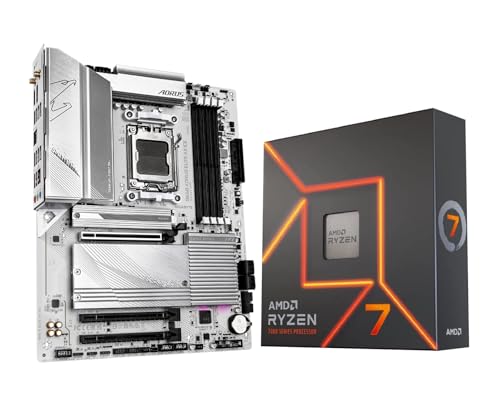 |
Gigabyte B650 Aorus ICE | White-themed motherboard design | ATX expansion layout | Wireless networking included | View on Amazon | Read Review |
| Future-Ready Connectivity |  |
Gigabyte B850 Aorus Elite | PCIe 5.0 support | Three M.2 slots | Wi-Fi 7 networking | View on Amazon | Read Review |
| Feature-Rich Gamer |  |
ASUS B650-A Gaming WiFi | Three M.2 storage slots | Wi-Fi 6E included | 2.5GbE wired networking | View on Amazon | Read Review |
| Balanced ATX Choice |  |
Gigabyte B650 Aorus Elite | Full-size ATX format | DDR5 memory support | Wireless connectivity onboard | View on Amazon | Read Review |
| Premium White Platform |  |
Gigabyte X870 Aorus ICE | Four M.2 storage slots | USB4 connectivity | Wi-Fi 7 support | View on Amazon | Read Review |
| Durable Upgrade Base |  |
ASUS TUF B850-Plus WiFi | Newer B850 chipset | Full-size ATX design | Wireless networking included | View on Amazon | Read Review |
More Details on Our Top Picks
-
Gigabyte B650M Ryzen Bundle
Choose this bundle if you want a compact AM5 build centered on the Ryzen 7 7700X. The GIGABYTE B650M AORUS Elite AX brings DDR5 support, built-in Wi-Fi, and a smaller micro-ATX footprint that works well in space-conscious cases.
You also get a practical starting point for gaming, productivity, and general desktop use without piecing together the processor and motherboard separately. The main limitation is expansion room, since micro-ATX boards generally offer fewer slots and headers than full-size ATX models.
- Chipset:AMD B650
- Socket:AM5
- Form Factor:Micro-ATX
- Memory:DDR5
- Wi-Fi:Built-in Wi-Fi
- Additional Feature:Ryzen 7 7700X included
- Additional Feature:PCIe expansion support
- Additional Feature:Integrated rear I/O
-
Gigabyte B850 Gaming Bundle
This pairing suits a builder who wants the Ryzen 7 7700X with a newer B850 motherboard platform. The GIGABYTE B850 Gaming WiFi board provides AM5 compatibility, DDR5 support, and onboard wireless connectivity for a clean first build.
Its newer chipset gives you a sensible foundation for adding storage, graphics, and modern peripherals over time. Still, the product listing provides limited board-level detail, so confirm the exact M.2 layout, rear USB selection, and wireless standard before ordering.
- Chipset:AMD B850
- Socket:AM5
- Memory:DDR5
- Wi-Fi:Built-in Wi-Fi
- Additional Feature:Ryzen 7 7700X included
- Additional Feature:Modern AM5 support
- Additional Feature:Gaming-focused motherboard design
-
MSI B850 Gaming Bundle
Consider this bundle if you prefer MSI’s gaming-oriented motherboard layout and want the 7700X included from the start. The B850 Gaming Plus WiFi board combines the current AM5 platform with DDR5 memory and integrated wireless networking.
That combination leaves room for a strong graphics card, fast storage, and future AM5 upgrades, depending on the exact board revision. The limitation is a lack of detailed listing information, so check the manufacturer’s specifications for storage slots, USB connectivity, and expansion details.
- Chipset:AMD B850
- Socket:AM5
- Memory:DDR5
- Wi-Fi:Built-in Wi-Fi
- Additional Feature:Ryzen 7 7700X included
- Additional Feature:Gaming-oriented BIOS features
- Additional Feature:AM5 upgrade compatibility
-
Gigabyte B650 Gaming X
For a traditional tower PC, this bundle offers a strong balance of full-size ATX expansion and practical connectivity. The GIGABYTE B650 Gaming X AX V2 supports DDR5, Wi-Fi 6E, and USB 3.2 Gen 2×2 Type-C, giving you useful options for fast external storage and modern accessories.
The board’s larger layout is better suited to multi-drive builds and larger graphics cards than a compact motherboard. Its honest drawback is that the B650 platform is an older option than B850 or X870, so it may provide fewer newer-generation features out of the box.
- Chipset:AMD B650
- Socket:AM5
- Form Factor:ATX
- Memory:DDR5
- Wi-Fi:Wi-Fi 6E
- Additional Feature:USB 3.2 Gen 2×2 Type-C
- Additional Feature:Ryzen 7 7700X included
- Additional Feature:PCIe graphics support
-
Gigabyte B650 Aorus ICE
Pick this version for a white or light-colored PC build that still needs the Ryzen 7 7700X’s strong eight-core performance. The B650 AORUS Elite AX ICE pairs the AM5 socket with DDR5 memory, onboard Wi-Fi, and a full-size board layout suitable for gaming systems.
The ICE finish can help create a coordinated build without sacrificing the core features expected from a modern desktop platform. You are still working with B650, however, so newer B850 and X870 boards may offer a broader selection of current connectivity features.
- Chipset:AMD B650
- Socket:AM5
- Form Factor:ATX
- Memory:DDR5
- Wi-Fi:Built-in Wi-Fi
- Additional Feature:Ryzen 7 7700X included
- Additional Feature:AORUS cooling design
- Additional Feature:PCIe graphics support
-
Gigabyte B850 Aorus Elite
This motherboard makes sense if you already own a compatible AM5 processor or want to pair the board with the 7700X separately. Its B850 chipset, PCIe 5.0 support, three M.2 slots, and Wi-Fi 7 give you a modern base for fast storage and next-generation networking.
The 14+2+2 power phase design is well suited to a performance desktop, while 2.5GbE LAN adds useful wired-networking headroom. The limitation is simple: this is a motherboard-only option, so the processor, cooler, and other core components must be sourced separately.
- Chipset:AMD B850
- Socket:AM5
- Form Factor:ATX
- Memory:DDR5
- M.2 Slots:3
- Wi-Fi:Wi-Fi 7
- Additional Feature:14+2+2 power phase design
- Additional Feature:2.5GbE LAN
- Additional Feature:EZ-Latch hardware
-
ASUS B650-A Gaming WiFi
This ASUS bundle targets gamers who want a feature-rich ATX board with a distinctive light-colored design. The ROG Strix B650-A includes three M.2 slots, Wi-Fi 6E, 2.5GbE LAN, and 12+2 power stages, making it a well-equipped match for the Ryzen 7 7700X.
You get plenty of room for graphics hardware and multiple NVMe drives, while DDR5 support keeps the platform current. Its PCIe 4.0 focus is the main limitation here, especially if you specifically want PCIe 5.0 expansion from the motherboard.
- Chipset:AMD B650
- Socket:AM5
- Form Factor:ATX
- Memory:DDR5
- M.2 Slots:3
- Wi-Fi:Wi-Fi 6E
- Additional Feature:12+2 power stages
- Additional Feature:PCIe 4.0 support
- Additional Feature:Ryzen 7 7700X included
-
Gigabyte B650 Aorus Elite
Choose this bundle for a balanced ATX configuration that pairs the 7700X with GIGABYTE’s AORUS Elite platform. It gives you DDR5 support, AM5 compatibility, and onboard Wi-Fi, creating a sensible foundation for gaming, content work, and everyday multitasking.
The full-size layout should appeal if you want more room for expansion than a micro-ATX board provides. The tradeoff is the same age-related constraint found on other B650 options, with fewer newer-platform features than the B850 and X870 alternatives listed here.
- Chipset:AMD B650
- Socket:AM5
- Form Factor:ATX
- Memory:DDR5
- Wi-Fi:Built-in Wi-Fi
- Additional Feature:Ryzen 7 7700X included
- Additional Feature:AORUS thermal design
- Additional Feature:PCIe graphics support
-
Gigabyte X870 Aorus ICE
This is the strongest fit for a high-end white AM5 build that needs current connectivity rather than the basics. The X870 AORUS Elite WIFI7 ICE includes PCIe 5.0, four M.2 slots, USB4, Wi-Fi 7, and 2.5GbE LAN, giving you substantial room for fast storage and modern peripherals.
Its ATX format also leaves space for larger cooling and graphics setups, while the five-year warranty adds useful long-term reassurance. The main catch is that the board is sold without a processor, and its higher-end feature set may be unnecessary for a straightforward 7700X gaming build.
- Chipset:AMD X870
- Socket:AM5
- Form Factor:ATX
- Memory:DDR5
- M.2 Slots:4
- Wi-Fi:Wi-Fi 7
- Additional Feature:PCIe 5.0 support
- Additional Feature:2.5GbE LAN
- Additional Feature:Five-year warranty
-
ASUS TUF B850-Plus WiFi
This motherboard suits a builder who wants the TUF Gaming design and a newer B850 base for the Ryzen 7 7700X. Its AM5 socket and DDR5 support keep it aligned with the current Ryzen desktop platform, while integrated Wi-Fi reduces cable clutter around the gaming desk.
The full-size board should work well for a conventional gaming or workstation tower, with room for a dedicated graphics card and additional components. Because the listing gives few detailed specifications, confirm the exact M.2 count, wireless generation, and rear I/O before finalizing a parts list.
- Chipset:AMD B850
- Socket:AM5
- Form Factor:ATX
- Memory:DDR5
- Wi-Fi:Built-in Wi-Fi
- Additional Feature:TUF Gaming construction
- Additional Feature:AM5 processor support
- Additional Feature:Ryzen 7 7700X compatible
Frequently Asked Questions
What chipset is best for the Ryzen 7 7700X?
B650 is the best fit for many buyers because it supports the 7700X, DDR5, CPU overclocking, and modern M.2 storage without the price of a high-end chipset. It also provides enough expansion for most single-GPU gaming systems. Choose B650E or X670E if PCIe 5.0 graphics support, additional storage, or extensive connectivity matters. X670 is useful for more lanes and ports, but it is not required for normal gaming performance.
Do I need a BIOS update for the Ryzen 7 7700X?
Many AM5 motherboards support the 7700X out of the box, but older inventory may ship with an earlier BIOS. Choose a board with BIOS Flashback, which lets you update firmware with a USB drive, often without installing a processor. Check the manufacturer’s CPU support list before purchase. A current BIOS can also improve DDR5 compatibility, boot times, system stability, and support for newer AM5 processors.
What RAM should I buy for the Ryzen 7 7700X?
A 32GB kit using two DDR5 modules is a sensible starting point, with DDR5-6000 often serving as a strong balance of speed and compatibility. Select a kit with AMD EXPO support so the rated settings are easier to apply in the firmware. Avoid filling all four memory slots unless you need the extra capacity. Two modules usually place less strain on the memory controller and make high-speed operation more straightforward.
Can a B650 motherboard handle the Ryzen 7 7700X?
Yes. A quality B650 board can handle the processor at stock settings and usually offers the core features most buyers need, including AM5 support, DDR5, multiple M.2 slots, and CPU overclocking controls. Pay attention to VRM heatsinks, firmware support, and rear I/O rather than assuming every B650 model is identical. The chipset sets the general feature level, but the board’s actual design determines the details.
What cooler and power supply does the Ryzen 7 7700X need?
The 7700X does not include a stock cooler, so plan for a capable tower air cooler or a 240mm-class liquid cooler. A quality dual-tower air cooler is often enough for normal use, provided the case has good airflow. For the power supply, a 650W to 750W unit is suitable for many systems with one mainstream graphics card. Higher-power graphics cards may require more capacity, and the supply should come from a reputable brand with the correct PCIe power connectors.


