


Threadripper motherboards once centered on a few workstation essentials, but today’s platforms pair massive core counts with faster memory, storage, networking, and expansion. That shift makes the board less like a passive foundation and more like the control room for a serious compute system.
You can compare the best threadripper motherboards across current and previous-generation platforms, with attention to compatibility, slot layout, connectivity, and upgrade room. Keep reading to separate headline specifications from the details that shape a build.
Key Takeaways
- Confirm the CPU socket and Threadripper generation before comparing features, because compatibility comes first.
- Prioritize ECC memory support and the correct DDR4 or DDR5 type for workstation stability and capacity.
- Count PCIe slots carefully, especially if your build needs multiple GPUs, capture cards, networking cards, or storage adapters.
- Match VRM power delivery to your processor’s core count and sustained workload, not just its peak boost speed.
- Check rear I/O, USB4, Wi-Fi, and wired network speeds so the board fits your peripherals and production workflow.
| Maximum Expansion |  |
ASUS WRX90E-SAGE SE Workstation | Seven PCIe 5.0 slots | ECC DDR5 support | 10Gb networking | View on Amazon | Read Review |
| Wireless Workstation |  |
ASUS TRX50-SAGE WIFI Workstation | Built-in Wi-Fi 7 | 36-phase power design | ECC DDR5 support | View on Amazon | Read Review |
| Tuned Creator |  |
ASUS TRX50-SAGE WIFI Overclocking | CPU and memory tuning | USB4 connectivity | 10Gb networking | View on Amazon | Read Review |
| Proven Platform |  |
ASUS WRX80E-SAGE SE WiFi II | Threadripper PRO platform | Built-in Wi-Fi | Workstation-focused layout | View on Amazon | Read Review |
| Wireless Creator |  |
Gigabyte TRX50 AERO D | USB4 Type-C | Wi-Fi 7 included | 10GbE networking | View on Amazon | Read Review |
| AI Compute Base | 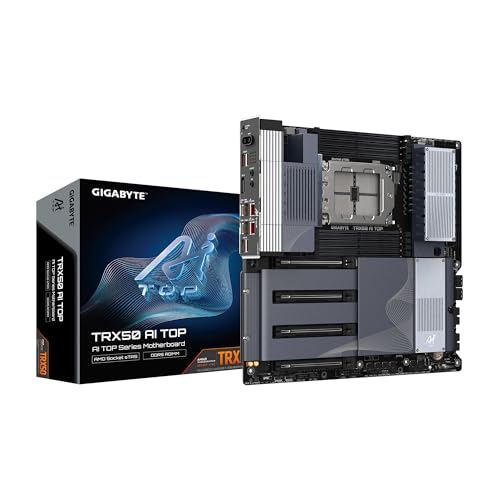 |
Gigabyte TRX50 AI TOP | AI-focused workstation design | USB4 Type-C | Wi-Fi 7 connectivity | View on Amazon | Read Review |
| Ready-Built Pairing |  |
Gigabyte TRX50 AERO D Bundle | Includes Threadripper 9960X | PCIe 5.0 platform | USB4 Type-C | View on Amazon | Read Review |
| Expandable Legacy |  |
ASUS WRX80E-SAGE SE WiFi | Seven PCIe x16 slots | Dual 10Gb LAN | Remote management support | View on Amazon | Read Review |
| Fast Storage Hub |  |
Gigabyte TRX50 AERO D Wi-Fi 7 | Four M.2 slots | Wi-Fi 7 included | 10GbE LAN | View on Amazon | Read Review |
| Practical Workstation |  |
ASRock WRX90 WS EVO | WRX90 workstation platform | Threadripper PRO focus | Professional system orientation | View on Amazon | Read Review |
More Details on Our Top Picks
-
ASUS WRX90E-SAGE SE Workstation
For demanding Threadripper PRO 7000 WX systems, this is the strongest fit in the roundup. The EEB board provides seven PCIe 5.0 x16 slots, giving you unusual room for multi-GPU setups, accelerator cards, and high-speed expansion hardware.
You also get ECC R-DIMM DDR5, a 32-phase power design, PCIe 5.0 M.2 storage, and both 10Gb and 2.5Gb networking. The honest catch is its EEB form factor, which requires a suitably large workstation chassis and careful build planning.
- Brand:ASUS
- CPU Socket:sTR5
- Form Factor:EEB
- Memory Type:ECC R-DIMM DDR5
- PCIe Version:PCIe 5.0
- Networking:10Gb and 2.5Gb LAN
- Additional Feature:Multi-GPU support
- Additional Feature:PCIe 5.0 M.2
- Additional Feature:32 power-stage design
-
ASUS TRX50-SAGE WIFI Workstation
Choose this board for a high-end TRX50 workstation that needs serious expansion and modern wireless connectivity. Its 36-phase power design, PCIe 5.0 support, and ECC R-DIMM DDR5 compatibility suit sustained CPU workloads, professional content creation, and compute-heavy applications.
Built-in Wi-Fi 7 reduces the need for an add-in card, while 10Gb and 2.5Gb LAN cover fast wired networks. The CEB form factor is smaller than EEB, but it still calls for a workstation-class case and a deliberate component layout.
- Brand:ASUS
- CPU Socket:sTR5
- Form Factor:CEB
- Memory Type:ECC R-DIMM DDR5
- PCIe Version:PCIe 5.0
- Networking:10Gb and 2.5Gb LAN
- Additional Feature:Multi-GPU support
- Additional Feature:PCIe 5.0 M.2
- Additional Feature:Threadripper PRO support
-
ASUS TRX50-SAGE WIFI Overclocking
This model targets builders who want Threadripper performance with room to tune the processor and memory. The TRX50 platform, 20-phase power design, and PCIe 5.0 x16 slot provide a capable foundation for rendering, simulation, video production, and other heavily threaded work.
USB4, 10Gb and 2.5Gb LAN, and multi-GPU support broaden its workstation credentials. Its main limitation is that the feature set is aimed at a specialized TR5 platform, so it makes little sense for a conventional desktop build.
- Brand:ASUS
- CPU Socket:sTR5
- Form Factor:CEB
- PCIe Version:PCIe 5.0
- Networking:10Gb and 2.5Gb LAN
- Additional Feature:20 power-stage design
- Additional Feature:Multi-GPU support
- Additional Feature:PCIe 5.0 M.2
-
ASUS WRX80E-SAGE SE WiFi II
For a Threadripper PRO WRX80 build, this ASUS board offers a workstation-focused platform with built-in Wi-Fi and an extended ATX layout. It is a sensible match for professional systems that prioritize platform stability, expansion, and a large CPU socket ecosystem over the newest interface standards.
The limitation is age: WRX80 predates the newer WRX90 and TRX50 platforms, so you should expect less current connectivity and older-generation expansion support. Its E-ATX size also narrows your case choices.
- Brand:ASUS
- CPU Socket:sWRX8
- Form Factor:Extended ATX
- Memory Type:ECC memory
- PCIe Version:PCIe 4.0
- Additional Feature:Wi-Fi connectivity
- Additional Feature:Multi-GPU support
- Additional Feature:Extended ATX design
-
Gigabyte TRX50 AERO D
The TRX50 AERO D is a strong choice for a creator workstation built around a current sTR5 processor. PCIe 5.0 expansion, PCIe 5.0 M.2 storage, USB4 Type-C, and 10GbE networking give you a fast foundation for large media files, demanding applications, and high-speed storage.
Built-in Wi-Fi 7 adds flexibility for modern networks, while the E-ATX layout leaves room for substantial hardware. That larger footprint is the tradeoff, and compatibility with your case should be confirmed before selecting other components.
- Brand:Gigabyte
- CPU Socket:sTR5
- Form Factor:E-ATX
- Memory Type:DDR5
- PCIe Version:PCIe 5.0
- Networking:Marvell 10GbE
- Additional Feature:PCIe 5.0 M.2
- Additional Feature:Multi-GPU support
- Additional Feature:Creator-focused design
-
Gigabyte TRX50 AI TOP
This board is aimed at AI and compute-focused systems that need a current Threadripper platform and plenty of high-speed connectivity. Its TRX50 chipset, PCIe 5.0 support, USB4 Type-C, and 10GbE LAN provide useful bandwidth for accelerators, fast storage, and networked project files.
Wi-Fi 7 keeps wireless networking current, while DDR5 supports the memory demands of modern workstation software. The E-ATX form factor is the main practical constraint, particularly for compact cases or builds with tight cable routing.
- Brand:Gigabyte
- CPU Socket:sTR5
- Form Factor:E-ATX
- Memory Type:DDR5
- PCIe Version:PCIe 5.0
- Networking:Marvell 10GbE
- Additional Feature:PCIe 5.0 M.2
- Additional Feature:High-speed expansion
- Additional Feature:USB4 Type-C
-
Gigabyte TRX50 AERO D Bundle
This listing combines a Ryzen Threadripper 9960X processor with the Gigabyte TRX50 AERO D motherboard, making it useful if you want the core CPU platform selected in one package. The board brings PCIe 5.0, USB4 Type-C, Wi-Fi 7, and Marvell 10GbE to a high-end workstation foundation.
The key limitation is flexibility: this is a CPU-and-motherboard bundle, not a motherboard-only purchase. You still need to account for compatible DDR5 memory, cooling, storage, graphics hardware, and a case that accepts the E-ATX board.
- Brand:Gigabyte
- CPU Socket:sTR5
- Form Factor:E-ATX
- Memory Type:DDR5
- PCIe Version:PCIe 5.0
- Networking:Marvell 10GbE
- Additional Feature:Wi-Fi 7 connectivity
- Additional Feature:PCIe 5.0 M.2
- Additional Feature:CPU and board bundle
-
ASUS WRX80E-SAGE SE WiFi
This ASUS board suits a WRX80 Threadripper PRO workstation where expansion capacity matters more than adopting the newest platform. Seven PCIe 4.0 x16 slots, three M.2 sockets, two U.2 ports, and dual 10Gb LAN create a generous base for graphics cards, storage, and professional networking.
It also includes ASMB9-iKVM, a remote-management feature valuable in business or lab environments. The limitation is the older DDR4 and PCIe 4.0 platform, so newer WRX90 systems offer a clearer path for the latest processors and peripherals.
- Brand:ASUS
- CPU Socket:sWRX8
- Form Factor:E-ATX
- Memory Type:Eight-channel DDR4 ECC
- PCIe Version:PCIe 4.0
- Networking:Dual 10Gb LAN
- Additional Feature:ASMB9-iKVM support
- Additional Feature:Three M.2 ports
- Additional Feature:Two U.2 ports
-
Gigabyte TRX50 AERO D Wi-Fi 7
The TRX50 AERO D makes sense for a Threadripper 9000 build that needs fast storage and current connectivity. Three PCIe 5.0 M.2 slots, one PCIe 4.0 M.2 slot, USB4, Wi-Fi 7, and 10GbE LAN give this board a well-rounded high-speed I/O package.
Its 16+8+4 digital VRM design and support for DDR5 speeds up to 7800MHz through overclocking add appeal for performance-focused builders. That memory figure is an overclocked ceiling, not a guaranteed setting, and the E-ATX design still demands a spacious case.
- Brand:Gigabyte
- CPU Socket:sTR5
- Form Factor:E-ATX
- Memory Type:DDR5
- PCIe Version:PCIe 5.0
- Networking:10GbE LAN
- Additional Feature:Three PCIe 5.0 M.2
- Additional Feature:USB4 connectivity
- Additional Feature:16+8+4 digital VRM
-
ASRock WRX90 WS EVO
The ASRock WRX90 WS EVO is aimed at builders assembling a Threadripper PRO workstation around the WRX90 platform. Its naming places it in the newer generation of professional AMD boards, making it a logical candidate for CPU-heavy applications such as rendering, engineering, simulation, and data work.
The available listing provides very little detail beyond the model name, so you should confirm memory support, slot layout, networking, and storage connections before buying. That sparse specification record is the main drawback, especially for a workstation where every expansion lane tends to have a job.
- Brand:ASRock
- CPU Socket:sTR5
- Additional Feature:WRX90 chipset platform
- Additional Feature:WS EVO model
- Additional Feature:Workstation motherboard design
Frequently Asked Questions
Can A TRX50 Motherboard Run Threadripper Pro?
Some TRX50 motherboards support both standard Threadripper 7000 and Threadripper Pro 7000 WX processors, but support varies by model and BIOS version. Check the manufacturer’s CPU support list before purchasing. A WRX90 board is generally the safer choice for a Pro system that needs eight-channel memory, maximum PCIe expansion, and the full workstation feature set. The processor, board, and memory must all be selected as one compatible platform.
Do Threadripper Motherboards Use Regular DDR5 Memory?
Most current Threadripper platforms require DDR5 ECC RDIMM memory rather than standard desktop DDR5 UDIMMs. RDIMMs include register circuitry that supports the high capacities and memory configurations expected in workstation systems. Do not mix RDIMM and UDIMM modules, and do not assume that ECC support alone makes a memory kit compatible. Use the motherboard’s qualified memory list when possible, especially for large-capacity kits.
Are Older Threadripper CPUs Compatible With New Boards?
Usually, no. Threadripper 3000 processors use sTRX4, while Threadripper 7000 and Threadripper Pro 7000 WX processors use sTR5, so the sockets and platforms are different. The same rule applies in reverse. An older sTRX4 motherboard cannot accept a current sTR5 processor, even if the board appears similar and uses the Threadripper name.
How Much Power Does A Threadripper System Need?
The correct power supply depends on the processor, graphics cards, storage devices, and expansion cards. A basic workstation may fit comfortably with a quality 1,000-watt PSU, while multi-GPU systems can require 1,300 watts or more. Check the CPU’s rated power, the graphics card recommendations, and the motherboard’s EPS connector requirements. Select a unit with sufficient continuous output, modern PCIe power connectors, and efficiency appropriate for long workloads.
Do I Need A WRX90 Motherboard?
Choose WRX90 if you need Threadripper Pro, eight-channel memory, a large number of PCIe lanes, extensive storage, or workstation management features. It is well suited to rendering, engineering simulation, virtualization, and other workloads that can use many devices at once. A TRX50 board is usually the better value for standard Threadripper 7000 systems, gaming plus content creation, and workstations with fewer expansion cards. Spending more on WRX90 will not automatically improve performance if the workload does not use its extra memory bandwidth and connectivity.


