


The case is open on the desk, its white interior catching the glow from a work light as you line up the motherboard standoffs. You pause before tightening the first screw, because this flat slab will shape the build around it, from the first boot to future upgrades.
This roundup brings together the best white motherboards for several modern PC builds, with a practical comparison ahead. Keep reading before the screwdriver gets involved.
Key Takeaways
- Confirm the CPU socket and chipset match your processor generation before purchase, especially across AM5 and LGA 1700 platforms.
- Choose ATX or micro-ATX based on your case, expansion-card needs, and available room for cooling hardware.
- Prioritize the M.2 count and PCIe version if you plan to install multiple fast NVMe drives.
- Select WiFi 7, WiFi 6E, or wired 2.5GbE based on your router, network speed, and preferred connection method.
- Check DDR5 support and memory limits, including advertised overclocking speeds, before pairing the board with a memory kit.
| Versatile White Foundation | 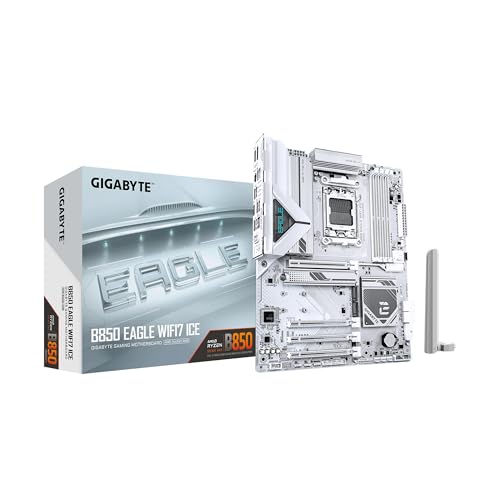 |
Gigabyte B850 Eagle WiFi7 | WiFi 7 connectivity | Three M.2 slots | PCIe 5.0 support | View on Amazon | Read Review |
| Connectivity Powerhouse |  |
ASUS ROG Strix B850-A WiFi | Four M.2 slots | 14+2+2 power stages | 20Gbps USB-C | View on Amazon | Read Review |
| Long-Term Upgrade Pick |  |
Gigabyte X870 AORUS Elite | Four M.2 slots | USB4 connectivity | Five-year warranty | View on Amazon | Read Review |
| Compact Performance Core |  |
Gigabyte B850M AORUS Elite | Micro-ATX footprint | 12+2+2 power phases | PCIe 5.0 support | View on Amazon | Read Review |
| Enthusiast Control Center |  |
ASUS ROG Strix X870-A | 16+2+2 power stages | Dynamic OC Switcher | USB4 connectivity | View on Amazon | Read Review |
| Practical Compact Builder |  |
Gigabyte B850M Eagle WiFi6E | Compact micro-ATX design | PCIe 5.0 support | WiFi 6E networking | View on Amazon | Read Review |
| Balanced Enthusiast Platform |  |
Gigabyte B850 AORUS Elite | Strong 14+2+2 power | Three M.2 slots | Five-year warranty | View on Amazon | Read Review |
| Intel White Classic |  |
ASUS Z790-AYW WiFi W | Intel Z790 chipset | PCIe 5.0 support | Three M.2 slots | View on Amazon | Read Review |
| White PCIe Specialist |  |
ASUS B650E MAX Gaming WiFi | White PCB design | Three M.2 slots | BIOS Flashback | View on Amazon | Read Review |
| Minimalist Micro-ATX Choice |  |
ASRock B650M-HDV M.2 | Micro-ATX form factor | Gen5 and Gen4 M.2 | 2.5G LAN | View on Amazon | Read Review |
More Details on Our Top Picks
-
Gigabyte B850 Eagle WiFi7
For an all-white AM5 gaming build, this Gigabyte board offers a practical balance of current connectivity and upgrade room. Support for Ryzen 9000, 8000, and 7000 processors, DDR5 memory, and PCIe 5.0 gives you a strong base for a new system.
You also get three M.2 slots, 2.5GbE LAN, USB-C, and WiFi 7, which keeps storage and networking options generous. The honest tradeoff is the 8+2+2 power phase, which is less substantial than the power delivery on higher-end AORUS and ROG models.
- Brand:Gigabyte
- Chipset:AMD B850
- Form Factor:ATX
- Socket:AM5
- Memory:DDR5
- Wireless:WiFi 7
- Additional Feature:2.5GbE LAN
- Additional Feature:EZ-Latch design
- Additional Feature:Three-year warranty
-
ASUS ROG Strix B850-A WiFi
Choose this ROG Strix model if you want stronger power delivery and a fuller feature set without moving to the X870 platform. Its 14+2+2 power stages, four M.2 slots, and DDR5 AEMP support suit performance-focused Ryzen systems.
Wireless networking comes through WiFi 7 with Q-Antenna, while 2.5GbE and 20Gbps USB-C add useful wired speed. The limitation is that the product listing does not identify USB4, so connectivity is impressive but not quite as expansive as premium X870 alternatives.
- Brand:ASUS
- Chipset:AMD B850
- Form Factor:ATX
- Socket:AM5
- Memory:DDR5
- Wireless:WiFi 7
- Additional Feature:Q-Antenna
- Additional Feature:AI Networking II
- Additional Feature:ASUS AI Advisor
-
Gigabyte X870 AORUS Elite
If you are building a high-end AM5 workstation or gaming PC, this AORUS Elite board brings the platform’s richer connectivity to a clean white design. Four M.2 slots, PCIe 5.0, and USB4 give you plenty of room for fast storage and modern peripherals.
WiFi 7 and 2.5GbE cover wireless and wired networking, while the five-year warranty adds useful ownership reassurance. Its main drawback is the ATX layout, which requires a standard mid-tower or larger case rather than a compact enclosure.
- Brand:Gigabyte
- Chipset:AMD X870
- Form Factor:ATX
- Socket:AM5
- Memory:DDR5
- Wireless:WiFi 7
- Additional Feature:2.5GbE LAN
- Additional Feature:EZ-Latch design
- Additional Feature:USB4 support
-
Gigabyte B850M AORUS Elite
A smaller case does not have to mean a stripped-down motherboard. This micro-ATX AORUS Elite supports Ryzen 9000, 8000, and 7000 processors, adds 12+2+2 power phases, and includes PCIe 5.0 for a capable compact build.
The two M.2 slots cover the needs of most gaming systems, and WiFi 6E plus 2.5GbE provide fast network options. The practical limitation is expansion space: micro-ATX leaves less room for add-in cards and storage than a full ATX board.
- Brand:Gigabyte
- Chipset:AMD B850
- Form Factor:Micro-ATX
- Socket:AM5
- Memory:DDR5
- Wireless:WiFi 6E
- Additional Feature:Two M.2 slots
- Additional Feature:2.5GbE LAN
- Additional Feature:EZ-Latch design
-
ASUS ROG Strix X870-A
For a feature-heavy Ryzen build, the ROG Strix X870-A brings enthusiast-focused tuning to a bright white platform. 16+2+2 power stages, Dynamic OC Switcher, and Core Flex are aimed at users who want more control over CPU performance and power behavior.
You also get four M.2 slots, PCIe 5.0, USB4, and WiFi 7, making this a strong fit for demanding gaming, creation, and storage-heavy systems. Its limitation is complexity: advanced features such as AI OCing and Core Flex offer value mainly if you plan to adjust and manage the system carefully.
- Brand:ASUS
- Chipset:AMD X870
- Form Factor:ATX
- Socket:AM5
- Memory:DDR5
- Wireless:WiFi 7
- Additional Feature:Core Flex tuning
- Additional Feature:Q-Release Slim
- Additional Feature:AI Networking
-
Gigabyte B850M Eagle WiFi6E
This Eagle model makes sense for a cost-conscious compact AM5 build that still needs current platform support. You get Ryzen 9000, 8000, and 7000 compatibility, DDR5, PCIe 5.0, and a micro-ATX layout suited to smaller cases.
WiFi 6E, 2.5GbE, USB-C, and two M.2 slots cover the essentials for a modern gaming PC. The 8+2+2 power phase is the clear compromise, offering less headroom than the AORUS Elite boards for demanding processors and aggressive tuning.
- Brand:Gigabyte
- Chipset:AMD B850
- Form Factor:Micro-ATX
- Socket:AM5
- Memory:DDR5
- Wireless:WiFi 6E
- Additional Feature:Two M.2 slots
- Additional Feature:2.5GbE LAN
- Additional Feature:EZ-Latch design
-
Gigabyte B850 AORUS Elite
Step up to this board if you want stronger VRM capacity without moving beyond the B850 chipset. The 14+2+2 power phase, three M.2 slots, and PCIe 5.0 make it well suited to a powerful Ryzen gaming system.
WiFi 7, 2.5GbE, and USB-C provide a well-rounded connection set, while the five-year warranty is a welcome extra. Because it remains an ATX motherboard, it needs more case room than the B850M options in this roundup.
- Brand:Gigabyte
- Chipset:AMD B850
- Form Factor:ATX
- Socket:AM5
- Memory:DDR5
- Wireless:WiFi 7
- Additional Feature:2.5GbE LAN
- Additional Feature:EZ-Latch design
- Additional Feature:USB-C connectivity
-
ASUS Z790-AYW WiFi W
Intel builders have a clear option here, with this Z790 ATX motherboard supporting LGA 1700 processors and DDR5 memory. PCIe 5.0, three M.2 slots, and 12+1 DrMOS power delivery create a sensible foundation for a modern Intel desktop.
WiFi 6, 2.5GbE, USB-C, and listed Thunderbolt and USB4 support give it a useful range of connections. The main limitation is platform age: LGA 1700 does not offer the same forward upgrade path as newer AM5 boards.
- Brand:ASUS
- Chipset:Intel Z790
- Form Factor:ATX
- Socket:LGA 1700
- Memory:DDR5
- Wireless:WiFi 6
- Additional Feature:2.5GbE LAN
- Additional Feature:Aura Sync lighting
- Additional Feature:USB4 support
-
ASUS B650E MAX Gaming WiFi
This ASUS board is a good match for an AM5 gaming build where graphics and storage bandwidth matter most. Its white PCB, PCIe 5.0, three M.2 slots, and DDR5 support give you a clean platform for current Ryzen processors.
WiFi 6E, 2.5GbE, HDMI, DisplayPort, and BIOS Flashback add practical value during setup and maintenance. The limitation is that the B650 platform offers fewer premium connectivity features than the X870 boards, particularly for users who need USB4-class expansion.
- Brand:ASUS
- Chipset:AMD B650
- Form Factor:ATX
- Socket:AM5
- Memory:DDR5
- Wireless:WiFi 6E
- Additional Feature:2.5GbE LAN
- Additional Feature:DisplayPort output
- Additional Feature:Aura Sync lighting
-
ASRock B650M-HDV M.2
Keep the build compact and focused with this white micro-ATX AM5 board from ASRock. It supports Ryzen 9000, 8000, and 7000 processors, DDR5 memory speeds up to 8200+ overclocked, and PCIe 5.0 for the primary graphics slot.
The dual M.2 arrangement includes one Gen5 and one Gen4 slot, while USB 3.2 Type-C and 2.5G LAN handle everyday connectivity. The tradeoff is a leaner feature set, with no onboard wireless networking listed and fewer expansion options than full-size ATX models.
- Brand:ASRock
- Chipset:AMD B650
- Form Factor:Micro-ATX
- Socket:AM5
- Memory:DDR5
- Additional Feature:PCIe 5.0 x16
- Additional Feature:USB 3.2 Type-C
- Additional Feature:8200+ memory support
Frequently Asked Questions
Are white motherboards compatible with any PC case?
A white motherboard works with a case only if the form factor matches, such as ATX, microATX, or Mini-ITX. The case must also provide compatible standoffs and enough clearance for the board, graphics card, CPU cooler, and cable connections. Check the case manual for motherboard support before ordering. Color is purely cosmetic, but physical fit is not forgiving.
Do white motherboards cost more than black motherboards?
Often, yes, because white models are commonly sold as premium or showcase products with upgraded heatsinks, lighting, Wi-Fi, or power delivery. The color alone does not improve performance, however, and a less expensive board may offer the same core capability. Compare the feature list, not just the finish. A good-value white board should provide the CPU support, expansion, storage, and connectivity your build requires.
Can I use DDR4 RAM with a white DDR5 motherboard?
No. DDR4 and DDR5 use different electrical standards, notch positions, and memory slots, so they cannot be substituted for one another. The motherboard specification and CPU platform determine which memory type you need. Buy the RAM as a matched kit, ideally using two modules for dual-channel performance. Also check the board’s memory support list if you plan to use especially high speeds.
Do white motherboards work with AMD and Intel processors?
A motherboard supports only the processor families designed for its CPU socket. An AMD AM5 board cannot run an Intel processor, and an Intel LGA1851 board cannot run an AMD Ryzen chip. Choose the processor first, then select a compatible socket and chipset. Confirm the exact CPU model on the manufacturer’s support page, since socket compatibility alone does not guarantee BIOS support.
Is built-in Wi-Fi worth paying more for?
Built-in Wi-Fi 6E or Wi-Fi 7 is useful if your PC sits far from the router, lacks a convenient Ethernet connection, or needs wireless networking without an add-in card. It also keeps the build cleaner by removing a separate adapter. Wired 2.5Gb Ethernet is usually preferable for gaming, large downloads, and reliable file transfers, provided your router and network support it. If you already have Ethernet nearby, paying extra for Wi-Fi may offer little practical benefit.


