


Not long ago, a premium motherboard mainly meant faster memory support and a larger feature list. Now, DDR5 platforms bring quicker data access, newer expansion standards, and far more room for high-speed storage.
That shift makes the best z690 ddr5 motherboards worth comparing carefully, especially alongside newer Z790 alternatives. The guide that follows separates the meaningful differences from the alphabet soup, so keep reading before choosing your foundation.
Key Takeaways
- Prioritize DDR5 speed support that matches your memory kit, because advertised overclocked speeds depend on the CPU and board layout.
- Choose a board with enough M.2 slots and suitable heatsinks if you plan to add several NVMe drives over time.
- Check the PCIe 5.0 layout carefully, since using one expansion slot can reduce lane availability for another device.
- Favor strong VRM power delivery and adequate heatsinks for high-core-count processors or sustained workloads.
- Confirm the rear I/O includes the USB, Wi-Fi, LAN, and display outputs your setup actually requires.
| Feature-Rich Enthusiast |  |
ASUS ROG Strix Z690-E WiFi 6E | Five M.2 slots | PCIe 5.0 support | WiFi 6E | View on Amazon | Read Review |
| Storage-Centric Performer |  |
Gigabyte Z690 AORUS Ultra DDR5 | Quad M.2 storage | PCIe 5.0 support | 2.5GbE networking | View on Amazon | Read Review |
| Newer Platform Pick | Gigabyte Z790 AORUS Elite AX | Supports three Intel generations | Four M.2 slots | WiFi 6E connectivity | View on Amazon | Read Review | |
| Clean Professional Build | 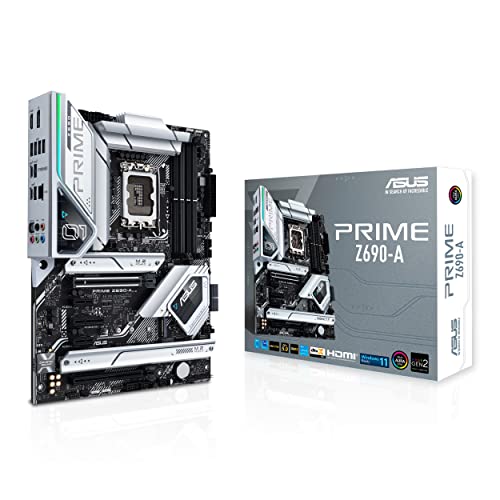 |
ASUS Prime Z690-A DDR5 | Four M.2 slots | 16+1 DrMOS design | Thunderbolt 4 support | View on Amazon | Read Review |
| Wireless Gaming Foundation |  |
MSI MPG Z690 Edge WiFi | WiFi 6E included | PCIe 5.0 support | 2.5G LAN | View on Amazon | Read Review |
| Balanced ROG Performer | 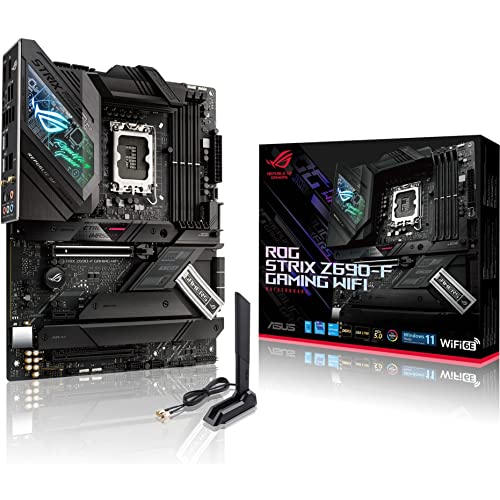 |
ASUS ROG Strix Z690-F WiFi 6E | 16+1 power stages | Four M.2 slots | Bluetooth 5.2 | View on Amazon | Read Review |
| Modern Connectivity Choice |  |
ASUS Z790-AYW WiFi W II | PCIe 5.0 support | USB4 connectivity | WiFi 6 networking | View on Amazon | Read Review |
| Practical Expansion Pick |  |
Gigabyte Z790 Eagle AX | Supports three Intel generations | WiFi 6E included | EZ-Latch design | View on Amazon | Read Review |
| Durable Gaming Mainstay |  |
ASUS TUF Gaming Z690-PLUS WiFi | Built-in WiFi | DDR5 memory support | USB 3.2 connectivity | View on Amazon | Read Review |
| Water-Cooling Specialist | 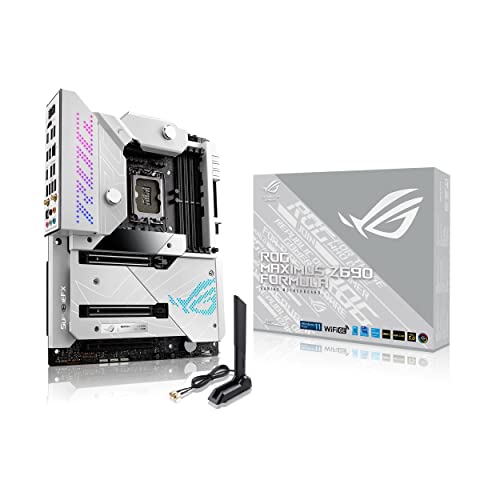 |
ASUS ROG Maximus Z690 Formula | Water-cooling support | WiFi 6E connectivity | Thunderbolt 4 | View on Amazon | Read Review |
More Details on Our Top Picks
-
ASUS ROG Strix Z690-E WiFi 6E
Choose this board for a high-end 12th Gen Intel build with several fast storage drives, modern connectivity, and room for future upgrades. Its PCIe 5.0 support, five M.2 slots, 2.5Gb LAN, and WiFi 6E give demanding gaming and workstation systems plenty of headroom.
The included ROG Hyper M.2 card expands storage flexibility, while Thunderbolt 4 and front-panel USB-C suit a polished desktop setup. The limitation is its premium feature load, which can be unnecessary if you only need one or two SSDs and basic connectivity.
- Brand:ASUS
- Chipset:Intel Z690
- Form Factor:ATX
- Memory Type:DDR5
- M.2 Slots:5
- Wireless:WiFi 6E
- Additional Feature:ROG Hyper M.2 card
- Additional Feature:Thunderbolt 4 support
- Additional Feature:2.5Gb Ethernet
-
Gigabyte Z690 AORUS Ultra DDR5
The AORUS Ultra fits builders who want a strong storage foundation without moving beyond the Z690 platform. Four M.2 slots, PCIe 5.0, WiFi 6, and 2.5GbE cover the essentials for a fast gaming system with multiple NVMe drives.
Its USB 3.2 Gen 2×2 Type-C port adds useful high-speed peripheral support, and the ATX layout leaves room for expansion cards. The main drawback is that WiFi 6E is absent, so nearby wireless congestion may matter more than it would with newer 6E boards.
- Brand:Gigabyte
- Chipset:Intel Z690
- Form Factor:ATX
- Memory Type:DDR5
- M.2 Slots:4
- Wireless:WiFi 6
- Additional Feature:USB-C 20Gbps support
- Additional Feature:2.5GbE LAN
- Additional Feature:PCIe 5.0 slot
-
Gigabyte Z790 AORUS Elite AX
Although it is not a Z690 model, this Z790 motherboard deserves attention if you are open to a newer chipset in the same LGA 1700 family. Support for 14th, 13th, and 12th Gen Intel processors, four M.2 slots, and WiFi 6E make it a flexible choice for a fresh build.
The 16+1+2 power phase design suits performance-focused CPUs, while Q-Flash and EZ-Latch simplify firmware updates and component installation. Its limitation is straightforward: it falls outside a strict Z690 shortlist, so buyers seeking chipset consistency should choose another board.
- Brand:Gigabyte
- Chipset:Intel Z790
- Form Factor:ATX
- Memory Type:DDR5
- M.2 Slots:4
- Wireless:WiFi 6E
- Additional Feature:16+1+2 power phase
- Additional Feature:Q-Flash firmware updates
- Additional Feature:EZ-Latch installation design
-
ASUS Prime Z690-A DDR5
Select the Prime Z690-A for a restrained ATX build that favors practical connectivity over aggressive gaming styling. Its 16+1 DrMOS power design, four M.2 slots, PCIe 5.0, and 2.5Gb LAN give a strong base for productivity and gaming alike.
Thunderbolt 4 support and a front-panel USB-C connector help it fit modern desk setups, while Aura Sync adds optional lighting control. There is no listed built-in wireless networking, so you will need Ethernet, a separate WiFi card, or another adapter for wireless access.
- Brand:ASUS
- Chipset:Intel Z690
- Form Factor:ATX
- Memory Type:DDR5
- M.2 Slots:4
- Wireless:Not listed
- Additional Feature:2.5Gb Intel LAN
- Additional Feature:Front-panel USB-C
- Additional Feature:Aura Sync lighting
-
MSI MPG Z690 Edge WiFi
MSI’s MPG Z690 Edge is aimed at gamers who want built-in WiFi 6E, DDR5 support, and a straightforward path to a 12th Gen Intel system. PCIe 5.0, 2.5G LAN, and M.2 support cover the core performance requirements without straying from a familiar ATX layout.
The combination of wired and wireless networking makes it practical for rooms where cable routing is inconvenient, while the LGA 1700 socket supports the intended processor generation. The limitation is that the available listing does not specify the number of M.2 slots, making storage planning less precise.
- Brand:MSI
- Chipset:Intel Z690
- Form Factor:ATX
- Memory Type:DDR5
- Wireless:WiFi 6E
- Additional Feature:M.2 storage support
- Additional Feature:2.5G Ethernet
- Additional Feature:LGA 1700 socket
-
ASUS ROG Strix Z690-F WiFi 6E
This ROG Strix model suits a high-performance gaming PC that needs strong power delivery and modern expansion without the larger feature list of the top-ranked Z690-E. Its 16+1 power stages, four M.2 slots, PCIe 5.0, and 2.5Gb LAN form a well-rounded platform for demanding components.
WiFi 6E and Bluetooth 5.2 improve wireless flexibility, while Thunderbolt 4 and front-panel USB-C support newer peripherals. The honest tradeoff is that it offers less storage expansion than the Z690-E, with four listed M.2 slots instead of five.
- Brand:ASUS
- Chipset:Intel Z690
- Form Factor:ATX
- Memory Type:DDR5
- M.2 Slots:4
- Wireless:WiFi 6E
- Additional Feature:Thunderbolt 4 support
- Additional Feature:2.5Gb LAN
- Additional Feature:Front-panel USB-C
-
ASUS Z790-AYW WiFi W II
This is another Z790 rather than Z690 option, built for buyers who want a newer LGA 1700 platform and a clean collection of current connections. Three M.2 slots, PCIe 5.0, DDR5, WiFi 6, and 2.5Gb LAN provide a sensible foundation for a mainstream performance build.
Its USB 10Gbps Type-C ports, Thunderbolt, and USB4 support are useful for fast external storage and docking hardware. The limitation is the three-slot M.2 layout, which gives less internal storage flexibility than several higher-ranked alternatives.
- Brand:ASUS
- Chipset:Intel Z790
- Form Factor:ATX
- Memory Type:DDR5
- M.2 Slots:3
- Wireless:WiFi 6
- Additional Feature:Thunderbolt support
- Additional Feature:USB4 connectivity
- Additional Feature:2.5Gb LAN
-
Gigabyte Z790 Eagle AX
The Z790 Eagle AX targets builders who want broad Intel processor support and the major features needed for a capable gaming or productivity system. Its 12+1+1 power phase, three M.2 slots, PCIe 5.0, and WiFi 6E keep the specification balanced without chasing every premium extra.
Q-Flash helps with firmware maintenance, while EZ-Latch makes component installation less fiddly. As a Z790 board, it does not match a strict Z690-only requirement, and its three M.2 slots provide less storage capacity than the top Z690 choices.
- Brand:Gigabyte
- Chipset:Intel Z790
- Form Factor:ATX
- Memory Type:DDR5
- M.2 Slots:3
- Wireless:WiFi 6E
- Additional Feature:12+1+1 power phase
- Additional Feature:Q-Flash support
- Additional Feature:2.5GbE networking
-
ASUS TUF Gaming Z690-PLUS WiFi
Choose the TUF Gaming Z690-PLUS for a straightforward DDR5 gaming build with integrated WiFi and the familiar ATX form factor. Its support for LGA 1700 processors, SATA 3, USB 3.2, and M.2 storage covers the everyday needs of a modern desktop.
WiFi and Bluetooth keep wireless accessories and networking convenient, while the TUF Gaming line is positioned for practical, long-term system building. The limitation is that the listing does not identify PCIe 5.0, LAN speed, or M.2 count, so expansion planning requires closer board-level verification.
- Brand:ASUS
- Chipset:Intel Z690
- Form Factor:ATX
- Memory Type:DDR5
- Wireless:WiFi and Bluetooth
- Additional Feature:SATA 3 support
- Additional Feature:M.2 storage support
- Additional Feature:LGA 1700 socket
-
ASUS ROG Maximus Z690 Formula
The ROG Maximus Z690 Formula is built for an enthusiast workstation or gaming rig where premium cooling integration and connectivity matter. Water-cooling support, PCIe 5.0, DDR5, WiFi 6E, and Thunderbolt 4 create a platform suited to ambitious custom builds.
Its feature set is especially appealing if you plan a custom liquid-cooling loop and need fast external device support. That focus is also the main limitation, because water-cooling hardware adds cost, planning, and maintenance that a conventional air-cooled system can avoid.
- Brand:ASUS
- Chipset:Intel Z690
- Form Factor:ATX
- Memory Type:DDR5
- Wireless:WiFi 6E
- Additional Feature:PCIe 5.0 support
- Additional Feature:Thunderbolt 4 connectivity
- Additional Feature:Custom loop support
Frequently Asked Questions
Can A Z690 DDR5 Motherboard Run 13th Or 14th Gen Intel CPUs?
Usually, yes, but the board may require a BIOS update. Check the manufacturer’s CPU support list and BIOS notes for the exact model and revision. A board with BIOS Flashback is the safer choice if the system may arrive with older firmware. Without that feature, updating the BIOS could require an older compatible processor.
Is DDR5 Worth Choosing Over DDR4 On Z690?
Choose DDR5 if you want a newer platform, higher memory bandwidth, and more upgrade flexibility. The practical gaming difference varies by title, while productivity applications can benefit more clearly from faster memory. Do not mix the two standards, and remember that DDR4 and DDR5 motherboards are separate products. Select the memory type first, then buy a board that matches it.
How Much RAM Should A Z690 Gaming PC Have?
32GB, installed as 2 x 16GB, is a sensible target for modern gaming, streaming, and everyday applications. It leaves room for background software without pushing most users into unnecessary expense. Choose 64GB for video editing, large creative projects, virtual machines, or heavy multitasking. Two modules are generally easier to configure at high speeds than four, especially with demanding DDR5 kits.
Do All Z690 Motherboards Support PCIe 5.0 SSDs?
No. Many Z690 boards provide PCIe 5.0 for the graphics slot, while their M.2 connectors use PCIe 4.0. Some models include a PCIe 5.0 M.2 slot, but that feature is not universal. Read the storage section of the specifications carefully, and check whether a PCIe 5.0 M.2 slot shares lanes with the graphics card. On some boards, using it can reduce the main slot to PCIe 5.0 x8.
Is Wi-Fi Necessary On A Z690 Motherboard?
Not if you plan to use Ethernet. A wired connection remains the straightforward choice for stable online gaming, large downloads, and low-latency work. Integrated Wi-Fi 6E or Wi-Fi 7 is useful for rooms where running a cable is inconvenient. It usually costs less than adding a separate wireless card later, and it keeps an expansion slot available for another device.


