

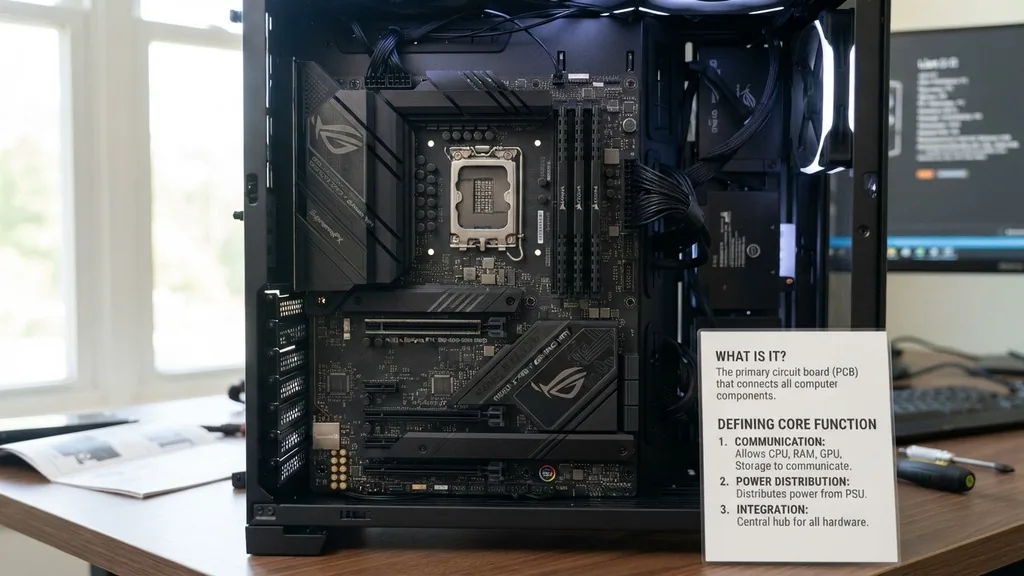
The motherboard acts as the central nervous system of any modern computer. It is the primary printed circuit board that connects every single piece of hardware within your machine. Without this complex foundation, your CPU, memory, and storage drives would have no way to communicate or receive power.
Think of it as the physical landscape where all electronic traffic is routed, ensuring that data flows correctly between the brain of the system and its various peripherals. Whether you are building a high-end workstation or just curious about why your desktop boots up, understanding this board is the first step toward mastering PC architecture.
Defining the Core Function of the Motherboard
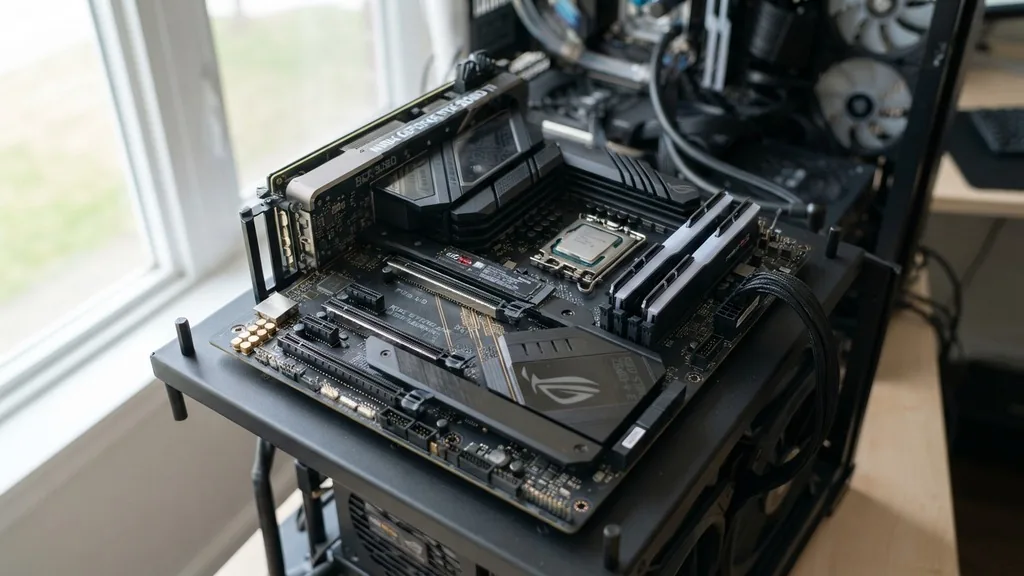
At its most basic level, a motherboard is a large, multi-layered board that houses the essential components of a system. Its primary role is to provide the electrical pathways, known as buses, that allow different parts to talk to one another.
When you press the power button, the motherboard initiates a sequence that wakes the processor, initializes the RAM, and eventually loads your operating system. It does not just hold these parts; it actively manages them by distributing voltage and coordinating signals at lightning-fast speeds.
Every motherboard is built around a specific chipset. This collection of microchips determines which processors are compatible with the board and how fast the internal communication can occur.
The chipset acts as a bridge, linking the CPU to the graphics card, the storage drives, and the input/output ports like USB or Ethernet. If you have ever wondered why some boards cost significantly more than others, it is usually because the higher-end models feature more advanced chipsets that support faster data transfer rates, better overclocking capabilities, and more robust connectivity options for high-performance hardware.
The Anatomy of a System Board
To understand the motherboard, you must look at the individual components soldered onto its surface. While the layout varies depending on the form factor—such as ATX, Micro-ATX, or Mini-ITX—the fundamental building blocks remain consistent across almost every computer. These include the CPU socket, memory slots, expansion slots, and various power connectors.
The CPU socket is the most prominent feature, serving as the dedicated landing zone for the processor. Surrounding this are the power delivery modules, often covered by metal heatsinks to keep them cool under load. Near these, you will find the RAM slots, which allow for the installation of volatile memory modules.
Further down the board, you will see PCI Express (PCIe) slots. These are specifically designed for add-in cards, most notably dedicated graphics cards, network interface controllers, and high-speed storage expansion cards. Every one of these elements relies on the motherboard’s integrated circuitry to receive clean, consistent power from the power supply unit.
How Data Moves Across Your Hardware
The movement of data within a computer is a marvel of engineering. When you execute a command, electrical signals travel through copper traces embedded deep within the layers of the motherboard. These traces function like a complex highway system, ensuring that information from your storage drive reaches the processor without interference or delay.
Modern boards utilize high-speed buses to handle this traffic. For instance, the interface connecting the CPU to the RAM is designed for near-instantaneous access, as the processor needs to pull instructions from memory millions of times per second. Simultaneously, the board manages slower, steady traffic for peripherals like your keyboard, mouse, and printer.
By segmenting these communication channels, the board prevents data bottlenecks that would otherwise cripple system performance. This routing is managed by the motherboard’s firmware, known as the UEFI or BIOS, which provides the base-level instructions needed to wake up the hardware before the operating system takes over.
Understanding Form Factors and Compatibility
Not all motherboards are created equal, and size is a massive factor in how they are utilized. The physical dimensions and the layout of the mounting holes are standardized, which is why you can buy a case from one manufacturer and a board from another and expect them to fit.
The most common standard is ATX, which offers the most slots and expansion capabilities. However, for smaller builds, you might opt for a Micro-ATX or Mini-ITX board.
Compatibility goes beyond just fitting inside a case. You must ensure the board’s socket matches your chosen processor. If you select an Intel chip, you need a board with the corresponding LGA socket; if you choose an AMD chip, you need an AM4 or AM5 socket, depending on the generation.
This is a critical point for anyone planning a build. Always check the manufacturer’s website or the official hardware specifications to ensure your parts will work together harmoniously. Failing to verify this can lead to a system that refuses to boot or, worse, damaged pins.
The Role of Power Distribution and Regulation
A motherboard is responsible for converting the raw electricity coming from your power supply into the precise voltages required by your sensitive components. This is handled by the Voltage Regulator Module (VRM).
The VRM takes the 12V current from the power supply and steps it down to the lower voltages, often less than 1.5V, that modern processors require. A higher-quality VRM is essential for stability, especially if you intend to push your CPU to its limits through overclocking.
When the VRM is inefficient, it generates excessive heat, which can cause the system to throttle or shut down entirely to protect the hardware. This is why you often see large, finned metal blocks covering the area around the processor socket—these are heatsinks designed to dissipate that heat. Without this cooling, the motherboard would quickly degrade under the thermal stress of high-performance computing.
| Component | Primary Function | Connection Type |
|---|---|---|
| CPU Socket | Hosts the processor | LGA or PGA |
| RAM Slots | Holds system memory | DIMM or SO-DIMM |
| PCIe Slots | Expansion for GPUs and storage | PCIe Gen 3/4/5 |
| SATA Ports | Connects hard drives and SSDs | SATA Cable |
| VRM | Regulates electrical voltage | Integrated Circuits |
Why Expansion Slots Matter for Future-Proofing
One of the best features of a desktop computer is the ability to upgrade individual parts over time. The motherboard provides the necessary slots to facilitate this longevity.
If your graphics performance is lagging, you can swap out your old graphics card for a newer one by plugging it into the primary PCIe x16 slot. If you need more storage, you can add an M.2 NVMe drive directly onto the board.
This modularity is why building a PC is often more cost-effective in the long run than buying a locked-down laptop or console. You are not forced to replace the entire system just because one piece of hardware becomes obsolete.
By investing in a high-quality motherboard with plenty of expansion options, you ensure that you can keep your machine relevant for years to come. Simply keep an eye on the PCIe lane count, as this determines how many high-speed devices can run at full capacity simultaneously without slowing each other down.
Addressing Common Topical Gaps
Many users struggle to understand the difference between the chipset and the motherboard itself. To clarify: the motherboard is the physical board, while the chipset is the logic controller embedded within it. Another frequent confusion involves the integrated components.
Many boards now come with built-in audio and networking features, meaning you do not necessarily need to purchase a separate sound card or network card anymore. These integrated solutions are highly efficient and save both space and money.
Furthermore, people often ask if the motherboard affects gaming performance. The answer is nuanced. While the board does not directly calculate frames per second like a GPU, it provides the stable foundation that allows your other parts to perform their best.
A low-quality board might limit the speed of your RAM or cause your processor to run hotter due to poor power delivery, which indirectly lowers your overall gaming experience. Therefore, while it isn’t the primary driver of performance, it is the bedrock that supports it.
- Form Factor: Ensures the board fits in your case (ATX, ITX, etc.).
- Socket Type: Determines which CPU will physically fit and work with the board.
- Chipset: Dictates the features, such as number of USB ports and overclocking support.
- PCIe Lanes: Limits how many high-speed expansion cards can run at full speed.
- VRM Quality: Impacts the stability and thermal performance of the CPU.
Maintenance and Troubleshooting Tips
Because the motherboard is the heart of your computer, keeping it in good health is vital. Dust accumulation is the primary enemy. Over time, dust can act as an insulator, trapping heat against the sensitive electrical traces and causing components to overheat.
Using compressed air to occasionally blow out your case can prevent these issues. Be careful not to touch the components directly, as static electricity can cause permanent damage to the delicate circuitry.
If you encounter issues like the system failing to boot, the motherboard often provides clues through diagnostic LEDs or a series of beeps, known as post codes. These codes tell you exactly which part of the system is failing, such as a loose stick of RAM or a graphics card that isn’t seated correctly.
Learning to read these codes can save you hours of frustration. Always remember that the motherboard is a precision instrument; it requires careful handling and a stable power source to function correctly for the life of your machine.
Frequently Asked Questions
What happens if I touch the motherboard components with my bare hands?
Touching the motherboard with bare hands can transfer oils or moisture, which might cause corrosion, or static electricity, which can fry sensitive microchips. Always discharge your static electricity by touching a grounded metal surface before working inside your computer, or wear an anti-static wrist strap for maximum safety.
Is the motherboard the same thing as the CPU?
No, they are distinct. The motherboard is the main circuit board that connects all hardware, while the CPU (Central Processing Unit) is the “brain” of the computer that sits inside a socket on the motherboard to process data and execute instructions provided by software.
How long do motherboards typically last?
A well-maintained motherboard can last for
A well-maintained motherboard can last for 5 to 10 years or more. However, they are often replaced sooner as technology advances, making older boards incompatible with newer, faster processors or memory standards. Proper cooling and a stable power supply unit are key to extending their lifespan.
Can I upgrade my motherboard without reinstalling Windows?
Technically, it is possible, but it is highly discouraged. Switching to a motherboard with a different chipset usually requires different drivers, which can lead to system instability, blue screens, or performance issues. A clean install of the operating system is always recommended when replacing a motherboard.


