

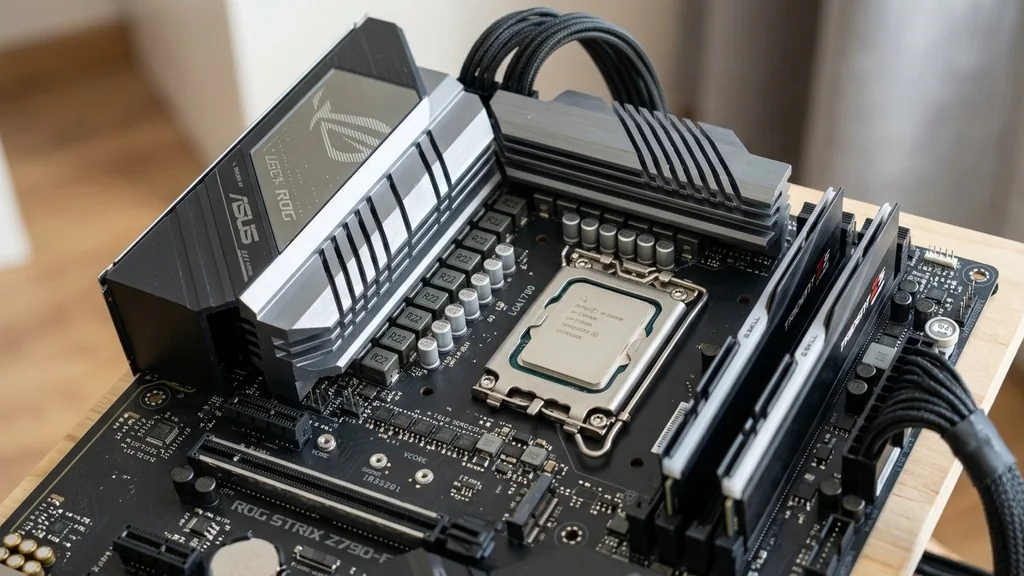
When you look at a motherboard, the area surrounding the CPU socket is often crowded with small, square components and large metal heatsinks. Many PC enthusiasts ignore these parts, yet they are the heartbeat of system stability.
A VRM, or Voltage Regulator Module, is a critical circuit responsible for converting the raw power coming from your power supply into the precise, clean voltage your processor requires. Without this conversion process, a modern processor would be instantly destroyed by the 12-volt current flowing directly from the power supply unit.
The Fundamental Role of the Voltage Regulator Module
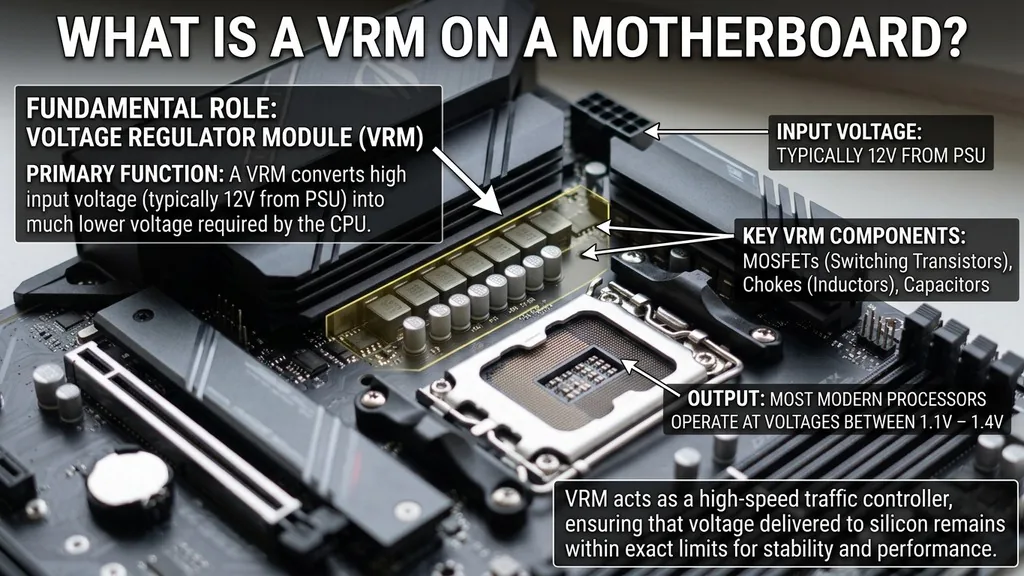
The primary function of a VRM is to step down the input voltage—typically 12 volts—into the much lower voltage required by the cpu. Most modern processors operate at voltages between 1.1 and 1.4 volts. The VRM acts as a high-speed traffic controller, ensuring that the voltage delivered to the silicon remains within extremely tight tolerances, even when the processor is shifting from an idle state to a heavy, multi-threaded workload in a fraction of a millisecond.
Think of the VRM as a sophisticated transformer. It takes the coarse, high-voltage electricity provided by the power supply and smooths it out into a refined, steady stream. If this stream fluctuates too much, the system crashes.
If the VRM cannot supply enough current, the CPU throttles its clock speed to prevent a total shutdown. This is why high-end motherboards boast massive, multi-phase power delivery systems; they are designed to handle the intense current draw of flagship processors without breaking a sweat.
Key Components That Make Up a VRM
A VRM is not a single chip but a collection of electronic components working in harmony. Each “phase” of a VRM typically consists of three main parts: the MOSFETs, the chokes, and the capacitors. These work together to switch the power on and off thousands of times per second, effectively averaging the voltage down to the target level.
The MOSFETs (Metal-Oxide-Semiconductor Field-Effect Transistors) act as the switches. They determine how much current is allowed to pass through the circuit at any given moment. The chokes, which look like small metal cubes or coils, store energy in a magnetic field to help smooth out the electrical ripples.
Finally, the capacitors act as energy reservoirs, holding a small charge to ensure that the voltage remains rock-steady even if the CPU suddenly demands a massive spike in power. When you see a “12+2” phase design on a motherboard spec sheet, it refers to how many of these sets of components are dedicated to the CPU core and the auxiliary rails.
Why VRM Quality Matters for Stability
You might wonder if a basic VRM is enough for a standard office computer. For most tasks, a simple, entry-level power delivery system is perfectly adequate. However, if you want to push your hardware, the quality of these components becomes a deciding factor in system longevity and performance.
Poor-quality VRMs generate significantly more heat because they are less efficient at converting power. This excess heat radiates into the motherboard and the surrounding area, potentially shortening the lifespan of sensitive components.
Stable power delivery is the foundation of a reliable machine. If the voltage regulation is sloppy, you might experience random blue screens, system freezes, or corrupt data during heavy operation.
Professional overclockers prioritize motherboard VRM designs because they know that cleaner power allows for higher stable clock speeds. Even if you aren’t overclocking, a robust VRM ensures that your CPU can maintain its maximum boost frequency for extended periods without thermal throttling, providing a smoother experience in demanding applications like video editing or gaming.
Identifying VRMs on Your Motherboard
If you are curious about what your specific board uses, you can usually spot the VRM section by looking for a line of chokes and MOSFETs near the top and left sides of the CPU socket. On modern boards, these are almost always covered by brushed-aluminum or black metal heatsinks.
These heatsinks are vital because they pull heat away from the MOSFETs. If you remove these heatsinks, you will see a row of identical power stages lined up like soldiers.
To check the specifics of your own motherboard, you can often consult the manual or look at the product page on the manufacturer’s website. They will frequently advertise the number of phases and the amperage rating of the power stages.
For a deeper look, enthusiasts often turn to the official Intel documentation on power delivery design, which outlines the rigorous standards these circuits must meet to maintain system integrity. If your board feels hot to the touch in the socket area during intense gaming, it’s a sign that the VRM is working hard to keep up with your gpu and CPU demands.
Is Higher Phase Count Always Better?
A common misconception is that a higher number of phases always equals a “better” motherboard. While a 20-phase VRM sounds impressive, it is often more about marketing than actual necessity. Modern components are incredibly efficient, and a well-engineered 8-phase system using high-quality, high-amperage power stages can easily outperform a poorly designed 16-phase setup.
Marketing teams often push “phase count” as a primary metric, but you should look for the total current capacity. If a motherboard uses low-grade MOSFETs, adding more of them doesn’t necessarily make the system more efficient; it just adds more points of failure.
Look for boards that emphasize “DrMOS” or “Smart Power Stages.” These integrate the driver and the MOSFET into a single package, which reduces electrical resistance, lowers heat output, and provides much more accurate voltage control than older, discrete designs.
The Impact of VRM Heat on Performance
Heat is the enemy of electronics, and the VRM is no exception. When MOSFETs heat up, their electrical resistance increases, which makes them less efficient, causing them to heat up even more. This creates a thermal feedback loop that can eventually lead to the VRM shutting down to protect itself.
This is why you see massive, finned heatsinks on high-end boards. Some even include small, integrated fans to keep the air moving over those components.
If you are building a system in a small case with limited airflow, VRM temperatures can become a real issue. If the air around the CPU socket is stagnant, the heat from the chipset and the processor itself will soak into the VRM heatsinks, preventing them from doing their job.
This is why case airflow is just as important as the motherboard design itself. A well-ventilated case allows the VRM to operate within its ideal thermal window, ensuring that your system remains fast and responsive under any load.
Comparing VRM Configurations
When choosing a motherboard, it helps to understand how different tiers of hardware handle power. The following table illustrates the general differences you might encounter across various market segments.
| Segment | Typical Phase Count | Cooling Method | Intended Use |
|---|---|---|---|
| Entry-Level | 4 to 6 Phases | None or Small Heatsink | Office, Media, Light Gaming |
| Mid-Range | 8 to 12 Phases | Aluminum Heatsink | Gaming, Content Creation |
| Enthusiast/Pro | 14+ Phases | Large Heatsinks/Active Cooling | Overclocking, Heavy Workloads |
As you can see, the jump from entry-level to enthusiast hardware is not just about the number of components; it is about the thermal management and the headroom provided for power delivery. If you need to run a processor at high stock settings for hours on end, or if you plan to overclock, the mid-range or enthusiast tiers are where you should focus your budget.
Common Questions About VRM Functionality
- Do I need a motherboard with a massive VRM for gaming? Most modern gaming CPUs are efficient enough that even a mid-range motherboard will provide more than enough power without overheating.
- Can I replace a faulty VRM on a motherboard? Generally, no. VRM components are soldered directly to the multi-layer PCB. Replacing them requires specialized industrial equipment and technical expertise that exceeds the value of the board itself.
- How do I know if my VRM is overheating? You might notice your CPU clock speeds suddenly dropping during intense tasks, even if your CPU temperature itself looks normal. Software monitoring tools can sometimes display VRM temperatures if the motherboard has integrated sensors.
- Does the VRM affect the GPU? The VRM on your motherboard provides power to the CPU and other onboard components, but your GPU has its own dedicated VRM on its own circuit board. While they are separate, they both contribute to the overall power draw of your system.
Understanding these circuits helps you make informed decisions when you build a new computer. While the CPU and GPU often grab the headlines, the motherboard’s power delivery system is the silent workhorse that ensures every other part of your system functions at its peak. By prioritizing boards with decent power delivery and effective heatsinks, you ensure that your investment will remain stable and performant for years to come.


