

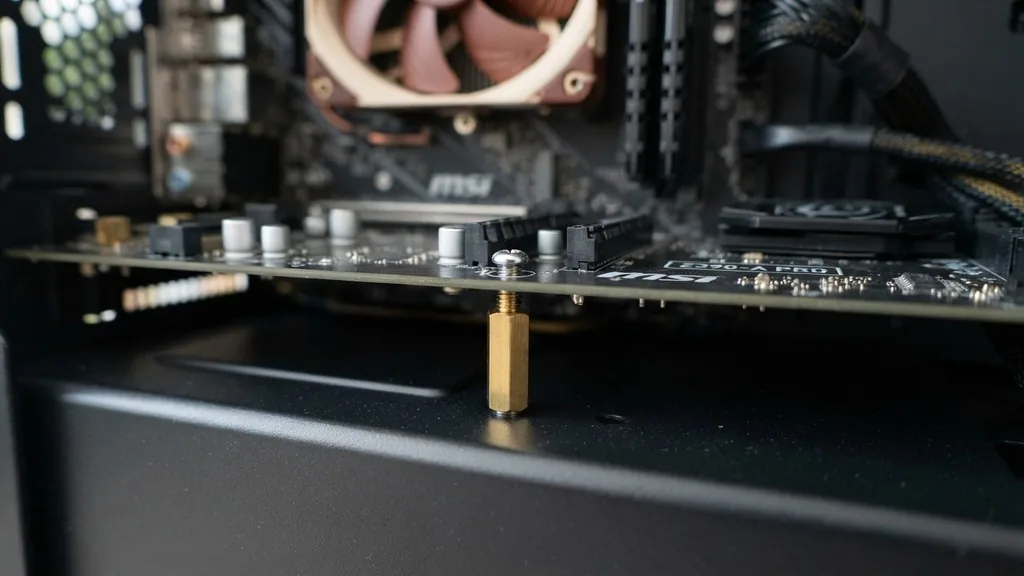
Motherboard standoffs are the small, often overlooked metal or plastic spacers that sit between your computer motherboard and the metal chassis of the case. While they may seem like trivial hardware, they serve a critical function in the health and longevity of your build.
Without them, your components would make direct contact with the case, leading to short circuits that could instantly ruin your expensive hardware. Understanding what are motherboard standoffs is the first step toward building a safe, reliable machine.
The Fundamental Purpose of Motherboard Standoffs
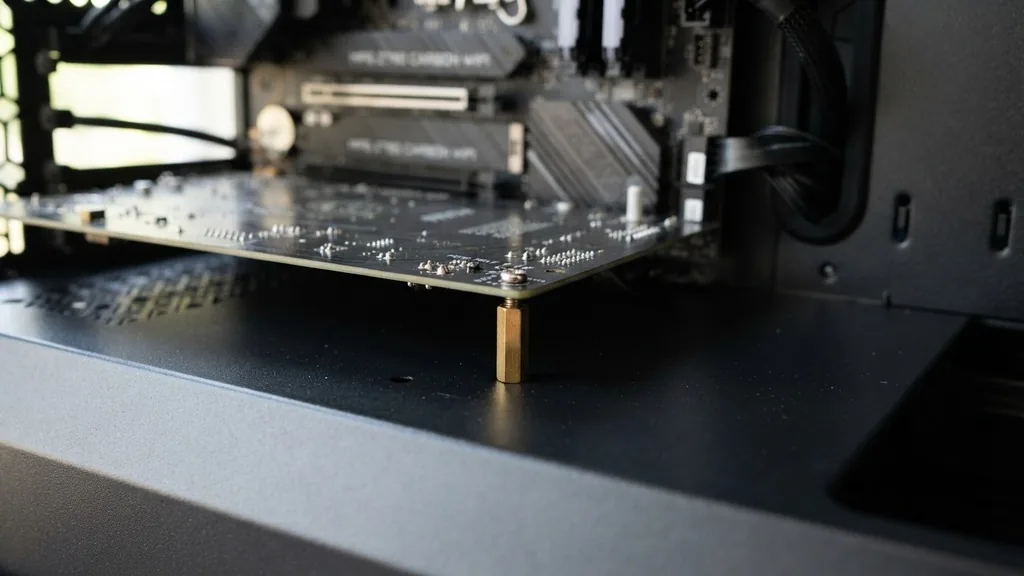
Motherboard standoffs are functional spacers designed to create a precise gap between the underside of a motherboard and the interior wall of a computer case. This gap is not merely for aesthetics or cable management; it is a vital safety requirement. The primary purpose of these components is to prevent electrical shorts by insulating the motherboard’s circuitry from the conductive metal of the PC case.
Most motherboards feature a series of traces—tiny copper pathways that carry electrical signals—on their bottom surface. If these traces touch the metal of the case, the electricity will take the path of least resistance, which is usually directly into the chassis.
This creates a short circuit. When a short occurs, it can trigger the power supply protection mechanisms to shut down the system, or in more severe cases, it can permanently fry the motherboard’s voltage regulation modules, the CPU socket, or even the GPU.
Beyond electrical isolation, standoffs provide structural support. A motherboard is a large, thin circuit board that can flex under pressure. When you plug in heavy components like a massive air cooler or a high-end graphics card, or when you apply pressure to seat the 24-pin power connector, the board experiences mechanical stress.
Standoffs act as pillars, ensuring the board remains rigid and flat. Without this support, the board could bend, causing hairline fractures in the solder joints or damaging the delicate pins within the CPU socket.
Types of Motherboard Standoffs and Materials
Not all standoffs are created equal, and knowing the variety available helps when you are assembling a custom system. Most modern cases come with a set of pre-installed or included brass standoffs. Brass is the industry standard because it is durable, easy to machine, and provides a reliable ground connection between the motherboard’s mounting holes and the case.
Some older or budget-oriented cases may use plastic standoffs. While these provide excellent electrical insulation, they lack the structural rigidity of their metal counterparts. You will also encounter different threading specifications.
The most common thread size is 6-32, which is standard for most PC cases. However, some cases or specific form factors might use M3 threads. Mixing these up is a common mistake that leads to stripped threads or a loose motherboard.
Key Differences in Standoff Construction
- Brass Standoffs: The most common type; they offer high structural integrity and facilitate a proper ground connection for the motherboard.
- Plastic Spacers/Clips: Often found in tool-less case designs, these are easier to install but may not support heavy aftermarket cooling solutions as well as metal.
- Hex Standoffs: These have a hexagonal shape, allowing you to use a socket driver or a specific standoff tool to tighten them securely against the case.
- Threaded vs. Push-pin: Threaded standoffs screw into the case, while push-pin varieties snap into pre-drilled holes, which are common in proprietary pre-built systems.
What Happens If You Forget Standoffs
If you forget to install motherboard standoffs, the results are almost always catastrophic for your system’s health. Many novice builders assume that because the motherboard has holes, it should be screwed directly into the case. Doing this forces the bottom of the motherboard to press flush against the flat surface of the case tray.
Immediately upon powering on the system, the motherboard’s underside components will likely make contact with the metal case. This creates a direct bridge.
In many cases, the motherboard will fail to post, and the power supply will detect a surge and immediately cut power to prevent a fire. However, if the short is subtle—perhaps only touching a non-critical ground trace—you might be able to boot the computer, only for it to crash randomly under load.
Persistent operation of a system without standoffs can lead to “arcing,” where electricity jumps between the board and the case. This can create micro-welds or burn marks on the PCB. Even if the system miraculously survives the initial boot, the long-term reliability is compromised.
You might experience persistent driver errors, GPU instability, or random reboots because the ground plane of the motherboard is being interfered with by the case. Always double-check your case manual to see if the standoffs are pre-installed or if you need to manually screw them in.
Standoffs, Screws, and Threading Standards
A common point of confusion for builders involves the relationship between motherboard standoffs and the screws that hold the board in place. The standoff acts as the female receiver for the motherboard screw. Because the standoff is screwed into the case, it provides a stable, fixed point to secure the board.
The threads on the standoff are usually split into two parts. The bottom part, which enters the case, is typically a 6-32 thread. The top part, which receives the screw holding the motherboard down, is often a smaller thread, such as M3.
It is vital to use the correct screws. If you try to force a coarse-threaded screw into a fine-threaded standoff, you will strip the metal, making it impossible to remove or tighten properly.
If you are interested in the technical specifications of standard computer hardware, you can refer to the official ATX motherboard specifications provided by Intel, which detail the mounting hole patterns and electrical requirements for system builds.
| Component Type | Common Thread Size | Primary Function |
|---|---|---|
| Case Standoff (Base) | 6-32 | Structural mounting to the chassis |
| Motherboard Screw | M3 | Securing the PCB to the standoff |
| Hard Drive Screw | 6-32 | Mounting drives to cages |
Installing Standoffs Correctly
Installing standoffs is a straightforward process, but it requires patience. First, identify the form factor of your motherboard (ATX, Micro-ATX, or Mini-ITX).
Your case will have a grid of holes drilled into the motherboard tray. You must install the standoffs only in the positions that correspond to the mounting holes on your specific motherboard.
If you install a standoff in a location where the motherboard has no hole, the top of the standoff will press against the bottom of the circuit board. This creates a “pressure point” that can crack the motherboard or cause a short if it happens to touch a trace. Always place the motherboard inside the case without any screws first to visualize exactly where the holes align.
Use a dedicated standoff tool or a pair of needle-nose pliers to tighten the standoffs until they are snug against the case tray. Do not overtighten them, as the metal of the case tray can be thin and prone to stripping. Once the standoffs are secure, place the motherboard on top, align the holes, and use the appropriate screws to fix the board in place.
Troubleshooting Standoff Issues
Even experienced builders run into issues with standoffs. One of the most common problems is a “stuck” standoff.
This often happens if the standoff was overtightened or if the threads have become cross-threaded. If a standoff is stuck, do not force it with excessive pressure, as you risk twisting the metal of the case tray.
Another issue is the “missing standoff” scenario. If you find yourself building a system and realize you have fewer standoffs than motherboard holes, you might be tempted to skip one.
While it is generally safe to skip one or two standoffs—provided they are not in critical areas like the center or near the RAM slots—it is not recommended. A missing standoff leaves that part of the board unsupported, which can lead to sagging or difficulty when plugging in power cables.
If you have lost your standoffs, do not attempt to use makeshift spacers like rubber washers or electrical tape. These materials can melt or degrade over time, leading to a loss of structural integrity or even fire hazards. Always purchase a standard motherboard standoff kit that matches your case’s threading specifications.
Are Standoffs the Same as M.2 Spacers?
A frequent point of confusion for those building modern systems is the difference between motherboard standoffs and the small spacers used for M.2 SSDs. While they share the same name—both are essentially spacers—they serve entirely different purposes and are not interchangeable.
A motherboard standoff is relatively large and is used to mount the entire motherboard to the case. An M.2 standoff is tiny, often only a few millimeters tall, and is designed to hold an M.2 drive parallel to the motherboard so it doesn’t bend or touch the PCB. M.2 drives generate heat, and the gap created by the standoff allows for better airflow around the drive, preventing thermal throttling.
Never attempt to use a standard motherboard standoff as a replacement for an M.2 standoff. The threading is completely different, and it will physically not fit. If you lose your M.2 screw and standoff, you must purchase a specific M.2 mounting kit that is compatible with your motherboard’s manufacturer.
The Role of Standoffs in System Grounding
Grounding is a critical aspect of electrical safety in computers. The motherboard’s mounting holes are usually surrounded by a small copper ring. When you screw the motherboard into a brass standoff, that screw creates an electrical path from the motherboard’s ground plane to the metal case.
This is intentional. The case acts as a large heat sink and a Faraday cage, helping to dissipate electromagnetic interference (EMI). By grounding the motherboard to the case, you help reduce electronic noise, which can interfere with sensitive audio components or high-speed data signals.
If you use plastic standoffs, you break this ground path. While your computer might still work, you could experience issues like buzzing in your headphones or unstable data transfer speeds on your USB ports.
This is why brass standoffs are preferred over plastic. They provide both the physical support required for the heavy GPU and the electrical connection needed for a stable system. When you start your build, ensure that the connection between the motherboard holes and the brass standoffs is clean and free of debris, such as paint or stickers, which could insulate the contact point.
Common Questions About Motherboard Standoffs
What happens if I forget to install a standoff in one spot?
If you miss a single standoff, the motherboard will have a weak point. This is usually not an immediate disaster, but it makes the board vulnerable to flexing when you plug in cables or install a graphics card. It is best to use all available mounting points to ensure the board is fully supported.
Are motherboard standoffs universal?
Most standoffs use a standard 6-32 thread for the case side, but the height can vary slightly. Most modern ATX cases are designed to a standard height, so kits are generally interchangeable between major brands. However, always check your case manual if you are working with proprietary pre-built systems, as they may use custom mounting hardware.
What do I do if a standoff is stuck to the motherboard?
If a standoff is stuck on the back of the motherboard rather than the case, it usually means the screw was overtightened. Use two pairs of pliers—one to hold the standoff and one to hold the screw head—and gently turn them in opposite directions. Be extremely careful not to put pressure on the motherboard PCB itself.
Can I use plastic standoffs instead of brass?
You can use plastic standoffs, but they are generally less durable and do not provide the necessary ground connection between the motherboard and the case. They are better suited for specific industrial applications or non-conductive mounting scenarios rather than standard desktop PC builds. Always stick to brass if your case supports it.


