

Many buyers assume any motherboard paired with a Ryzen 7 7700X will deliver the same result. That shortcut can turn a promising build into an expensive mismatch, especially when priorities differ.
The best motherboards for 7700x depend on how you plan to use the system and what you expect from the platform over time. This comparison narrows the field, so keep reading for a clearer starting point.
Key Takeaways
- Prioritize the AM5 socket and a compatible chipset before comparing extra features.
- Match the motherboard’s form factor to your case, since ATX and Mini-ITX layouts are not interchangeable.
- Choose DDR5 support with the memory capacity and speed your build requires.
- Check the number of M.2 slots if you plan to install multiple NVMe drives.
- Confirm networking, USB, and PCIe support before paying more for connectivity you may not use.
| Best Overall Bundle |  |
GIGABYTE B850 Gaming WiFi | Newer B850 platform | AM5 processor compatibility | DDR5 memory support | View on Amazon | Read Review |
| Compact AORUS Foundation | GIGABYTE B650M AORUS Elite AX | Compact Micro-ATX format | Built-in wireless networking | AM5 platform support | View on Amazon | Read Review | |
| Fresh Platform Pick |  |
MSI B850 Gaming Plus WiFi | Current B850 chipset | Integrated Wi-Fi | DDR5-ready platform | View on Amazon | Read Review |
| Feature-Rich ATX Choice |  |
GIGABYTE B650 Gaming X AX | Full ATX layout | Wi-Fi 6E support | USB Type-C connectivity | View on Amazon | Read Review |
| Clean White Build | 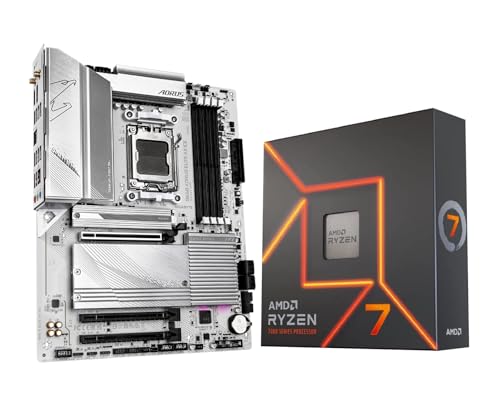 |
GIGABYTE B650 AORUS Elite AX ICE | White ICE styling | AM5 compatibility | Integrated AX Wi-Fi | View on Amazon | Read Review |
| Next-Gen Connectivity |  |
GIGABYTE X870 Gaming X WIFI7 | USB4 connectivity | Three M.2 slots | Five-year warranty | View on Amazon | Read Review |
| Platform Mismatch Alert |  |
GIGABYTE Z890 Gaming X WIFI7 | Four M.2 slots | USB4 connectivity | Wi-Fi 7 support | View on Amazon | Read Review |
| Mini-ITX Powerhouse | GIGABYTE X870I AORUS PRO ICE | Mini-ITX footprint | Two M.2 slots | Five-year warranty | View on Amazon | Read Review | |
| Budget-Sized Platform | MSI B650M Gaming Plus WiFi | Three M.2 slots | Four DDR5 slots | Integrated Wi-Fi | View on Amazon | Read Review | |
| Storage Expansion Specialist | 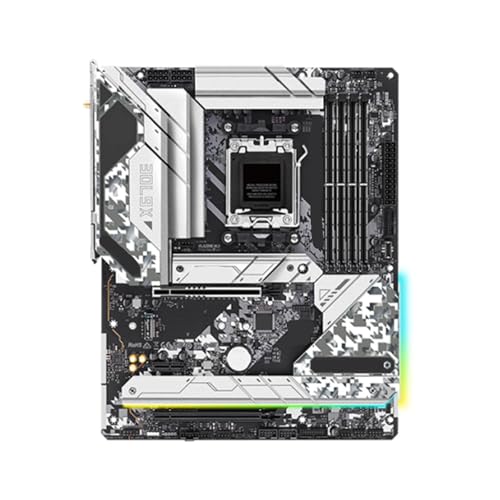 |
ASRock X670E Steel Legend | X670E expansion platform | ATX motherboard layout | DDR5-7200 support | View on Amazon | Read Review |
More Details on Our Top Picks
-
GIGABYTE B850 Gaming WiFi
The top pick suits anyone building around the Ryzen 7 7700X and wanting a newer B850 platform without choosing a processor and board separately. Its GIGABYTE Gaming-series foundation, AM5 socket, and DDR5 support create a sensible base for a modern gaming PC.
You still need to verify the exact board revision and included accessories before ordering, since the listing provides no detailed feature bullets. The main limitation is that this bundle may include hardware you already own, and its individual motherboard specifications are not fully disclosed.
- Brand:GIGABYTE
- Socket:AM5
- Chipset:B850
- Memory Type:DDR5
- Additional Feature:Integrated Wi-Fi
- Additional Feature:Gaming-focused motherboard design
- Additional Feature:Ryzen 7 7700X bundle
-
GIGABYTE B650M AORUS Elite AX
Choose this board if you want a smaller Micro-ATX build centered on the Ryzen 7 7700X. The B650 chipset supports the AM5 platform, while the AORUS Elite AX name points to a gaming-oriented design with integrated wireless networking.
Its compact format can simplify a space-conscious build, but it leaves less room for expansion than a full ATX board. The listing also provides no detailed specifications, so confirm rear USB connectivity, M.2 capacity, and BIOS support before purchase.
- Brand:GIGABYTE
- Socket:AM5
- Chipset:B650
- Form Factor:Micro-ATX
- Memory Type:DDR5
- Additional Feature:AORUS gaming design
- Additional Feature:Wi-Fi connectivity
- Additional Feature:Ryzen 7 7700X bundle
-
MSI B850 Gaming Plus WiFi
This MSI bundle fits a 7700X build that prioritizes a current-generation B850 motherboard and built-in Wi-Fi. It is a straightforward pairing for a gaming desktop, with AM5 compatibility and DDR5 support providing a modern upgrade path.
The catch is familiar with this listing: key board details are missing, including expansion and storage information. Check the exact model, BIOS readiness, and included processor before ordering, particularly if you already have a Ryzen chip.
- Brand:MSI
- Socket:AM5
- Chipset:B850
- Memory Type:DDR5
- Additional Feature:Gaming-series motherboard
- Additional Feature:Ryzen 7 7700X bundle
- Additional Feature:Wireless networking
-
GIGABYTE B650 Gaming X AX
The B650 Gaming X AX V2 is a strong match for a full-size AM5 gaming build using the Ryzen 7 7700X. Its listed USB 3.2 Gen 2×2 Type-C port and Wi-Fi 6E support are useful additions for fast external storage and wireless connectivity.
You also get an ATX layout with DDR5 support, which leaves more room for expansion than Micro-ATX alternatives. The limitation is that the listing says little about power delivery, M.2 slots, or firmware, so confirm those details before committing.
- Brand:GIGABYTE
- Socket:AM5
- Chipset:B650
- Form Factor:ATX
- Memory Type:DDR5
- Additional Feature:USB 3.2 Gen2x2 Type-C
- Additional Feature:Wi-Fi 6E
- Additional Feature:V2 motherboard revision
-
GIGABYTE B650 AORUS Elite AX ICE
This board is aimed at a light-colored gaming PC, pairing the Ryzen 7 7700X with GIGABYTE’s white ICE styling. The B650 chipset, AM5 socket, DDR5 support, and integrated AX wireless networking cover the core needs of a current AMD desktop.
The visual theme is the obvious attraction, especially for a coordinated case and component selection. Since the listing contains no feature bullets, verify the board’s exact form factor, storage layout, and rear I/O before purchase.
- Brand:GIGABYTE
- Socket:AM5
- Chipset:B650
- Memory Type:DDR5
- Additional Feature:AORUS gaming design
- Additional Feature:White motherboard finish
- Additional Feature:Ryzen 7 7700X bundle
-
GIGABYTE X870 Gaming X WIFI7
Pick this X870 board if your 7700X system needs modern connectivity and expansion beyond the basics. The listed features include PCIe 5.0, USB4, Wi-Fi 7, 2.5GbE LAN, and three M.2 slots, giving you a generous platform for fast storage and networking.
Its ATX format provides room for a broad component layout, while the five-year warranty adds useful ownership support. The honest trade-off is that an X870 board can be more platform than a 7700X needs, especially if you do not plan to use USB4, PCIe 5.0, or Wi-Fi 7.
- Brand:GIGABYTE
- Socket:AM5
- Chipset:X870
- Form Factor:ATX
- Memory Type:DDR5
- M.2 Slots:3
- Additional Feature:PCIe 5.0 support
- Additional Feature:Wi-Fi 7
- Additional Feature:2.5GbE LAN
-
GIGABYTE Z890 Gaming X WIFI7
Do not choose this board for a Ryzen 7 7700X build. The Intel Z890 chipset and LGA 1851 socket target Intel Core Ultra processors, while the 7700X requires AMD’s AM5 socket, making these platforms incompatible.
As a standalone Intel motherboard, it lists strong connectivity, including PCIe 5.0, USB4, Wi-Fi 7, four M.2 slots, and 2.5GbE LAN. For this roundup, however, the decisive limitation is simple: the socket does not match the processor.
- Brand:GIGABYTE
- Socket:LGA 1851
- Chipset:Z890
- Form Factor:ATX
- Memory Type:DDR5
- M.2 Slots:4
- Additional Feature:PCIe 5.0 support
- Additional Feature:2.5GbE LAN
- Additional Feature:EZ-Latch design
-
GIGABYTE X870I AORUS PRO ICE
This is the specialist choice for a small-form-factor 7700X system. Its Mini-ITX design keeps the footprint compact, while PCIe 5.0, dual M.2 storage, Wi-Fi 7, 2.5GbE LAN, and USB-C provide a surprisingly capable feature set.
Compact boards demand more careful component planning, particularly around cooler clearance, memory access, and cable routing. You also get fewer expansion options than ATX, so the main limitation is the single PCIe slot and compact layout, not a lack of modern connectivity.
- Brand:GIGABYTE
- Socket:AM5
- Chipset:X870
- Form Factor:Mini-ITX
- Memory Type:DDR5
- M.2 Slots:2
- Additional Feature:PCIe 5.0 support
- Additional Feature:Wi-Fi 7
- Additional Feature:2.5GbE LAN
-
MSI B650M Gaming Plus WiFi
This listing targets builders seeking a B650M board for the Ryzen 7 7700X, with four DDR5 slots, three M.2 slots, HDMI, and integrated Wi-Fi listed in the title. Those features make it appealing for a practical gaming system that needs useful storage capacity without moving to a larger platform.
The listing is unusually inconsistent, calling the board both B650M and ATX, so verify the manufacturer model and physical dimensions carefully. It also appears to be a motherboard-only listing rather than a processor bundle, and the sparse product information makes checking socket and BIOS details especially important.
- Brand:MSI
- Socket:AM5
- Chipset:B650
- Form Factor:Micro-ATX
- Memory Type:DDR5
- M.2 Slots:3
- Additional Feature:HDMI output
- Additional Feature:Ryzen 7 compatibility
- Additional Feature:Four memory slots
-
ASRock X670E Steel Legend
The ASRock X670E Steel Legend suits a 7700X build that needs a higher-end AM5 chipset and room for future expansion. Its stated DDR5-7200 memory support, ATX format, and X670E platform make it a better fit for builders planning multiple drives or additional PCIe hardware.
The listing references broad Ryzen compatibility but provides few board-level details, so verify the exact Steel Legend revision before ordering. Compared with B650 options, this board may offer more capability than a standard gaming build requires, particularly if you only need one graphics card and a couple of drives.
- Brand:ASRock
- Socket:AM5
- Chipset:X670E
- Form Factor:ATX
- Memory Type:DDR5
- Additional Feature:Ryzen 7 7700X support
- Additional Feature:PCIe expansion capability
- Additional Feature:Steel Legend design
Frequently Asked Questions
Which chipset is best for the Ryzen 7 7700X?
For most buyers, B650 offers the best balance of price, features, and CPU support. It can handle the 7700X properly while providing DDR5 support, NVMe storage options, and CPU overclocking features. Choose B650E, X670, X670E, or X870 if you need more PCIe lanes, additional high-speed ports, multiple expansion cards, or newer connectivity. A premium chipset is useful for a specific feature list, not simply because it carries a larger number.
Do all 7700X motherboards support DDR5?
Yes. The Ryzen 7 7700X belongs to AMD’s AM5 platform, which requires DDR5 memory. DDR4 modules are not compatible, even though they may look physically similar. Use two matching memory modules for dual-channel operation, and check the motherboard’s qualified memory list if you plan to use a high-speed kit or four DIMMs. A 2x16GB DDR5-6000 EXPO kit is a common starting point for a gaming-focused system.
Does the motherboard need BIOS support for the 7700X?
Yes, the board needs a BIOS version that recognizes the Ryzen 7 7700X. Most current AM5 motherboards ship with suitable firmware, but older inventory may require an update. A board with BIOS Flashback can update firmware from a USB drive without an installed CPU, which is helpful if the board arrives with an older version. Check the manufacturer’s CPU support page before purchase.
Is a B650 motherboard enough for the 7700X?
In most builds, yes. A well-designed B650 motherboard with a cooled VRM can support the 7700X for gaming, productivity, and sustained workloads without requiring an X670-class board. Compare the exact model’s storage slots, rear USB ports, networking, and audio rather than judging by the chipset name alone. Two B650 boards can have very different feature sets, because motherboard specifications enjoy making simple shopping decisions slightly less simple.
Does the Ryzen 7 7700X need a dedicated graphics card?
The 7700X includes a basic integrated Radeon graphics unit, which can handle display output and basic troubleshooting. It is not intended to replace a dedicated graphics card for modern gaming or demanding GPU work. If you install a graphics card, connect the monitor to the card’s video outputs. The motherboard’s HDMI or DisplayPort connections use the processor’s integrated graphics and may remain inactive when the system is configured around a discrete GPU.


