

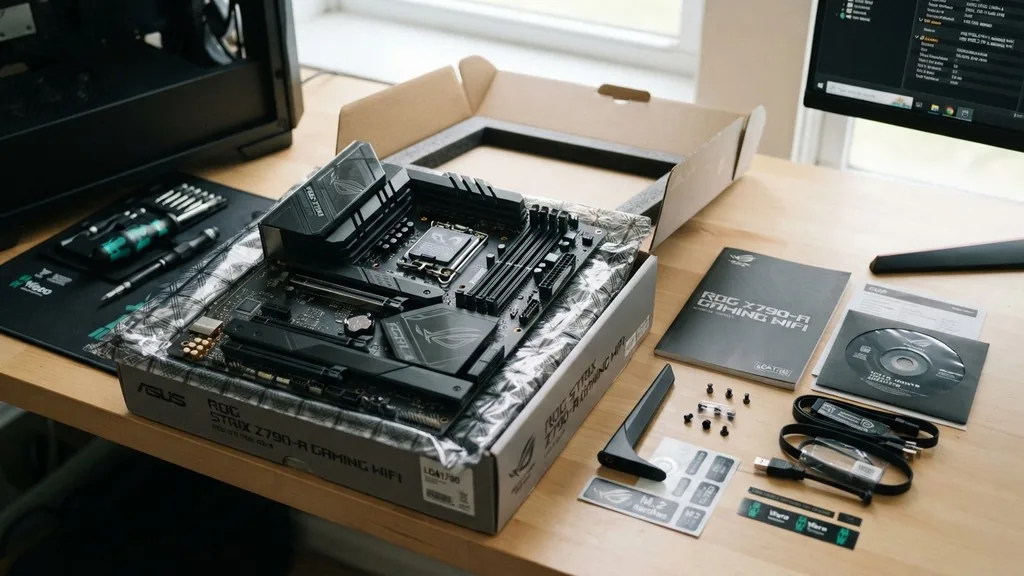
When embarking on a custom PC build, the excitement of unboxing your new components is often met with a moment of panic: does a motherboard come with screws? The short answer is that while the motherboard itself rarely includes the mounting hardware you need, your PC case almost always does.
Understanding the distinction between what comes in the box with a motherboard and what you should expect from your computer chassis is vital for a smooth building experience. If you find yourself staring at an empty case and a motherboard, knowing exactly where to look for those critical fasteners will save you hours of frustration.
Why Motherboards Do Not Include Mounting Screws
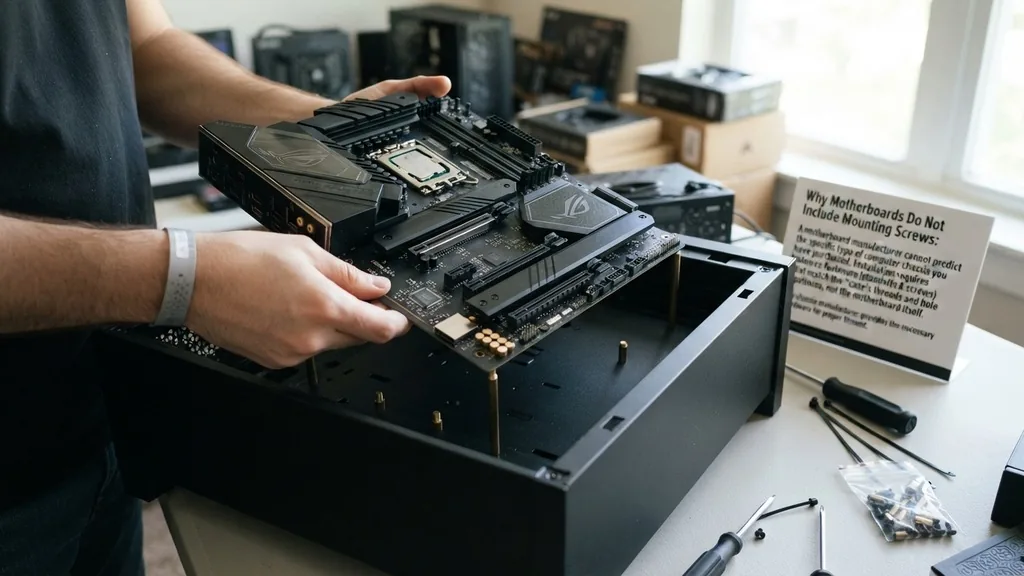
The primary reason a motherboard does not come with screws is that the manufacturer cannot predict which type of computer chassis you have purchased. Motherboard installation requires specific fasteners that match the threads and hole patterns of the case, not the motherboard itself. Because the motherboard acts as a standardized component—fitting into ATX, Micro-ATX, or Mini-ITX enclosures—the burden of providing the mounting hardware falls on the case manufacturer.
Think of it like buying a light fixture; the light bulb manufacturer provides the bulb, but the wall mount or the ceiling bracket comes with the housing. Similarly, motherboard standoffs and the corresponding mounting screws are considered part of the computer chassis accessories.
If motherboard manufacturers included every possible variation of screw for every possible case size, the box would be cluttered with unnecessary metal, increasing shipping weight and production costs unnecessarily. By offloading this responsibility to the case manufacturer, motherboard companies keep their packaging lean and focused on the core components: the board, the manual, and occasionally a few specialized interface cables or M.2 drive screws.
The Role of the PC Case Hardware Kit
When you purchase a new computer chassis, you should find a small bag or box inside, often tucked into one of the drive bays. This PC case hardware kit is the source of almost all the fasteners you will need for your build.
It is designed to be a comprehensive set that covers the specific requirements of that chassis. If you are wondering where to find the hardware, always check the drive cages or the floor of the case; manufacturers frequently tape these bags to the frame to ensure they don’t get lost during shipping.
The kit usually contains a variety of hardware, including:
- Standoffs, which elevate the board away from the metal chassis to prevent electrical shorts.
- M3 screws, which are the standard size used for securing the motherboard to the standoffs.
- Longer, coarse-threaded screws for mounting fans and radiators.
- Hard drive mounting screws for 3.5-inch or 2.5-inch storage devices.
- Cable management ties or stickers to keep the interior clean and organized.
Identifying the Correct Hardware for Your Build
Not all screws are created equal, and attempting to force the wrong one into your motherboard can cause irreparable damage to the PCB or the threads in the standoff. The standard screw for most consumer motherboards is the 6-32 thread size for the case, but the board itself often uses the M3 standard.
You must ensure you are using the correct mounting screws that came with your case. If you mix them up, you might find that a screw gets stuck or fails to tighten properly, leaving your expensive motherboard loose and vulnerable to vibrations.
A simple way to verify you have the right hardware is to test the fit before you place the motherboard into the chassis. Take one of the standoffs and screw it into the case. Then, take the screw you intend to use and see if it threads smoothly into the standoff.
If there is significant resistance, stop immediately. You are likely using a screw meant for a power supply or a fan. Proper identification prevents stripped threads and ensures your components stay securely in place for years.
What Actually Comes in the Motherboard Box
While the motherboard doesn’t come with the screws to mount it to the case, it does come with a specific set of accessories necessary for its operation. Most modern boards include a few SATA cables, a Wi-Fi antenna (if the board has integrated wireless), and the essential I/O shield.
The I/O shield is a metal plate that snaps into the back of the case, protecting the motherboard ports from dust and providing a grounding point. Some high-end boards now feature a pre-installed shield, which is a massive quality-of-life improvement for builders.
The following table outlines the typical contents found in a motherboard box versus a computer case box:
| Component | Found in Motherboard Box | Found in Case Box |
|---|---|---|
| Mounting Screws | Rarely | Always |
| Motherboard Standoffs | Never | Always |
| M.2 Drive Screws | Usually | Never |
| I/O Shield | Always (or pre-installed) | Never |
| Cable Management Ties | Rarely | Always |
Addressing the M.2 Drive Screw Situation
One notable exception to the rule that motherboards don’t include screws is the M.2 drive screw. Because these tiny, specialized fasteners are specific to the motherboard’s M.2 slot and are not part of the case’s standard hardware set, the motherboard manufacturer must provide them.
However, they are notoriously easy to lose. These screws are often tiny and pre-installed in the standoff on the motherboard, or they are included in a small plastic baggie taped to the box.
If you find that your M.2 screw is missing, do not panic. Many modern motherboards have moved to tool-less M.2 latches—small plastic clips that rotate to lock the drive in place without requiring a screwdriver.
If your board still uses a screw and it is missing, you can often find replacements at local computer repair shops or by ordering a small kit online. Never try to force a screw from your PC case hardware kit into an M.2 slot, as the threads are entirely different.
What to Do If You Are Missing Hardware
If you have opened your case and found no hardware kit, it is usually a sign of a packaging error or that the bag was accidentally discarded. Before you assume the worst, check every corner of the box. Manufacturers sometimes hide these bags behind the motherboard tray or inside the power supply shroud.
If you truly cannot find them, do not try to build your system without the proper standoffs. Installing a motherboard directly against the metal of the case will result in a short circuit the moment you press the power button, potentially frying your motherboard or power supply.
In the event of missing parts, your best course of action is to contact the case manufacturer’s support team. Most major companies are happy to ship a replacement hardware kit for a nominal fee or even for free if you can provide proof of purchase.
Alternatively, you can search for a “universal PC screw kit” online. These kits are inexpensive and contain an assortment of every screw type used in modern PCs, including various M3 screws, standoffs, and fan mounting hardware, ensuring you are never caught unprepared.
The Importance of Motherboard Standoffs
Motherboard standoffs are the unsung heroes of the build process. They create a critical gap between the bottom of the motherboard and the metal wall of the case.
This gap serves two purposes: it prevents electrical components on the back of the board from touching the grounded chassis, and it allows for airflow behind the board to help with heat dissipation. Without these, your system would be an electrical hazard.
When installing the standoffs, ensure that they align perfectly with the holes on your motherboard. Different motherboards—whether ATX, Micro-ATX, or Mini-ITX—have different screw hole configurations.
Most cases come with the standoffs pre-installed for an ATX board, but if you are using a smaller form factor, you may need to move the standoffs to different positions. Use a standoff tool or a pair of pliers to tighten them into the case, but be careful not to overtighten, as the threads on the case can strip if you use too much force.
Tips for Managing Your Hardware During the Build
A common mistake for first-time builders is losing track of which screw goes where. When you open your PC case hardware kit, take a moment to organize the pieces.
Use a small tray, a muffin tin, or even the plastic bags the hardware came in to keep everything separated. Labeling these containers can save you a significant amount of time during the assembly process.
It is also helpful to consult the manual for your case. The manual will almost always have a section detailing the contents of the hardware kit, often with diagrams showing which screw is meant for the motherboard, which for the fans, and which for the power supply.
For more information on standardizing your build, you can refer to the Intel processor and component installation guides, which provide a high-level overview of how these components integrate within a system. By following these documents, you ensure that every part is installed according to the manufacturer’s design, which promotes better system longevity and performance.
Topical Gaps: What Most Guides Miss
Many builders are confused because they assume the motherboard box is the “source of truth” for all installation hardware. The biggest gap in common knowledge is the confusion between the I/O shield and the mounting screws. While the motherboard does indeed provide the I/O shield, it assumes the user already has a standardized case.
Another common gap is the assumption that all screws are universal. In reality, some cases use proprietary mounting systems, especially those from pre-built manufacturers like Dell or HP. If you are working with a case from a pre-built system, you may find that standard off-the-shelf screws do not fit, which is a major hurdle for anyone trying to migrate components into a new, standard chassis.
Furthermore, many guides fail to mention that some cases come with pre-installed standoffs that are fixed in place. If your motherboard has a hole pattern that doesn’t match these fixed standoffs, you might be in trouble.
Always check your motherboard’s layout against your case’s mounting points before you start screwing anything in. Taking ten minutes to verify your alignment before you start the build is the best way to avoid the “missing screw” panic and the frustration of having to take the whole system apart because of a single misaligned standoff.
Frequently Asked Questions
- Can I use screws from an old case? Yes, provided they are the correct thread size. Most PC cases use a standard 6-32 thread for the case and M3 for the motherboard. If the screws fit without force, they are generally safe to reuse, but try to use the ones provided with your current chassis first.
- What happens if I don’t use standoffs? You will almost certainly cause a short circuit. The motherboard’s solder points on the back will touch the metal case, which can permanently damage your hardware. Never attempt to mount a motherboard directly to the metal surface of a computer chassis without standoffs.
- Are M.2 screws universal? While most M.2 screws are similar, there can be slight variations in head diameter and thread pitch depending on the manufacturer. It is always best to use the specific screw that came with your motherboard box. If you lose it, look for a replacement kit specifically labeled for M.2 drives.
- Does every case come with all the screws I need? Almost all modern consumer cases come with a full hardware kit. However, if you bought a used or “open box” case, the hardware kit may be missing. In that case, you will need to purchase a generic PC screw kit from an online retailer to complete your build.


