

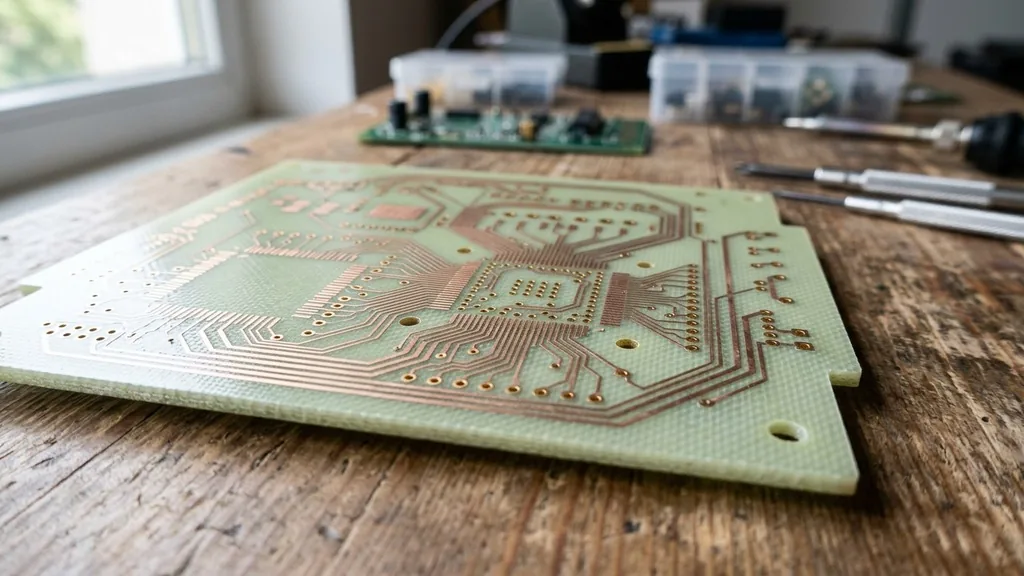
A motherboard serves as the central nervous system of any modern computer, acting as the primary hub that connects every vital piece of hardware. When you ask what a motherboard is made of, you are essentially inquiring about the physical foundation of computing itself.
At its core, it is a complex, multi-layered circuit board designed to facilitate high-speed communication between the processor, memory, and various peripherals. Understanding its composition requires looking past the green or black finish to the intricate layers of fiberglass, copper, and specialized polymers that allow electrical signals to travel at lightning speeds.
The Substrate: Fiberglass and Resin Foundations
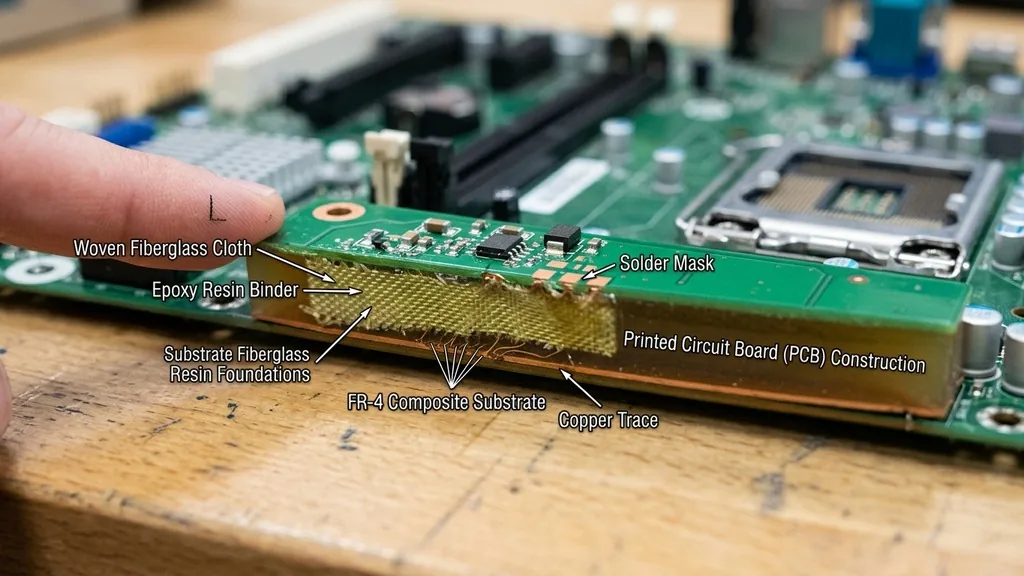
A motherboard is fundamentally a printed circuit board (PCB) built upon a rigid, non-conductive substrate. The most common material used for this base is FR-4, a composite of woven fiberglass cloth impregnated with an epoxy resin binder. This specific material is chosen for its excellent strength-to-weight ratio, high electrical insulation properties, and resistance to thermal expansion.
When your computer heats up during an intense gaming session or a heavy rendering task, the motherboard must remain dimensionally stable. If the board warped or flexed significantly, the microscopic connections between the components could snap, leading to permanent system failure.
The process begins by layering these sheets of fiberglass and resin, which are then cured under high heat and pressure. This creates a durable, flat panel that acts as the backbone for the entire system.
Manufacturers select these materials because they are flame-retardant and can withstand the harsh chemical etching processes required to create the intricate circuitry. While some low-cost electronics might use cheaper phenolic paper substrates, high-performance motherboards for personal computers rely on these glass-reinforced epoxies to ensure longevity and signal integrity.
Conductive Layers: The Copper Pathways
While the substrate provides the physical shape, the copper pathways are what actually make the motherboard functional. These pathways, known as traces, are thin strips of copper foil bonded to the fiberglass layers.
They act as the highways for electrical signals, moving data between the CPU, memory modules, and expansion cards. A modern motherboard is not just a single layer of copper; it is a stack of many layers, often ranging from four to eight or more, depending on the complexity of the board.
These internal layers are separated by thin sheets of insulating material called prepreg. By stacking these layers, engineers can create incredibly dense networks of connections without the traces crossing each other and causing electrical interference.
The copper itself is typically deposited through a process called electroplating, where copper ions are moved onto the board surface in a chemical bath. Once the desired thickness is achieved, a photoresist mask is applied, and the unwanted copper is etched away with acid, leaving behind the precise pattern of wires that define the motherboard’s architecture.
Solder Mask and Surface Finishes
If you look at a motherboard, you will notice it is usually covered in a protective, colored coating—most commonly green, black, or blue. This is known as the solder mask. Beyond giving the board its aesthetic appeal, the solder mask serves a critical functional role: it prevents accidental electrical bridges between closely spaced components.
It acts as an insulator, ensuring that solder only sticks to the pads where it is intended to go. This mask is usually a liquid photoimageable polymer that is cured with UV light to harden into a tough, chemical-resistant shell.
Once the mask is applied, the exposed copper pads—where the CPU socket, RAM slots, and other components will be soldered—are treated with a surface finish. This is vital because copper oxidizes quickly when exposed to air, which would prevent a reliable electrical connection.
Common finishes include HASL (Hot Air Solder Leveling) or more advanced, gold-plated finishes like ENIG (Electroless Nickel Immersion Gold). Gold is preferred for high-end boards because it provides superior corrosion resistance and excellent conductivity, ensuring that your delicate components maintain a solid connection over years of operation.
The CPU Socket and Power Delivery Systems
The most prominent feature on the face of the board is the CPU socket, which is a masterpiece of precision engineering. This component is typically made from high-grade plastics capable of withstanding extreme heat, housing hundreds or even thousands of tiny, spring-loaded metal pins.
These pins must make perfect contact with the underside of the processor to facilitate data transfer. Surrounding this socket, you will find the Voltage Regulator Modules (VRMs), which are the power delivery heart of the board.
VRMs consist of capacitors, chokes, and MOSFETs. Capacitors are essentially small energy storage devices that smooth out the power supplied to the processor, preventing voltage spikes that could damage the silicon. Chokes, which are the small, boxy coils you see near the CPU, filter the electricity to ensure it is clean and stable.
MOSFETs act as high-speed switches that regulate how much power the CPU receives at any given microsecond. These components are soldered directly to the board using high-melting-point lead-free solder, creating a robust connection that can handle the massive current draw of modern high-performance CPUs.
Slots and Connectors: The Interfaces for Expansion
A motherboard is useless if it cannot communicate with the outside world. This is where the various slots and ports come into play. Expansion slots, such as the PCIe slots used for graphics cards, are made from reinforced plastic housings with gold-plated contact fingers.
These are designed to be mechanically strong to support the weight of heavy, modern GPUs. The RAM slots are similarly constructed, utilizing high-tension springs to ensure that the memory modules remain firmly seated even if the computer is subjected to vibrations.
The rear I/O panel, where you plug in your mouse, keyboard, and monitors, is usually comprised of a mix of metal shielding and plastic connectors. These connectors are often soldered to the board with extra mechanical anchors to ensure they don’t break off when you plug and unplug cables repeatedly. You can find more information on how these components interact at the National Institute of Standards and Technology, which provides extensive documentation on the physical standards and material properties used in modern electronics manufacturing.
Understanding the Complexity of Layering
To understand the full scope of what a motherboard is made of, one must appreciate the sheer density of the multi-layer construction. Modern motherboards utilize a technique called via-drilling, where microscopic holes are laser-drilled through the substrate layers to connect the top of the board to the bottom or to any of the internal layers. These holes are then plated with copper to create vertical electrical pathways.
This layering allows for a massive amount of circuitry in a very small footprint. Without this multi-layer approach, a modern computer would be the size of a room.
The complexity is managed by automated design software that maps out thousands of individual paths, ensuring that high-speed data lines—which are sensitive to interference—are shielded by ground planes. Ground planes are solid sheets of copper within the board that act as a reference point for electrical signals and help dissipate heat away from the sensitive silicon components.
Thermal Management and Heatsinks
Because the components on a motherboard generate significant heat, especially under load, the board is often augmented with additional materials like aluminum or copper heatsinks. These are not part of the base PCB but are essential to its operation. Heatsinks are typically attached to the VRMs and chipset—the controller that manages data flow between the CPU, memory, and storage—to pull heat away from the silicon.
These heatsinks are often held in place with thermal pads or thermal paste, which are advanced polymer-based materials designed to fill microscopic gaps between the chip and the metal heatsink. Without these thermal interface materials, the air gap would act as an insulator, trapping heat and causing the system to throttle or shut down to prevent damage. High-end motherboards often use heat pipes, which are small, sealed copper tubes containing a fluid that vaporizes and condenses to move heat rapidly from one part of the board to another.
Comparative Breakdown of Motherboard Materials
The following table summarizes the primary materials used in the construction of a motherboard and their specific functions within the system.
| Component | Primary Material | Function |
|---|---|---|
| Base Substrate | FR-4 (Fiberglass/Epoxy) | Structural support and insulation |
| Conductive Traces | Copper | Electrical signal transmission |
| Solder Mask | Photoimageable Polymer | Insulation and oxidation protection |
| Surface Finish | Gold or Tin | Corrosion resistance for contacts |
| Heatsinks | Aluminum/Copper | Thermal dissipation |
Addressing Topical Gaps: Can You Build One from Scratch?
A common question is whether an enthusiast can build a motherboard from scratch. While you can certainly assemble a computer by buying a pre-made motherboard, fabricating the board itself is an entirely different challenge.
A motherboard is a multi-layered, high-density interconnect (HDI) PCB. Creating one requires industrial-grade photolithography, chemical etching baths, and precision drilling equipment that is generally inaccessible to the average hobbyist.
Even if you had the equipment, the design files for modern motherboards are proprietary and incredibly complex. A single board might have thousands of traces that must be length-matched to ensure that electrical signals arrive at the CPU at the exact same time.
If one trace is even a few millimeters longer than another, the high-speed data transmission could become desynchronized, causing the system to crash or fail to boot. While hobbyists can design and order custom two-layer PCBs for simple projects, the manufacturing of a modern, high-performance motherboard is a feat of precision engineering that relies on highly automated, clean-room environments to prevent even the smallest speck of dust from causing a short circuit.
The Lifespan and Degradation of Materials
The lifespan of a motherboard is largely determined by the chemical and physical degradation of its materials. The most common point of failure is actually not the fiberglass or the copper, but the electrolytic capacitors.
These components contain a liquid electrolyte that can dry out or leak over time, especially when subjected to high heat for extended periods. When this happens, the power delivery becomes unstable, leading to system crashes.
Other factors include “electromigration,” where the constant flow of electrons through the copper traces actually causes atoms to move over many years, potentially leading to microscopic open circuits. However, in most cases, a motherboard will remain functional for a decade or more if it is kept in a clean environment with stable power.
Dust accumulation is a significant enemy, as it can trap moisture and heat, accelerating the degradation of the solder joints and surface finishes. Regular cleaning and good airflow are the best ways to ensure the physical integrity of the motherboard’s materials remains intact for the long term.
Common Questions About Motherboard Construction
- Are motherboards just PCBs? While they are built on a PCB foundation, they are far more complex. A raw PCB is just the board; a motherboard is a populated system containing resistors, capacitors, chokes, sockets, and complex firmware stored on a flash chip.
- What is the most fragile part of the motherboard? The CPU socket pins are the most delicate. They are microscopic and can be bent or broken by the slightest mishandling during processor installation, which often renders the entire board unusable.
- Does the color of the motherboard matter? The color of the solder mask is purely aesthetic. It is determined by the pigment added to the polymer during manufacturing and does not affect the board’s performance, conductivity, or durability.
- Why are some motherboards more expensive? Price differences are usually due to the quality of the power delivery components (VRMs), the number of layers in the PCB, the quality of the surface finish, and the amount of shielding used to prevent electromagnetic interference.
In summary, a motherboard is a sophisticated marriage of materials science and electrical engineering. From the fiberglass substrate that provides rigid support to the gold-plated contacts that ensure reliable data flow, every element is chosen for its ability to handle the rigors of modern computing.
By understanding these materials, one gains a deeper appreciation for the silent, complex work that happens inside a computer every time the power button is pressed. It is not just a piece of plastic and metal; it is the essential bridge that allows the digital and physical worlds to communicate.


