

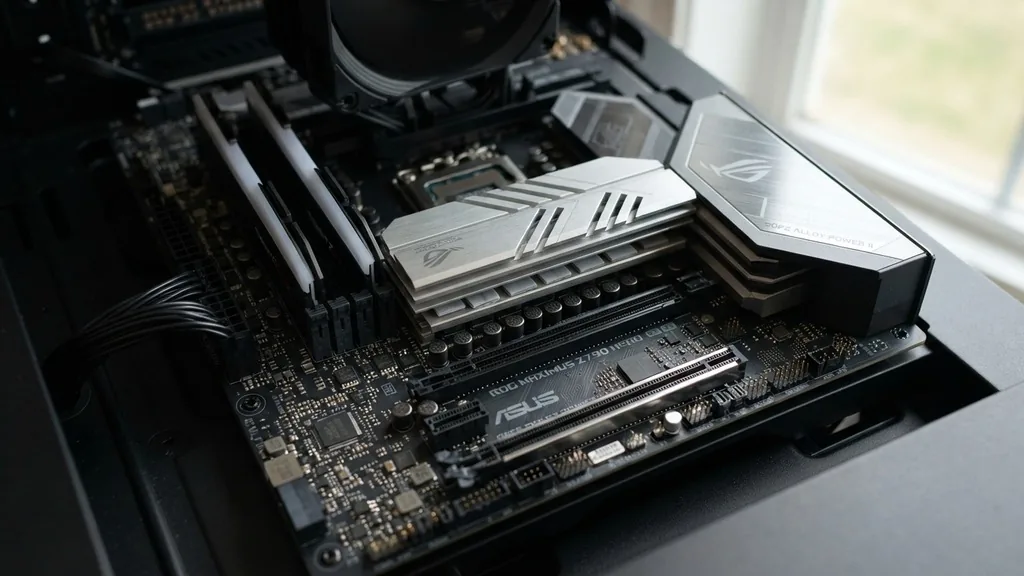
Choosing the right foundation for your computer is often the most overlooked part of building a PC. While enthusiasts frequently obsess over the graphics card or the processor, the motherboard acts as the central nervous system that dictates how every component communicates. Understanding what makes a good motherboard requires looking beyond the flashy RGB lights and marketing labels to evaluate the engineering decisions that ensure stability, upgradeability, and performance.
The Role of VRM Power Delivery in System Stability
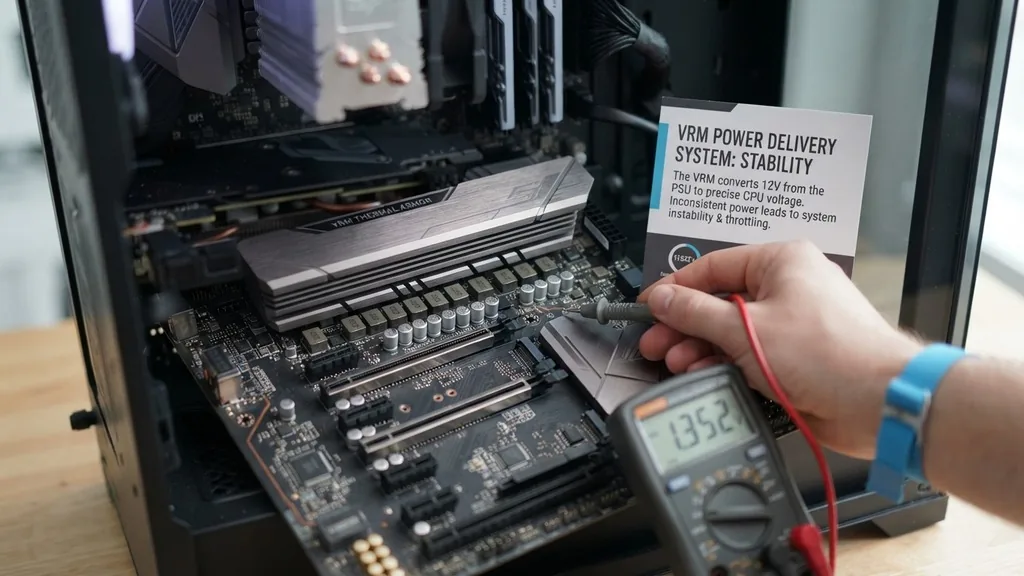
A good motherboard provides stable, clean power to the processor through its Voltage Regulator Module (VRM). The VRM power delivery system is responsible for converting the 12V electricity from your power supply unit into the lower, highly precise voltage that your CPU requires. If this delivery is inconsistent or inefficient, your system may experience crashes, thermal throttling, or even hardware failure under heavy load.
When evaluating a board, look for the quality and quantity of the power stages. High-end boards feature more power phases, which distribute the electrical load across multiple components. This not only keeps the individual parts cooler but also allows for more precise voltage regulation.
A board with a weak VRM might struggle to maintain stable clock speeds for high-end processors, effectively bottlenecking your CPU’s performance even if the chip itself is top-tier. You should also check for substantial heatsinks covering these components; the VRMs generate significant heat when pushing a modern, power-hungry CPU, and effective thermal dissipation is essential for longevity.
Chipset Compatibility and Future-Proofing
The chipset determines the communication bridge between the processor, memory, and various expansion cards. Choosing the right chipset is a balancing act of selecting the features you need today while ensuring the board remains relevant for future upgrades. For example, if you are building an AMD system, the AM5 platform offers a clear roadmap for future CPU generations, whereas Intel’s LGA sockets tend to have a shorter lifespan, often requiring a new board for every two generations of processors.
Beyond just the CPU socket type, the chipset dictates the number of high-speed ports and the total bandwidth available for connected devices. A premium chipset will typically offer more USB 3.2 or USB4 ports, support for faster memory speeds, and additional connectivity options that entry-level boards simply omit.
If you plan on using multiple high-speed storage drives or high-bandwidth peripherals, the chipset’s capabilities will define your experience. Always verify that your chosen motherboard supports your intended CPU generation out of the box, as some boards may require a BIOS update before they can recognize newer chips.
Understanding PCIe Lanes and Expansion
The PCIe lanes act as the highways for data moving between your CPU and add-in cards like graphics cards, capture cards, or high-speed networking adapters. A good motherboard manages these lanes effectively, ensuring that your primary graphics card gets the full bandwidth it needs. In many budget boards, the number of available PCIe lanes is limited, which can force your GPU to run at reduced speeds if you occupy other slots with secondary hardware.
Modern motherboards often feature a mix of PCIe 4.0 or 5.0 slots. While current GPUs rarely saturate the bandwidth of older PCIe standards, the inclusion of newer lanes is vital for high-speed M.2 NVMe storage drives.
If you are a content creator or a professional who moves large files frequently, the ability to utilize multiple high-speed storage slots without compromising GPU performance is a hallmark of a well-designed board. Consult the manufacturer’s manual to see how the board allocates lanes, as some configurations will automatically disable certain SATA ports or secondary slots when an M.2 drive is installed.
Memory Slots and RAM Support
The DIMM slots on a motherboard define your memory capacity and performance ceiling. Most standard builds utilize a dual-channel memory configuration, which requires at least two RAM slots.
A good motherboard will offer four DIMM slots, allowing for easier upgrades and the ability to reach higher total memory capacities. However, it is not just about the number of slots; it is about the trace routing—the physical copper paths on the PCB that connect the memory to the CPU.
High-quality boards use optimized trace routing to minimize signal interference, which is critical for running RAM at high XMP or EXPO profiles. If you buy high-speed memory but your motherboard cannot maintain signal integrity, you will be forced to run your RAM at slower, default speeds, losing the performance you paid for.
Check the motherboard’s QVL (Qualified Vendor List) to see which memory kits have been tested for stability on that specific board. This simple step can save you hours of troubleshooting instability or “blue screen” errors during the initial build phase.
Thermal Management and Heatsink Design
Heat is the enemy of electronic longevity. A good motherboard integrates effective heatsink thermal management across critical areas, including the VRMs, the chipset, and the M.2 slots.
Without proper cooling, these components can hit thermal limits that cause the system to throttle performance to prevent damage. When comparing options, look for boards that use thick, finned aluminum heatsinks rather than thin, decorative metal plates that offer little surface area for heat dissipation.
Many modern boards also include dedicated M.2 heatsinks. As NVMe drives have become faster, they have also become hotter, often reaching temperatures where they must throttle their read and write speeds. A motherboard that includes heat spreaders for your storage drives ensures that your system remains fast during long file transfers or intensive gaming sessions.
Furthermore, consider the placement of fan headers. A well-laid-out board will have enough headers in accessible locations to accommodate a full case of fans, allowing you to maintain positive airflow throughout your chassis.
Connectivity: SATA Ports, M.2 Slots, and I/O
The physical connectivity of a motherboard determines how many drives and peripherals you can attach. While the shift toward M.2 NVMe storage has made the classic SATA port less critical for primary boot drives, they remain essential for mass storage, such as large mechanical hard drives or 2.5-inch SSDs. A good motherboard should provide at least four to six SATA ports for future expansion.
Regarding M.2 slots, the trend is moving toward providing at least two or three on even mid-range boards. Look for boards that feature “tool-less” M.2 latches, which replace the tiny, easily lost screws typically used to secure drives. Additionally, pay attention to the rear I/O panel.
An integrated I/O shield is a major convenience feature that simplifies the installation process and ensures you don’t accidentally leave the shield out of the case. A good board will also provide a variety of rear USB ports, including high-speed Type-C connectors, and high-quality audio jacks to support your sound setup.
The Importance of a User-Friendly BIOS Interface
The BIOS interface is your primary tool for managing hardware settings, from fan curves to overclocking profiles. A good BIOS is not just about the number of settings available; it is about how easily you can navigate those settings. An intuitive, responsive interface allows you to update the firmware, enable XMP profiles, and monitor system temperatures without feeling like you need an engineering degree to perform basic maintenance.
Look for manufacturers that provide frequent BIOS updates. These updates are essential for patching security vulnerabilities, improving memory compatibility, and ensuring that newer CPU microcode is supported. A board with a robust BIOS often includes features like “Flashback,” which allows you to update the BIOS using only a USB stick and a power supply—even if you don’t have a CPU installed.
This is an invaluable feature if you buy a board that needs an update to support your specific processor. You can learn more about the technical standards of hardware interfaces at the International Organization for Standardization.
Troubleshooting Features: Debug LEDs and Diagnostics
Even the most experienced builders run into issues during a new build. A good motherboard makes the troubleshooting process significantly less stressful by including built-in diagnostic tools. The most common of these is a set of Debug LEDs.
These small lights on the PCB correspond to different components: CPU, DRAM, VGA, and BOOT. If your computer fails to post, these LEDs will light up to tell you exactly which component is causing the hang-up.
More expensive boards may include a two-character LED display that provides specific error codes. These codes can be cross-referenced with the manual to pinpoint issues as specific as a voltage error or a faulty memory channel.
These features are often ignored until the moment something goes wrong, but they are the difference between a quick fix and an afternoon of frustration. A board that simplifies the process of identifying a failed component is worth the extra investment for the peace of mind it provides throughout the life of the PC.
Summary of Key Motherboard Considerations
When you are narrowing down your choices, it helps to keep a checklist of the essential features that separate a functional board from an excellent one. The following table provides a breakdown of what to prioritize based on your specific use case.
| Feature | Budget/Basic Needs | Performance/Enthusiast Needs |
|---|---|---|
| VRM Cooling | Basic heatsink | Heavy-duty, finned heatsinks |
| M.2 Slots | 1-2 slots | 3+ slots with heat spreaders |
| Diagnostic Tools | Basic beep codes | Debug LEDs or numeric display |
| BIOS Features | Essential settings | Flashback, custom profiles, advanced tuning |
| I/O Shield | Separate piece | Pre-installed (integrated) |
- Form Factor: Ensure your case supports the ATX form factor, or check if you need a smaller Micro-ATX or Mini-ITX board for compact builds.
- Networking: Look for 2.5Gb Ethernet and Wi-Fi 6E/7 capabilities if your home network supports high-speed connectivity.
- Audio Quality: Check for isolated audio pathways on the PCB to reduce electrical noise in your headphones or speakers.
- Fan Headers: Ensure there are enough PWM headers to manage all the cooling fans in your case without needing external splitters.
- Warranty: Longer manufacturer warranties are often an indicator of higher build quality and more reliable components.
Frequently Asked Questions
- Does a motherboard affect gaming performance? The motherboard itself does not directly increase frame rates like a GPU, but a poor board can cause thermal throttling or memory instability that results in lower performance. A good board ensures your components run at their rated speeds consistently.
- How do I know if my CPU is compatible with a motherboard? You must match the socket type (e.g., AM5 or LGA1700) and check the motherboard manufacturer’s website for a CPU support list. Some boards require a BIOS update to support newer processor releases, so always verify the supported versions.
- Is an expensive motherboard worth the extra money? If you are not overclocking or using high-end components, a mid-range board is usually sufficient. Expensive boards offer better power delivery, more connectivity, and higher-quality materials, which are primarily beneficial for heavy multitaskers, creators, and enthusiasts.
- What is the most important feature to look for? Prioritize stable VRM power delivery and good thermal management. These two factors are the most critical for maintaining system health, ensuring your CPU performs as expected, and preventing long-term hardware degradation under load.


